Unlock a world of possibilities! Login now and discover the exclusive benefits awaiting you.

- Qlik Community
- :
- All Forums
- :
- QlikView
- :
- Top N Clients
- Subscribe to RSS Feed
- Mark Topic as New
- Mark Topic as Read
- Float this Topic for Current User
- Bookmark
- Subscribe
- Mute
- Printer Friendly Page

 paulwalker
- Mark as New
- Bookmark
- Subscribe
- Mute
- Subscribe to RSS Feed
- Permalink
- Report Inappropriate Content
Top N Clients
Hi Community,
I have one table
| Employee | Client | Revenue |
| A | ABC | 1000 |
| B | ABC | 2500 |
| AA | BCA | 2700 |
| BB | BCA | 230 |
| KL | BCA | 890 |
| LOL | CCA | 9000 |
| RR | CCA | 5000 |
| BT | KNR | 25000 |
| RT | KNR | 3500 |
I have created one variable vTop, and i have taken one input box. (these are my listed values 5,10,15 20)
in my straight table, i have 2 dimensions.
Dimensions: Client and Employee
Expression: Sum(Revenue)
IF i select top 5 values, not working properly. if i take one dimension working fine.
My top 5 should be this table.
| Employee | Client | Revenue |
| BT | KNR | 25000 |
| LOL | CCA | 9000 |
| RR | CCA | 5000 |
| RT | KNR | 3500 |
| AA | BCA | 2700 |
Please any one can help me.
Thanks in Advance.

 sunny_talwar
- Mark as New
- Bookmark
- Subscribe
- Mute
- Subscribe to RSS Feed
- Permalink
- Report Inappropriate Content
May be try like using Rank() function instead of dimension limits
If(Rank(TOTAL Sum(Revenue)) < 6, Sum(Revenue))
paulwalker
- Mark as New
- Bookmark
- Subscribe
- Mute
- Subscribe to RSS Feed
- Permalink
- Report Inappropriate Content
Thanks for Response..
I have to write Dimension level, because i have big expression.
I written dimension level, but it's not working
=Aggr(if(Rank(Sum({<Revenue))<=$(vTop), Employee),Employee)
 avinashelite
- Mark as New
- Bookmark
- Subscribe
- Mute
- Subscribe to RSS Feed
- Permalink
- Report Inappropriate Content
As you add the Dimensions you need to include them in the AGGR(expression,Dim1,Dim2,Dim3....)
sunny_talwar
- Mark as New
- Bookmark
- Subscribe
- Mute
- Subscribe to RSS Feed
- Permalink
- Report Inappropriate Content
May be try this
=Aggr(If(Rank(Sum(Revenue)) <= $(vTop), Employee), Employee)
paulwalker
- Mark as New
- Bookmark
- Subscribe
- Mute
- Subscribe to RSS Feed
- Permalink
- Report Inappropriate Content
if i am using this expression not showing Expression Total.
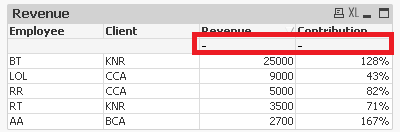
Please can you suggestion ?
sunny_talwar
- Mark as New
- Bookmark
- Subscribe
- Mute
- Subscribe to RSS Feed
- Permalink
- Report Inappropriate Content
Then do this
Sum(Aggr(If(Rank(TOTAL Sum(Revenue)) < 6, Sum(Revenue)), Employee, Client))
