Unlock a world of possibilities! Login now and discover the exclusive benefits awaiting you.

- Qlik Community
- :
- All Forums
- :
- QlikView
- :
- Top and Bottom 3 Tricky
- Subscribe to RSS Feed
- Mark Topic as New
- Mark Topic as Read
- Float this Topic for Current User
- Bookmark
- Subscribe
- Mute
- Printer Friendly Page

- Mark as New
- Bookmark
- Subscribe
- Mute
- Subscribe to RSS Feed
- Permalink
- Report Inappropriate Content
Top and Bottom 3 Tricky
Dear All
I have one table which has Value and Amount against Code.
I have use Condition if Amount>=20 than show my Top 3 and Bottom 3.
I have used Dimension Limits, Aggr in Calculated Dimension and Some Expressions but no luck.
Kindly, help me.
Regards
Cire
Accepted Solutions

 Gysbert_Wassena
- Mark as New
- Bookmark
- Subscribe
- Mute
- Subscribe to RSS Feed
- Permalink
- Report Inappropriate Content
=If(Aggr(Rank(Sum({<Code={"=sum(Amount)>20"}>}Amount)),Code)<=3 or Aggr(Rank(-Sum({<Code={"=sum(Amount)>20"}>}Amount)),Code)<=3,Code,'Others')
talk is cheap, supply exceeds demand
Gysbert_Wassena- Mark as New
- Bookmark
- Subscribe
- Mute
- Subscribe to RSS Feed
- Permalink
- Report Inappropriate Content
Try =If(Aggr(Rank(Sum(Amount)),Code)<=3 or Aggr(Rank(-Sum(Amount)),Code)<=3,Code,'Others')
talk is cheap, supply exceeds demand
- Mark as New
- Bookmark
- Subscribe
- Mute
- Subscribe to RSS Feed
- Permalink
- Report Inappropriate Content
Thanks for the Reply.
BUt as I mentioned it is not straight forward and it is little tricky.
I Have to pick only cases where Amount is greater than 20.

 sunny_talwar
- Mark as New
- Bookmark
- Subscribe
- Mute
- Subscribe to RSS Feed
- Permalink
- Report Inappropriate Content
Can you share what you desired output needs to look like? I know you have pointed out in your script the desired output, but I am guessing its not complete, because why else would you be here, right? What is missing? Can you elaborate a little?
- Mark as New
- Bookmark
- Subscribe
- Mute
- Subscribe to RSS Feed
- Permalink
- Report Inappropriate Content
Hi Sir
I want this Output:

sunny_talwar
- Mark as New
- Bookmark
- Subscribe
- Mute
- Subscribe to RSS Feed
- Permalink
- Report Inappropriate Content
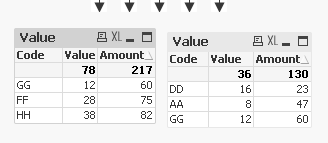
I got this

Expression used are the same
Sum({<Code = {"=Sum(Amount) > 20"}>}Value)
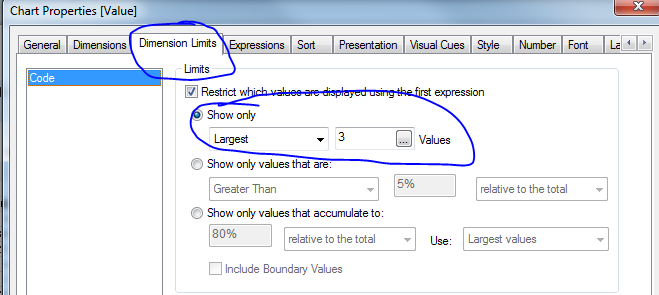
Chart on the left uses Largest on dimension limits and chart on the right uses smalles
- Mark as New
- Bookmark
- Subscribe
- Mute
- Subscribe to RSS Feed
- Permalink
- Report Inappropriate Content
Hi Sir
The Result is coming wrong for Top3 Charts.
Also, I want the Result Amount wise.
As my expressions are very complex so
I Can't use this approach here
Can I get the desired output using calculated dimension
someghing like this:
if(Aggr(Rank(sum({<Code={"=Sum(Amount)>20"}>}Amount)),Code<=3,Code,'others')
Can I use this in calculated dimension.
Gysbert_Wassena- Mark as New
- Bookmark
- Subscribe
- Mute
- Subscribe to RSS Feed
- Permalink
- Report Inappropriate Content
=If(Aggr(Rank(Sum({<Code={"=sum(Amount)>20"}>}Amount)),Code)<=3 or Aggr(Rank(-Sum({<Code={"=sum(Amount)>20"}>}Amount)),Code)<=3,Code,'Others')
talk is cheap, supply exceeds demand
- Mark as New
- Bookmark
- Subscribe
- Mute
- Subscribe to RSS Feed
- Permalink
- Report Inappropriate Content
Thank You Both of You for your time and solution.
New Learning for me as well as for some others.
Regards
Cire
sunny_talwar
- Mark as New
- Bookmark
- Subscribe
- Mute
- Subscribe to RSS Feed
- Permalink
- Report Inappropriate Content
May be this:
Dimension
Code
Expression
Sum({<Code = {"=Rank(Sum({<Code={""=Sum(Amount)>20""}>}Amount)) <=3"}>}Value)
Sum({<Code = {"=Rank(Sum({<Code={""=Sum(Amount)>20""}>}Amount)) <=3"}>}Amount)
Dimension
Code
Expression
Sum({<Code = {"=Rank(-Sum({<Code={""=Sum(Amount)>20""}>}Amount)) <=3"}>}Value)
Sum({<Code = {"=Rank(-Sum({<Code={""=Sum(Amount)>20""}>}Amount)) <=3"}>}Amount)