Unlock a world of possibilities! Login now and discover the exclusive benefits awaiting you.

- Qlik Community
- :
- All Forums
- :
- QlikView
- :
- Top and Double Bottom border
- Subscribe to RSS Feed
- Mark Topic as New
- Mark Topic as Read
- Float this Topic for Current User
- Bookmark
- Subscribe
- Mute
- Printer Friendly Page

- Mark as New
- Bookmark
- Subscribe
- Mute
- Subscribe to RSS Feed
- Permalink
- Report Inappropriate Content
Top and Double Bottom border
Hi All,
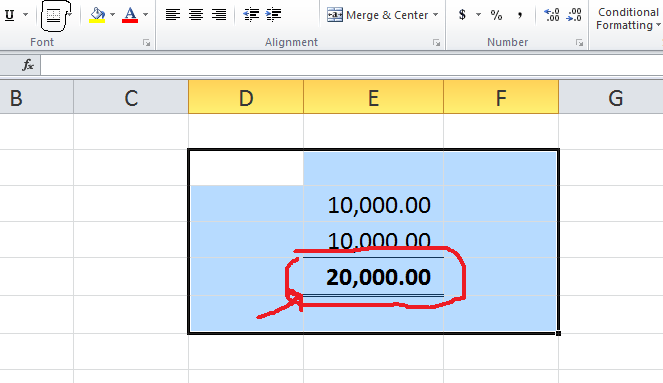
Can we format numbers in QV like we do in excel as below:

 sivarajs
- Mark as New
- Bookmark
- Subscribe
- Mute
- Subscribe to RSS Feed
- Permalink
- Report Inappropriate Content
yes we can change the format
Go to number tab in chart properties then select you expression and the change settings
- Mark as New
- Bookmark
- Subscribe
- Mute
- Subscribe to RSS Feed
- Permalink
- Report Inappropriate Content
I want to format as one line on top and double underline.

 sujeetsingh
- Mark as New
- Bookmark
- Subscribe
- Mute
- Subscribe to RSS Feed
- Permalink
- Report Inappropriate Content
Seems it is like adding line in ??
- Mark as New
- Bookmark
- Subscribe
- Mute
- Subscribe to RSS Feed
- Permalink
- Report Inappropriate Content
Go to the View menu and choose Design Grid
Then, on the chart you want to change, right-click on the number where you want an underline, from the menu that appears choose Custom Format Cell.
A Custom Format Cell window will appear that allows you to change cell borders and text attributes. Make the change you want and click OK.
If that looks good then go back to the View menu and turn off Design Grid.