Unlock a world of possibilities! Login now and discover the exclusive benefits awaiting you.

- Qlik Community
- :
- All Forums
- :
- QlikView
- :
- Total for variable
- Subscribe to RSS Feed
- Mark Topic as New
- Mark Topic as Read
- Float this Topic for Current User
- Bookmark
- Subscribe
- Mute
- Printer Friendly Page

- Mark as New
- Bookmark
- Subscribe
- Mute
- Subscribe to RSS Feed
- Permalink
- Report Inappropriate Content
Total for variable
Hi
I have expression in table called 'vPass' that return result 0 or 1.
The vPass value is varible called 'vCalTrueFalse':
vPass =$(vCalTrueFalse).
I need to create total field for vPass in TextObject at dashboard.
I tried ' Sum($(=vCalTrueFalse))' but it give me an error: 'Nested aggregation not allowed'.
How can I do it?
Thanks!
- « Previous Replies
- Next Replies »

 uacg0009
- Mark as New
- Bookmark
- Subscribe
- Mute
- Subscribe to RSS Feed
- Permalink
- Report Inappropriate Content
I think I didn't use any aggregation function in text, only sum and count.
You can test it separately, first crated a text object to calculate the =sum($(vsPass))
then use another text to calculate the =Count($(vsPass))
then try to make it together or find out what's the problem
- Mark as New
- Bookmark
- Subscribe
- Mute
- Subscribe to RSS Feed
- Permalink
- Report Inappropriate Content
In both cases I get this error.
uacg0009
- Mark as New
- Bookmark
- Subscribe
- Mute
- Subscribe to RSS Feed
- Permalink
- Report Inappropriate Content
because the logic of your vtpass is a little complex, and I don't have the data like you. So I simplify the vtpass.
Is your vtpass showing fine? fail and pass.
because I think if the vtpass is ok, the vspass is just to calculate the vtpass :
set vsPass = if($(vtPass) = 'Fail',0,if($(vtPass) = 'Pass',1));
I just need to use your vtpass definition and use my vspass definition.
And you also can try to use =$(vtPass) and =$(vsPass) into the chart to see whether it's ok or not, just like me below:
vPass and the last column.
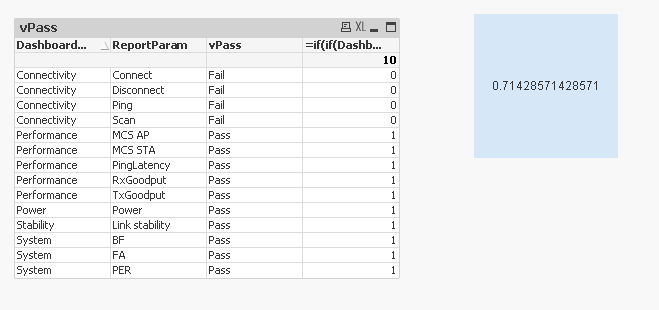
- Mark as New
- Bookmark
- Subscribe
- Mute
- Subscribe to RSS Feed
- Permalink
- Report Inappropriate Content
The results in both column is OK. I use '=$(vsPass)' or only '$(vsPass)'.
Pass and vPass column show the correct data.
Only text object calculation is wrong.
I all the time get the same error about 'Nested Aggregation not allowed"
uacg0009
- Mark as New
- Bookmark
- Subscribe
- Mute
- Subscribe to RSS Feed
- Permalink
- Report Inappropriate Content
maybe trying this :
=sum(aggr($(vsPass),DashboardName,ReportParam))/Count(aggr($(vsPass),DashboardName,ReportParam))
change the DashboardName,ReportParam to your dimensions.
- Mark as New
- Bookmark
- Subscribe
- Mute
- Subscribe to RSS Feed
- Permalink
- Report Inappropriate Content
Thank you its work! but not as I want ....
It show incorrect result. I just want it take what I show in table.
The combination of Dashboard and ReportParam is not correct, I need only the present rows in the table.
uacg0009
- Mark as New
- Bookmark
- Subscribe
- Mute
- Subscribe to RSS Feed
- Permalink
- Report Inappropriate Content
I think you need to add all dimensions of your table into the AGGR function, not just these 2 dimensions, because I only have 2 dimensions, so I only add these 2 into AGGR, maybe you need more.
- « Previous Replies
- Next Replies »