Unlock a world of possibilities! Login now and discover the exclusive benefits awaiting you.

- Qlik Community
- :
- All Forums
- :
- QlikView
- :
- Transpose
- Subscribe to RSS Feed
- Mark Topic as New
- Mark Topic as Read
- Float this Topic for Current User
- Bookmark
- Subscribe
- Mute
- Printer Friendly Page

- Mark as New
- Bookmark
- Subscribe
- Mute
- Subscribe to RSS Feed
- Permalink
- Report Inappropriate Content
Transpose
Hi All,
I need to transpose the Metric field values to column vise any suggestion.
Accepted Solutions

 avinashelite
- Mark as New
- Bookmark
- Subscribe
- Mute
- Subscribe to RSS Feed
- Permalink
- Report Inappropriate Content
Please find the attachment for the same
 sunny_talwar
- Mark as New
- Bookmark
- Subscribe
- Mute
- Subscribe to RSS Feed
- Permalink
- Report Inappropriate Content
Transpose them on the front end or the script?
sunny_talwar
- Mark as New
- Bookmark
- Subscribe
- Mute
- Subscribe to RSS Feed
- Permalink
- Report Inappropriate Content
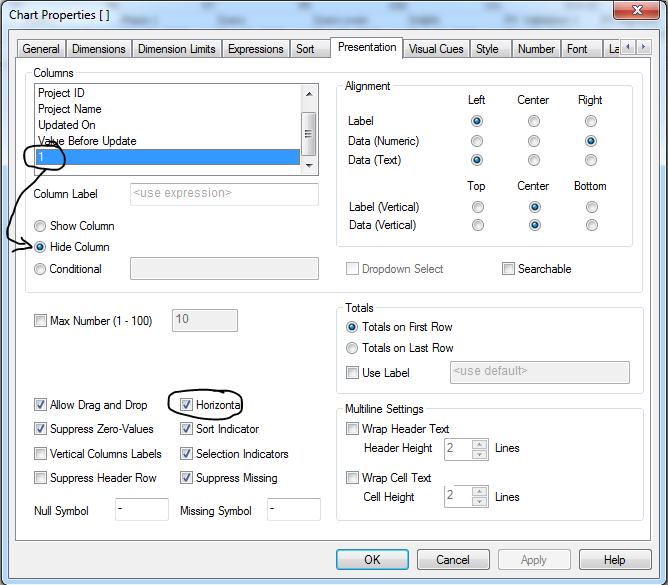
For front end option, you can do like this:
- Create a straight table
- Add Metric Name, Project ID, Project Name, Updated On, Value Before Update as Dimensions
- Create 1 as expression
- On Presentation tab Hide 1 as expression and select Horizontal check box (attaching a screenshot for this one)
Output:

HTH
Best,
Sunny
- Mark as New
- Bookmark
- Subscribe
- Mute
- Subscribe to RSS Feed
- Permalink
- Report Inappropriate Content
Thankyou,
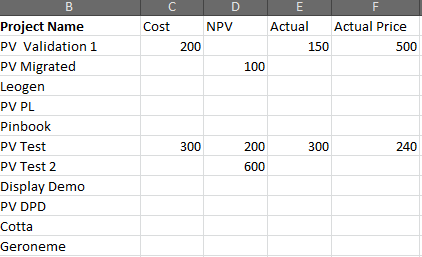
It need to be hardcoded in script Level.
Expected result is
avinashelite
- Mark as New
- Bookmark
- Subscribe
- Mute
- Subscribe to RSS Feed
- Permalink
- Report Inappropriate Content
Please find the attachment for the same

 petter
- Mark as New
- Bookmark
- Subscribe
- Mute
- Subscribe to RSS Feed
- Permalink
- Report Inappropriate Content
If you are looking for a solution where you transpose (un-pivot) the table in the load script then this could be a solution for you:

I had to make your XLSX-sample conformant with your expected results so I attached a new XLSX-file too...
- Mark as New
- Bookmark
- Subscribe
- Mute
- Subscribe to RSS Feed
- Permalink
- Report Inappropriate Content
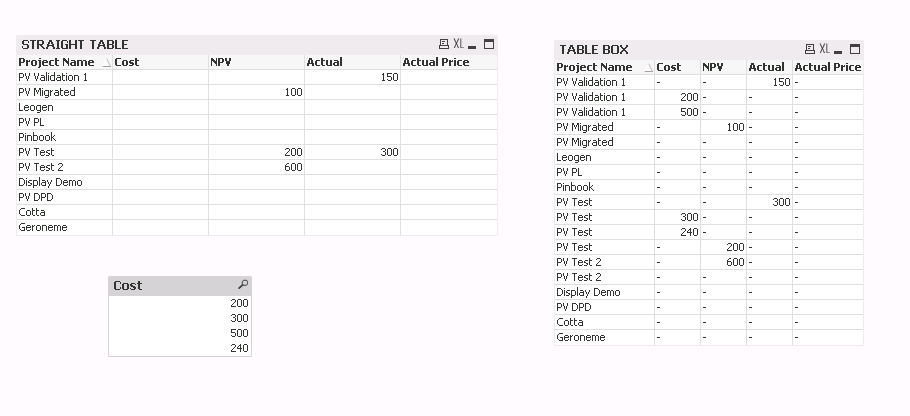
Hi Petter,
if i have multiple entries for same metric for same project the logic used is not working for straight table. am looking for result in straight table.