Unlock a world of possibilities! Login now and discover the exclusive benefits awaiting you.

- Qlik Community
- :
- All Forums
- :
- QlikView
- :
- Trobles Converting fields (Oracle) for to Qlikview
- Subscribe to RSS Feed
- Mark Topic as New
- Mark Topic as Read
- Float this Topic for Current User
- Bookmark
- Subscribe
- Mute
- Printer Friendly Page

 MarcoARaymundo
- Mark as New
- Bookmark
- Subscribe
- Mute
- Subscribe to RSS Feed
- Permalink
- Report Inappropriate Content
Trobles Converting fields (Oracle) for to Qlikview
Hi!
In the Oracle database, i have a fields type Number(), when i converted this field to qlikview field, the conversion resulted some problems.
Ex: Num(Field Oracle) as Field Qlikview
| Oracle field | Qlikview field result |
|---|---|
| 521,00 | 521,00000000002153 |
| 342,13 | 342,13000000000000 |
| 95,62 | 95,61999999999999 |
OBS: coma is a decimal point
I try: Money(Field Oracle), Num(Left(Text(Num(Field Oracle)), Index(Text(Num(Field Oracle)), ',') + 2)... and others, but the problem persist.
Oracle version: 11g Release 11.2.0.4.0 - 64bit Production PL/SQL Release 11.2.0.4.0 - Production "CORE 11.2.0.4.0 Production"
TNS for Linux: Version 11.2.0.4.0 - Production NLSRTL Version 11.2.0.4.0 - Production
Qlikview version: 11.20.11922.0 SR2 64-bit Edition (x64)
Can anyone help me?
- « Previous Replies
-
- 1
- 2
- Next Replies »
Accepted Solutions
MarcoARaymundo
- Mark as New
- Bookmark
- Subscribe
- Mute
- Subscribe to RSS Feed
- Permalink
- Report Inappropriate Content
Hi!
I tried various ways and only got hit when I changed the number format by Oracle. Like this:
TO_CHAR (FIELD, '000000000000000D00 ') AS FieldChanged
Return a string that was '000000000000000 .00 ', in my country the decimal separator is a comma.
So in QV simple character substitution converted the number correctly.
Replace (FieldChanged, '.', ',')
Thanks.

 Gysbert_Wassena
- Mark as New
- Bookmark
- Subscribe
- Mute
- Subscribe to RSS Feed
- Permalink
- Report Inappropriate Content
try round([Field Oracle],0.01)
talk is cheap, supply exceeds demand
MarcoARaymundo
- Mark as New
- Bookmark
- Subscribe
- Mute
- Subscribe to RSS Feed
- Permalink
- Report Inappropriate Content
Hi Gysbert,
I tried this and: Floor([Field Oracle], 0.01).
But, the problem persist.
More tips? please.
Gysbert_Wassena- Mark as New
- Bookmark
- Subscribe
- Mute
- Subscribe to RSS Feed
- Permalink
- Report Inappropriate Content
Just to be sure, though it shouldn't matter at all.... do you have the decimal separator variable defined in your script?
SET DecimalSep=',';
Do you use the round/floor in the sql statement itself or the preceding load statement?
talk is cheap, supply exceeds demand
 Colin-Albert
- Mark as New
- Bookmark
- Subscribe
- Mute
- Subscribe to RSS Feed
- Permalink
- Report Inappropriate Content
Have a look at this blog by Henric Cronström which explains the rounding you are seeing.
http://community.qlik.com/blogs/qlikviewdesignblog/2013/12/17/rounding-errors
MarcoARaymundo
- Mark as New
- Bookmark
- Subscribe
- Mute
- Subscribe to RSS Feed
- Permalink
- Report Inappropriate Content
Gysbert
My variables:
SET ThousandSep='.';
SET DecimalSep=',';
No, No, I extract data from SQL in a qvw, and another qvw make the conversions.

 maxgro
- Mark as New
- Bookmark
- Subscribe
- Mute
- Subscribe to RSS Feed
- Permalink
- Report Inappropriate Content
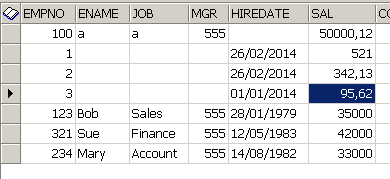
with this data in oracle (SAL column, comma is decimal separator)
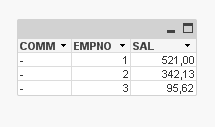
In Qlikview I get this
SET ThousandSep='.';
SET DecimalSep=',';
Table:
NoConcatenate
load
*;
SQL SELECT * FROM TEST.EMP where sal < 1000
;
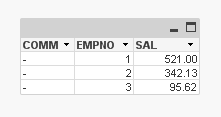
or this
SET ThousandSep=',';
SET DecimalSep='.';
Table:
NoConcatenate
load
*;
SQL SELECT * FROM TEST.EMP where sal < 1000
;
MarcoARaymundo
- Mark as New
- Bookmark
- Subscribe
- Mute
- Subscribe to RSS Feed
- Permalink
- Report Inappropriate Content
Thanks for share Colin.
I read the post, but there is no indication of how to handle this situation.
My problem is to convert the number zero, some times the return is something like:
0.00000000001000
MarcoARaymundo
- Mark as New
- Bookmark
- Subscribe
- Mute
- Subscribe to RSS Feed
- Permalink
- Report Inappropriate Content
Massimo, try format number like 0,0000000000000 and verify the results.
maxgro
- Mark as New
- Bookmark
- Subscribe
- Mute
- Subscribe to RSS Feed
- Permalink
- Report Inappropriate Content
added a 0
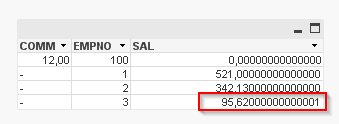
qlikview 11.2 SR5 64
oracle 11
oracle ddl
CREATE TABLE TEST.EMP
(
EMPNO NUMBER(4) NOT NULL,
ENAME VARCHAR2(10 BYTE) NULL,
JOB VARCHAR2(9 BYTE) NULL,
MGR NUMBER(4) NULL,
HIREDATE DATE NULL,
SAL NUMBER(7,2) NULL,
COMM NUMBER(7,2) NULL,
DEPTNO NUMBER(2) NULL
)

- « Previous Replies
-
- 1
- 2
- Next Replies »