Unlock a world of possibilities! Login now and discover the exclusive benefits awaiting you.

- Qlik Community
- :
- All Forums
- :
- QlikView
- :
- Turning Transactional Dates into Calendar Months
- Subscribe to RSS Feed
- Mark Topic as New
- Mark Topic as Read
- Float this Topic for Current User
- Bookmark
- Subscribe
- Mute
- Printer Friendly Page

 andyquirin
- Mark as New
- Bookmark
- Subscribe
- Mute
- Subscribe to RSS Feed
- Permalink
- Report Inappropriate Content
Turning Transactional Dates into Calendar Months
Hi Qlik Community,
I've hit a wall and am hoping you can help. I've got a transactional table of Assets that have Created Dates and End of Life Dates and Asset Status (Live, Failed). I've been asked to create a simple bar graph that shows how many assets were alive for a given month. In order to do so, I need to tie these assets to months (which aren't in the data) and do a distinct count of assets which were online between their Born On date and End of Life Date.
The data looks similar to this:
| Asset ID | Created_Date | Failure_Date | asset_status |
| 1 | 1/1/2015 | 4/7/2015 | Failed |
| 2 | 1/16/2015 | Passed | |
| 3 | 1/31/2015 | 5/19/2015 | Failed |
| 4 | 2/15/2015 | Passed | |
| 5 | 3/2/2015 | Passed | |
| 6 | 3/17/2015 | 5/21/2015 | Failed |
| 7 | 4/1/2015 | Passed | |
| 8 | 4/16/2015 | Passed | |
| 9 | 5/1/2015 | Passed |
I'm trying to transform it to something like this:
| YearMonth | Count of Assets |
|---|---|
| 2015 Jan | 3 |
| 2015 Feb | 4 |
| 2015 Mar | 9 |
| 2015 Apr | 7 |
How do I create this YearMonth field and count the assets for each of the months if the month falls between the assets created and EOL date?
Thanks for your help!
Andy
Accepted Solutions

 sunny_talwar
- Mark as New
- Bookmark
- Subscribe
- Mute
- Subscribe to RSS Feed
- Permalink
- Report Inappropriate Content
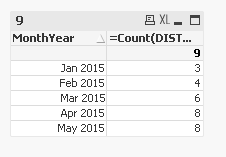
Not sure how you getting Mar and Apr number, but may be this:
Script:
Table:
LOAD [Asset ID],
Created_Date,
Failure_Date,
asset_status,
If(Len(Trim(Failure_Date)) = 0, MakeDate(2015, 5, 31), Failure_Date) as Temp_End_Date
FROM
[https://community.qlik.com/thread/208100]
(html, codepage is 1252, embedded labels, table is @1);
Temp:
LOAD Min(Created_Date) as minDate,
Max(Temp_End_Date) as maxDate
Resident Table;
Let varMinDate = Num(Peek('minDate', 0, 'Temp'));
Let varMaxDate = Num(Peek('maxDate', 0, 'Temp'));
DROP Table Temp;
Calendar:
LOAD MonthName($(varMinDate) + IterNo() - 1) as MonthYear,
Date($(varMinDate) + IterNo() - 1) as Date
AutoGenerate 1
While $(varMinDate) + IterNo() -1 <= $(varMaxDate);
Left Join (Table)
IntervalMatch (Date)
LOAD Created_Date,
Temp_End_Date
Resident Table;
Left Join (Table)
LOAD *
Resident Calendar;
DROP Table Calendar;

- Mark as New
- Bookmark
- Subscribe
- Mute
- Subscribe to RSS Feed
- Permalink
- Report Inappropriate Content
For creating your YearMonth field the MonthName() function should suffice.
For the rest I reckon you need the IntervalMatch() function, as described by HIC in this Blog PostIntervalMatch
sunny_talwar
- Mark as New
- Bookmark
- Subscribe
- Mute
- Subscribe to RSS Feed
- Permalink
- Report Inappropriate Content
Not sure how you getting Mar and Apr number, but may be this:
Script:
Table:
LOAD [Asset ID],
Created_Date,
Failure_Date,
asset_status,
If(Len(Trim(Failure_Date)) = 0, MakeDate(2015, 5, 31), Failure_Date) as Temp_End_Date
FROM
[https://community.qlik.com/thread/208100]
(html, codepage is 1252, embedded labels, table is @1);
Temp:
LOAD Min(Created_Date) as minDate,
Max(Temp_End_Date) as maxDate
Resident Table;
Let varMinDate = Num(Peek('minDate', 0, 'Temp'));
Let varMaxDate = Num(Peek('maxDate', 0, 'Temp'));
DROP Table Temp;
Calendar:
LOAD MonthName($(varMinDate) + IterNo() - 1) as MonthYear,
Date($(varMinDate) + IterNo() - 1) as Date
AutoGenerate 1
While $(varMinDate) + IterNo() -1 <= $(varMaxDate);
Left Join (Table)
IntervalMatch (Date)
LOAD Created_Date,
Temp_End_Date
Resident Table;
Left Join (Table)
LOAD *
Resident Calendar;
DROP Table Calendar;
 sfatoux72
- Mark as New
- Bookmark
- Subscribe
- Mute
- Subscribe to RSS Feed
- Permalink
- Report Inappropriate Content
Create a YearMonth Field:
load
Date(Date#(YearMonth, 'MM/YYYY'), 'YYYY MMM') as YearMonth
inline [
YearMonth
01/2015
02/2015
...
12/2015
];
and and use this expression :
=count(if((Created_Date <= MonthEnd(YearMonth)) and (Date(alt(Failure_Date,Date#('01/2100','MM/YYYY'))) >= MonthStart(YearMonth)) , [Asset ID]))
 maxgro
- Mark as New
- Bookmark
- Subscribe
- Mute
- Subscribe to RSS Feed
- Permalink
- Report Inappropriate Content
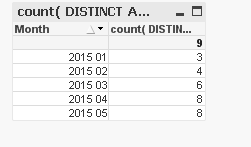
SET DateFormat='M/D/YYYY';
Z:
load
*,
If(Len(Trim(Failure_Date)) = 0, date(MakeDate(2015, 5, 31)), Failure_Date) as [End of Life Dates]
inline [
Asset_ID, Created_Date, Failure_Date, asset_status
1, 1/1/2015, 4/7/2015, Failed
2, 1/16/2015, ,Passed
3, 1/31/2015, 5/19/2015, Failed
4, 2/15/2015, ,Passed
5, 3/2/2015, ,Passed
6, 3/17/2015, 5/21/2015, Failed
7, 4/1/2015, ,Passed
8, 4/16/2015, ,Passed
9, 5/1/2015, ,Passed
] ;
load
Asset_ID,
Date(AddMonths(MonthStart(Created_Date), IterNo()-1), 'YYYY MM') as Month
Resident Z
While AddMonths(MonthStart(Created_Date), IterNo()-1) <= MonthStart([End of Life Dates]) ;
andyquirin
- Mark as New
- Bookmark
- Subscribe
- Mute
- Subscribe to RSS Feed
- Permalink
- Report Inappropriate Content
Thanks Sunny T! This worked perfectly - super impressed at your turn around.
I appreciate your help.
Best,
Andy