Unlock a world of possibilities! Login now and discover the exclusive benefits awaiting you.

- Qlik Community
- :
- All Forums
- :
- QlikView
- :
- Unable to find Rounded corners option in Text box ...
Options
- Subscribe to RSS Feed
- Mark Topic as New
- Mark Topic as Read
- Float this Topic for Current User
- Bookmark
- Subscribe
- Mute
- Printer Friendly Page
Turn on suggestions
Auto-suggest helps you quickly narrow down your search results by suggesting possible matches as you type.
Showing results for

 Akina0929
Creator
2017-12-15
01:58 AM
- Mark as New
- Bookmark
- Subscribe
- Mute
- Subscribe to RSS Feed
- Permalink
- Report Inappropriate Content
Unable to find Rounded corners option in Text box properties?
Hi,
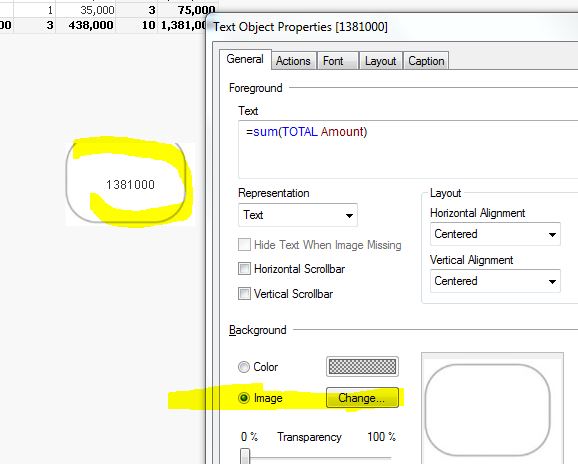
I am unable to find Rounded corner option Text box properties in lay out tab. please how can I display Help me.
Regards
Anji
2,449 Views
1 Solution
Accepted Solutions

 tresB
tresB
Champion III
2017-12-15
02:00 AM
- Mark as New
- Bookmark
- Subscribe
- Mute
- Subscribe to RSS Feed
- Permalink
- Report Inappropriate Content
You need to enable 'Advanced' styling mode: Settings->Doc Properties->General->Styling Mode->'Advanced'
4 Replies
tresB
Champion III
2017-12-15
02:00 AM
- Mark as New
- Bookmark
- Subscribe
- Mute
- Subscribe to RSS Feed
- Permalink
- Report Inappropriate Content
You need to enable 'Advanced' styling mode: Settings->Doc Properties->General->Styling Mode->'Advanced'


2017-12-15
02:02 AM
- Mark as New
- Bookmark
- Subscribe
- Mute
- Subscribe to RSS Feed
- Permalink
- Report Inappropriate Content
Check "Advanced" Mode from Settings ??
Best Anil, When applicable please mark the correct/appropriate replies as "solution" (you can mark up to 3 "solutions". Please LIKE threads if the provided solution is helpful

 devarasu07
Master II
2017-12-15
02:02 AM
- Mark as New
- Bookmark
- Subscribe
- Mute
- Subscribe to RSS Feed
- Permalink
- Report Inappropriate Content
Hi,
try to use custom image on the text box property then u can able get the desired format.
2,383 Views
Akina0929
Creator
2017-12-15
02:05 AM
Author
- Mark as New
- Bookmark
- Subscribe
- Mute
- Subscribe to RSS Feed
- Permalink
- Report Inappropriate Content
Thank you very much
2,383 Views
