Unlock a world of possibilities! Login now and discover the exclusive benefits awaiting you.

- Qlik Community
- :
- All Forums
- :
- QlikView
- :
- Unexpected data in loading data from 2 tables usin...
- Subscribe to RSS Feed
- Mark Topic as New
- Mark Topic as Read
- Float this Topic for Current User
- Bookmark
- Subscribe
- Mute
- Printer Friendly Page

- Mark as New
- Bookmark
- Subscribe
- Mute
- Subscribe to RSS Feed
- Permalink
- Report Inappropriate Content
Unexpected data in loading data from 2 tables using Key
Hello Team,
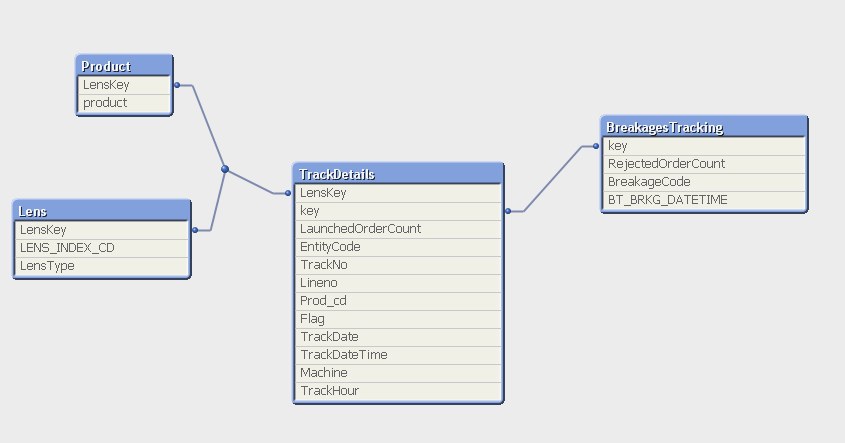
I am loading data from 2 tables using a key (combination of 5 fields) in load statement.
TRCK_TRAK_NO &'_'&TRCK_LINE_NO&'_'&TRCK_JOB_FLAG&'_'&TRCK_MACHINE&'_'&Date(TRCK_DATETIME ,'MM/DD/YYYY HH:MM:SS') as key,
BT_TRAK_NO&'_'&BT_LINE_NO&'_'&BT_RXCNC_FLAG&'_'&BT_RXCNC_MACHINE&'_'&Date(BT_RXCNC_DATETIME,'MM/DD/YYYY HH:MM:SS') as key
in which one table is a subset of other.
when i display the entire data in Table chart I am seeing data as below:
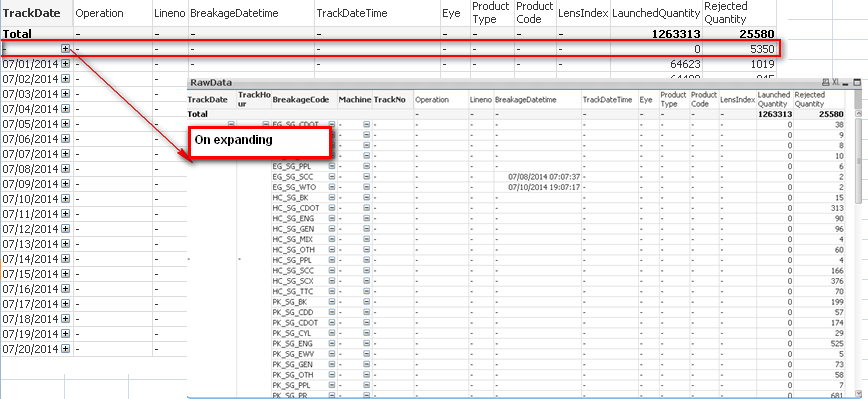
Table View:
When I select any of the parameters, it is perfect. but when i do 'Clear Selection', I don't want to see the marked above section.
Please help me in getting rid of this.
Thanks,
Deepa
- Tags:
- qlikview_scripting
Accepted Solutions

 sushil353
- Mark as New
- Bookmark
- Subscribe
- Mute
- Subscribe to RSS Feed
- Permalink
- Report Inappropriate Content
In chart>Dimension> check suppress when value is null.
sushil353
- Mark as New
- Bookmark
- Subscribe
- Mute
- Subscribe to RSS Feed
- Permalink
- Report Inappropriate Content
In chart>Dimension> check suppress when value is null.
- Mark as New
- Bookmark
- Subscribe
- Mute
- Subscribe to RSS Feed
- Permalink
- Report Inappropriate Content
It works.. Thank you Sushil,