Unlock a world of possibilities! Login now and discover the exclusive benefits awaiting you.

- Qlik Community
- :
- All Forums
- :
- QlikView
- :
- Urgent Need
- Subscribe to RSS Feed
- Mark Topic as New
- Mark Topic as Read
- Float this Topic for Current User
- Bookmark
- Subscribe
- Mute
- Printer Friendly Page

 Mahamed_Qlik
- Mark as New
- Bookmark
- Subscribe
- Mute
- Subscribe to RSS Feed
- Permalink
- Report Inappropriate Content
Urgent Need
Hi Guys,
I have following field i need the count of CropCode starting with 'CS only.
For example : only CS001, CS002, CS003,CS004 so the count should be 4
| CropCode |
|---|
| CS001 |
| CS002 |
| CS003 |
| CS004 |
| 1001 |
| 1002 |
Kindly Help.
- « Previous Replies
-
- 1
- 2
- Next Replies »

 sasiparupudi1
- Mark as New
- Bookmark
- Subscribe
- Mute
- Subscribe to RSS Feed
- Permalink
- Report Inappropriate Content
=Count({<CropCode={'CS*'}>}CropCode)
Mahamed_Qlik
- Mark as New
- Bookmark
- Subscribe
- Mute
- Subscribe to RSS Feed
- Permalink
- Report Inappropriate Content
Hi,
II tried but it is not working. showing count 0
 qlikmsg4u
- Mark as New
- Bookmark
- Subscribe
- Mute
- Subscribe to RSS Feed
- Permalink
- Report Inappropriate Content
In script:
Load *,If(Left(CropCode,2)='CS',1,0) as CSCount;
Load * Inline [
CropCode
CS001
CS002
CS003
CS004
1001
1002];
in UI:
=Sum(If(Left(CropCode,2)='CS',1,0))
or
=Count({<CropCode={'CS*'}>}CropCode)
Mahamed_Qlik
- Mark as New
- Bookmark
- Subscribe
- Mute
- Subscribe to RSS Feed
- Permalink
- Report Inappropriate Content
Not working.
sasiparupudi1
- Mark as New
- Bookmark
- Subscribe
- Mute
- Subscribe to RSS Feed
- Permalink
- Report Inappropriate Content
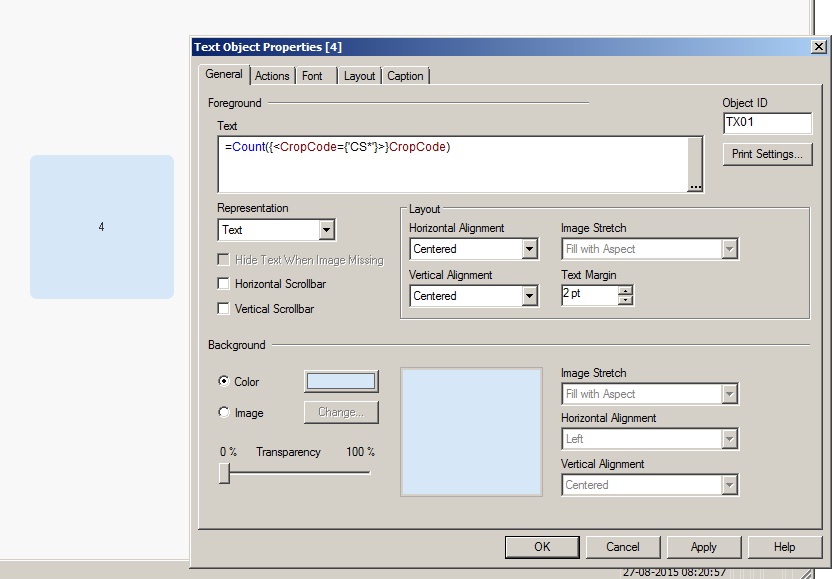 It shows 4 with the sample data.. how are you using it? may be can you share a sample?
qlikmsg4u
- Mark as New
- Bookmark
- Subscribe
- Mute
- Subscribe to RSS Feed
- Permalink
- Report Inappropriate Content
what do you mean by not working, it should work.what error you are getting
PFA

 jagan
jagan
- Mark as New
- Bookmark
- Subscribe
- Mute
- Subscribe to RSS Feed
- Permalink
- Report Inappropriate Content
Hi,
This should work
=Count({<CropCode={'CS*'}>}CropCode)
If not try this
=Sum(Aggr(If(Upper(Left(CropCode, 2)) = 'CS', 1, 0), CropCode))
Hope this helps you.
Regards,
jagan.

 Kushal_Chawda
- Mark as New
- Bookmark
- Subscribe
- Mute
- Subscribe to RSS Feed
- Permalink
- Report Inappropriate Content
create a flag in script,
if(wildmatch(lower(CropCode),'cs*',1,0) as CropCodeFlag
In front end use below expression
Count ({<CropCodeFlag={1}>}CropCode)
Mahamed_Qlik
- Mark as New
- Bookmark
- Subscribe
- Mute
- Subscribe to RSS Feed
- Permalink
- Report Inappropriate Content
Yes it works now..
There was an issue with the source db.
Thank you for your help.

- « Previous Replies
-
- 1
- 2
- Next Replies »