Unlock a world of possibilities! Login now and discover the exclusive benefits awaiting you.

- Qlik Community
- :
- All Forums
- :
- QlikView
- :
- Urgent help. Thanks
- Subscribe to RSS Feed
- Mark Topic as New
- Mark Topic as Read
- Float this Topic for Current User
- Bookmark
- Subscribe
- Mute
- Printer Friendly Page

 n1ef5ng1
- Mark as New
- Bookmark
- Subscribe
- Mute
- Subscribe to RSS Feed
- Permalink
- Report Inappropriate Content
Urgent help. Thanks
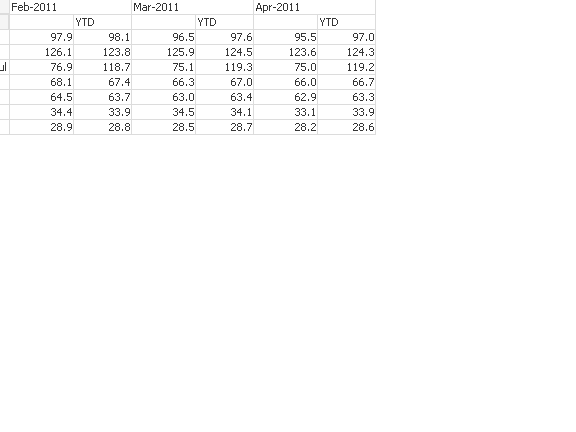 Hi guys,
As above image, my dimension is month and my expression consist of (blank) and YTD
However my desire output is to show (blank) values monthly and YTD value on the last month that the user click
meaning
Feb March April
value value value YTD(Apr)
instead of
value YTD(feb) value YTD(march) value (YTD April)
value denots (blank)
thanks alot

 sujeetsingh
- Mark as New
- Bookmark
- Subscribe
- Mute
- Subscribe to RSS Feed
- Permalink
- Report Inappropriate Content
Hi just write on your expression if() according to the current selection.
Post a sample

 giakoum
- Mark as New
- Bookmark
- Subscribe
- Mute
- Subscribe to RSS Feed
- Permalink
- Report Inappropriate Content
"value on the last month that the user click"
that I do not understand. You mean that if the user selects a range of month you want to show the value of each month in one column and the value of all selected months in the next column?
n1ef5ng1
- Mark as New
- Bookmark
- Subscribe
- Mute
- Subscribe to RSS Feed
- Permalink
- Report Inappropriate Content
I am using personal edition, can't read too 
sujeetsingh
- Mark as New
- Bookmark
- Subscribe
- Mute
- Subscribe to RSS Feed
- Permalink
- Report Inappropriate Content
Better you explain your stuff again in simple words
n1ef5ng1
- Mark as New
- Bookmark
- Subscribe
- Mute
- Subscribe to RSS Feed
- Permalink
- Report Inappropriate Content
ok let me rephrase,
My dimension include monthly, expression is the value and YTD
Referring to the picture i have attached earlier, I would like my desire output to have the YTD to remove on Feb and March. YTD will only show on the latest month, in this case, it is April.
I hope this will help to understand the problem better
giakoum
- Mark as New
- Bookmark
- Subscribe
- Mute
- Subscribe to RSS Feed
- Permalink
- Report Inappropriate Content
Then why don't you just create a total from the presentation tab?

sujeetsingh
- Mark as New
- Bookmark
- Subscribe
- Mute
- Subscribe to RSS Feed
- Permalink
- Report Inappropriate Content
Seee this
n1ef5ng1
- Mark as New
- Bookmark
- Subscribe
- Mute
- Subscribe to RSS Feed
- Permalink
- Report Inappropriate Content
i can view, am using personal edition. sorry about that
n1ef5ng1
- Mark as New
- Bookmark
- Subscribe
- Mute
- Subscribe to RSS Feed
- Permalink
- Report Inappropriate Content
I can't. the YTD has a different set of formula to derive the value
