Unlock a world of possibilities! Login now and discover the exclusive benefits awaiting you.

- Qlik Community
- :
- All Forums
- :
- QlikView
- :
- Use variable from Input box in Match function
- Subscribe to RSS Feed
- Mark Topic as New
- Mark Topic as Read
- Float this Topic for Current User
- Bookmark
- Subscribe
- Mute
- Printer Friendly Page

- Mark as New
- Bookmark
- Subscribe
- Mute
- Subscribe to RSS Feed
- Permalink
- Report Inappropriate Content
Use variable from Input box in Match function
Our CRM has a text "Notes" field that can be very large. We want the ability to filter via a user-supplied keyword, so the idea was to create an Input Box where the user entered the search term (stored in vSearch), and I used the MixMatch function as an Expression in the table:
if(MixMatch(Notes,vSearch)>=1,Notes,'No Match')
However, this uniformly returns "No Match", even when I type in the word "The" (which does appear in the Notes frequently!).
I'm guessing it's because vSearch is not a string. I tried MixMatch(Notes,$(vSearch))>=1, but that always returned "No Match" as well.
I'm not sure how to add the quotation marks to make vSearch a literal.
Any assistance would be appreciated!
thanks,
Kevin
Accepted Solutions

 rubenmarin
- Mark as New
- Bookmark
- Subscribe
- Mute
- Subscribe to RSS Feed
- Permalink
- Report Inappropriate Content
Hi Kevin, MixMatch will look for the whole string, maybe you looking for WildMatch.
For a variable vSearch with the value: Note
This expression returns Found:
=If(WildMatch('Notes','*$(vSearch)*'), 'Found', 'Not Found')
rubenmarin
- Mark as New
- Bookmark
- Subscribe
- Mute
- Subscribe to RSS Feed
- Permalink
- Report Inappropriate Content
Hi Kevin, try enclosing the string returned by the variable between quotes:
MixMatch(Notes,'$(vSearch)')
- Mark as New
- Bookmark
- Subscribe
- Mute
- Subscribe to RSS Feed
- Permalink
- Report Inappropriate Content
HI Ruben,
I thought of that, but doesn't that tell the system to look for the string $(vSearch) ?
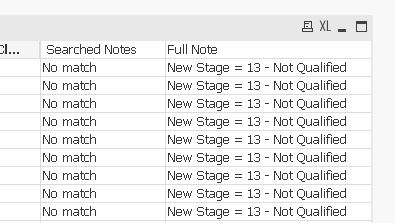
In any case, when I tried it, it returned "No Match" uniformly. Then I thought, why not enter the quote strings in the Input box, so I entered 'Not Qualified' (with the quote marks in the search string) I checked under the "Settings-> Variable Overview' and the value was 'Not Qualified' (with the quotation marks). But the same thing: No match.
Here's the data in "Full Notes" and the result of my expression in "Searched Notes"
- Mark as New
- Bookmark
- Subscribe
- Mute
- Subscribe to RSS Feed
- Permalink
- Report Inappropriate Content
Now I'm very confused.. I changed my expression to include the actual value, just to make sure, and even when I entered "if(MixMatch(Notes,'Not Qualified')>=1,Notes,'No Match')" as my expression, it returned "No Match".
Now, quite clearly, we can see "Not Qualified" is present in the "Full Note", so why does the MixMatch function not return a positive value here?
rubenmarin
- Mark as New
- Bookmark
- Subscribe
- Mute
- Subscribe to RSS Feed
- Permalink
- Report Inappropriate Content
Hi Kevin, MixMatch will look for the whole string, maybe you looking for WildMatch.
For a variable vSearch with the value: Note
This expression returns Found:
=If(WildMatch('Notes','*$(vSearch)*'), 'Found', 'Not Found')
- Mark as New
- Bookmark
- Subscribe
- Mute
- Subscribe to RSS Feed
- Permalink
- Report Inappropriate Content
Thanks, Ruben, changing to Wildmatch and adding the "*" delimiters did the trick!

 Shubham_Deshmuk
- Mark as New
- Bookmark
- Subscribe
- Mute
- Subscribe to RSS Feed
- Permalink
- Report Inappropriate Content