Unlock a world of possibilities! Login now and discover the exclusive benefits awaiting you.

- Qlik Community
- :
- All Forums
- :
- QlikView
- :
- Value on Data Point Stacked Bar - Only on Top
- Subscribe to RSS Feed
- Mark Topic as New
- Mark Topic as Read
- Float this Topic for Current User
- Bookmark
- Subscribe
- Mute
- Printer Friendly Page

 demcug82
- Mark as New
- Bookmark
- Subscribe
- Mute
- Subscribe to RSS Feed
- Permalink
- Report Inappropriate Content
Value on Data Point Stacked Bar - Only on Top
Hi,
i have a Stacked Bar and i would like to show only one value on data point on the top.
I created two expression:
1) for bar chart
2) for label
I have a negative value for a segment (-298) , so Qlik insert me two label (on top and on down)
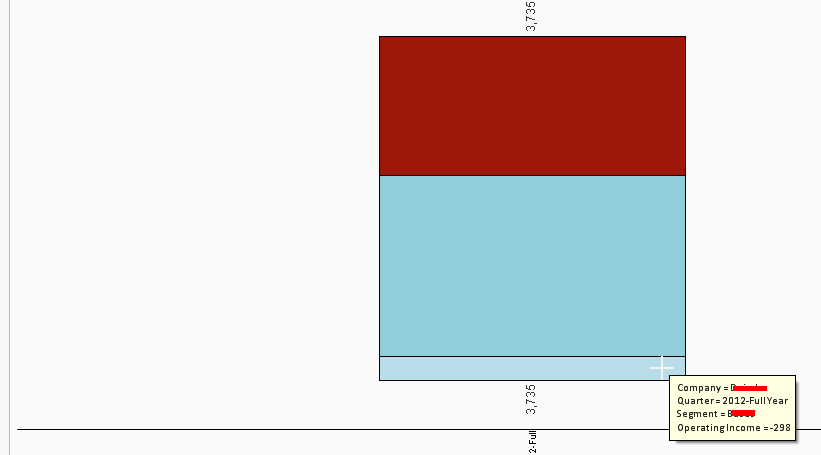
How can I do to show label only on the sum (In this case only on the top) ?

 sunny_talwar
- Mark as New
- Bookmark
- Subscribe
- Mute
- Subscribe to RSS Feed
- Permalink
- Report Inappropriate Content
May be create another label which just display the Sum by the your first dimension using Aggregate and place it on the chart. I will have to play around with it to give a better response, but try playing around with it your end as well.
Best,
Sunny
sunny_talwar
- Mark as New
- Bookmark
- Subscribe
- Mute
- Subscribe to RSS Feed
- Permalink
- Report Inappropriate Content
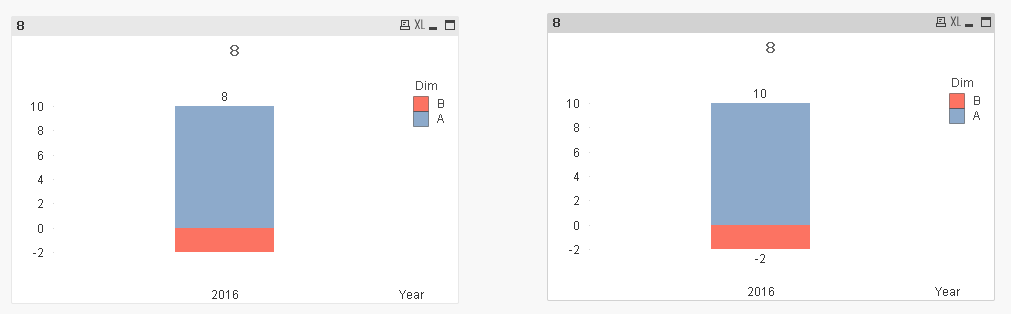
See if the attached application helps:
demcug82
- Mark as New
- Bookmark
- Subscribe
- Mute
- Subscribe to RSS Feed
- Permalink
- Report Inappropriate Content
 Hi Sunny,
ty for help but i have to use total.
My expression it's: (your sum(value))
num(round(sum(total <F.COMPETITOR, F.Y_Quarter>F.#ACT_E)),'#,##0') (Operating Income = F#ACT_E)
and only for business segment > 0 i would to like sum total
so i tried:
dual(if(num(round(sum(total <F.COMPETITOR, F.Y_Quarter, F.BUSINESS_SEGMENT>F.#ACT_E)),'#,##0') >=0, num(round(sum(total <F.COMPETITOR, F.Y_Quarter>F.#ACT_E)),'#,##0'),''),num(round(sum(total <F.COMPETITOR, F.Y_Quarter>F.#ACT_E)),'#,##0'))
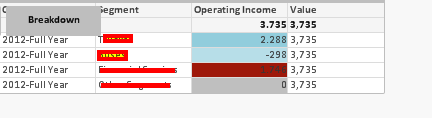
If i use > 0 in "IF..." not works (2 record > 0 and 2 <= 0 ) see image . Not insert label
IF i use >= 0 in "IF..." WORKS (3 records VS 1 that are in >= 0 Insert one label on the top
This it's strange ....too
Why??
