Unlock a world of possibilities! Login now and discover the exclusive benefits awaiting you.

- Qlik Community
- :
- All Forums
- :
- QlikView
- :
- Why no static step on second axis?
- Subscribe to RSS Feed
- Mark Topic as New
- Mark Topic as Read
- Float this Topic for Current User
- Bookmark
- Subscribe
- Mute
- Printer Friendly Page

- Mark as New
- Bookmark
- Subscribe
- Mute
- Subscribe to RSS Feed
- Permalink
- Report Inappropriate Content
Why no static step on second axis?
I have created the following chart with a split axis. I have added a static step (250000) on the primary axis (bottom) and tried to add a static step on the secondary axis (top). As the top axis is presented as a percentage I tried as normal to add a static step of 0.1 to show an axis in increment steps of 10%. Unfortunately it hasn't worked as shown below.
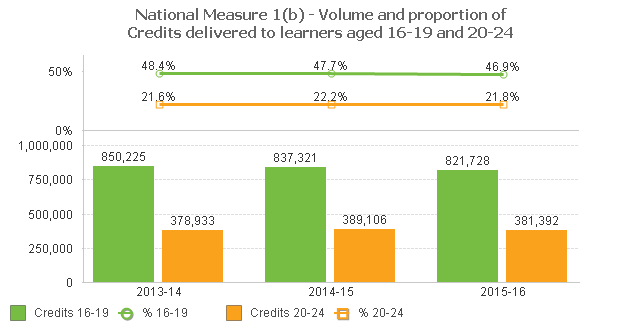
Any suggestions?
Thanks
Greg
Accepted Solutions

 m_woolf
- Mark as New
- Bookmark
- Subscribe
- Mute
- Subscribe to RSS Feed
- Permalink
- Report Inappropriate Content
Maybe there isn't enough space for a static step of .1.
See what happens if you make the chart taller, or try a static step of .25.
m_woolf
- Mark as New
- Bookmark
- Subscribe
- Mute
- Subscribe to RSS Feed
- Permalink
- Report Inappropriate Content
Maybe there isn't enough space for a static step of .1.
See what happens if you make the chart taller, or try a static step of .25.
- Mark as New
- Bookmark
- Subscribe
- Mute
- Subscribe to RSS Feed
- Permalink
- Report Inappropriate Content
Thanks, that worked but I had to significantly increase the height of the chart to get the static step to show. Is there a way to reduce the gap between the axis text. It seems to need a lot of white space in between?
Thanks
Greg
m_woolf
- Mark as New
- Bookmark
- Subscribe
- Mute
- Subscribe to RSS Feed
- Permalink
- Report Inappropriate Content
Just a guess - reduce the font size?