Unlock a world of possibilities! Login now and discover the exclusive benefits awaiting you.

- Qlik Community
- :
- All Forums
- :
- QlikView
- :
- Zoom in / Zoom out problem
- Subscribe to RSS Feed
- Mark Topic as New
- Mark Topic as Read
- Float this Topic for Current User
- Bookmark
- Subscribe
- Mute
- Printer Friendly Page

 ravindraa
- Mark as New
- Bookmark
- Subscribe
- Mute
- Subscribe to RSS Feed
- Permalink
- Report Inappropriate Content
Zoom in / Zoom out problem
Hi All,
I have struck one place please give me suggestion on this to come out from that.
I have created Map chart in qlikview but i am not finding Zoom/Zoom out option , if i select any one place it is zooming but i am not finding Zoom in/ Zoomout scale on Mapchart .
Please give me suggestion how to put zoom in / zoom out scale option on Map chart.
pleas find the attached document.
Thanks in advance..............
- « Previous Replies
-
- 1
- 2
- Next Replies »

 gautik92
- Mark as New
- Bookmark
- Subscribe
- Mute
- Subscribe to RSS Feed
- Permalink
- Report Inappropriate Content
can yu please elaborate your requirement ?
ravindraa
- Mark as New
- Bookmark
- Subscribe
- Mute
- Subscribe to RSS Feed
- Permalink
- Report Inappropriate Content
Hi Gowtham Kesavan,
Actuvaly when we go to good map we can find out Zoom in /zoom out option ( + symobel , - symbol ) the same option i am not gettion in Map chart.
thanks Regards
Niranjan
gautik92
- Mark as New
- Bookmark
- Subscribe
- Mute
- Subscribe to RSS Feed
- Permalink
- Report Inappropriate Content
which map extension are you using?
can yu post sample qvw?

 anat
anat
- Mark as New
- Bookmark
- Subscribe
- Mute
- Subscribe to RSS Feed
- Permalink
- Report Inappropriate Content
check below links ,may be these links will help you.
https://community.qlikview.com/thread/1219
ravindraa
- Mark as New
- Bookmark
- Subscribe
- Mute
- Subscribe to RSS Feed
- Permalink
- Report Inappropriate Content
Hi Ananth bab,
Thanks for replay , actvaly i need to put Zoom in /Zoom out option.
like attached option.
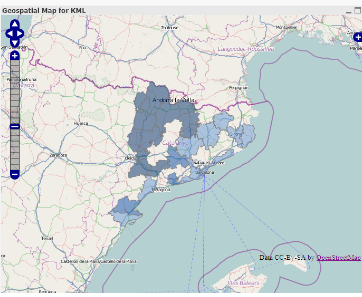
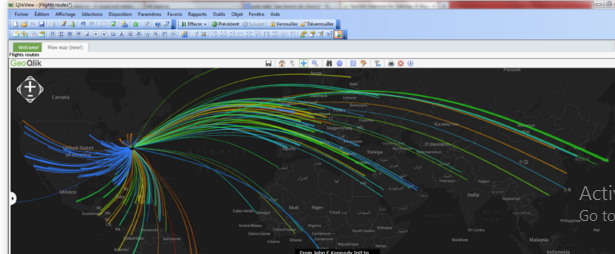
i am expection any one of above option on my Mapchart , kindly give me suggestion on this
Thanks in advance..............................
ravindraa
- Mark as New
- Bookmark
- Subscribe
- Mute
- Subscribe to RSS Feed
- Permalink
- Report Inappropriate Content
Hi experts ,
Kinldy give me suggestion on this.
Thanks in advance.................
Thanks & Regards
Niranjan
 Mahamed_Qlik
- Mark as New
- Bookmark
- Subscribe
- Mute
- Subscribe to RSS Feed
- Permalink
- Report Inappropriate Content
Dear Niranjan,
You can try this:
-Create on slider object on the sheet.
-Go to its properties select the variable from the drop down var_zoom
-Set its minimum value as 0 and max as 17
-then try .
Hope it helps,
Regards,
Mahamed
ravindraa
- Mark as New
- Bookmark
- Subscribe
- Mute
- Subscribe to RSS Feed
- Permalink
- Report Inappropriate Content
Hi Mahamed Khan,
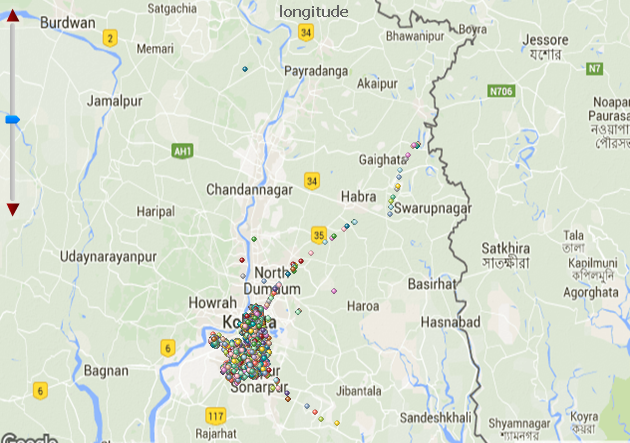
Thanks for replay, Yes i have created same , but when i zoom it half of the values going under the chart like below images , if i pick map then make it up that is good for me but i am unable to do that one...
Kindly give me suggestion on this please find image which i am getting................
before full zoom chart look like this..................
After done Zoome the values going to down of the chart.................
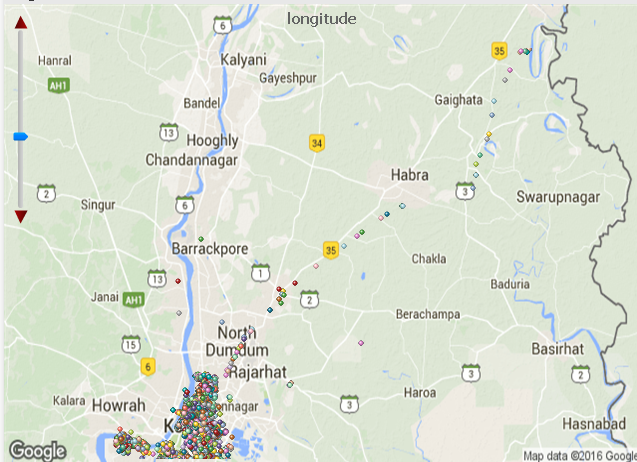
Thanks in advance please give me suggestion on this how to come out from this issue.
Mahamed_Qlik
- Mark as New
- Bookmark
- Subscribe
- Mute
- Subscribe to RSS Feed
- Permalink
- Report Inappropriate Content
Exactly...!
That slider is just to make the chart ZoomIn-ZoomOut but if you want to move the chart area as well (Like in actual Google-map) then only way you have to create two more slider. one for horizontal scrolling and the one for vertical scrolling. 
The best suggestion for any kind of scenario of using map in Qlik is just go with "GeoQlik"
Hope it helps.

- « Previous Replies
-
- 1
- 2
- Next Replies »