Unlock a world of possibilities! Login now and discover the exclusive benefits awaiting you.

- Qlik Community
- :
- All Forums
- :
- QlikView
- :
- adding conditions to Variables in Set Command
- Subscribe to RSS Feed
- Mark Topic as New
- Mark Topic as Read
- Float this Topic for Current User
- Bookmark
- Subscribe
- Mute
- Printer Friendly Page

 Krish
Krish
- Mark as New
- Bookmark
- Subscribe
- Mute
- Subscribe to RSS Feed
- Permalink
- Report Inappropriate Content
adding conditions to Variables in Set Command
Hi,
I am trying to re-use a formula which is used in multiple places in dashboard. I am trying to create a variable which is common across all the places like
sum({<payment={'cash'}>}sales) and create it as a variable vsales = sum({<payment={'cash'}>}sales),
Now I want to add a condition like country='IND' for one chart and country='usa' for other chart, but the calculation is same.
sum({<payment={'cash'},country={'IND'}>}sales) & sum({<payment={'cash'},country={'AUS'}>}sales)
How can I create a variable with common features and re-use them by adding the additional condition based on requirement.
- Tags:
- qlikview

 QFabian
- Mark as New
- Bookmark
- Subscribe
- Mute
- Subscribe to RSS Feed
- Permalink
- Report Inappropriate Content
Hi @Krish , one option could be use alternate states inside the expressions.
So you can have the same field Country, more than one, but each one referencing to a different State
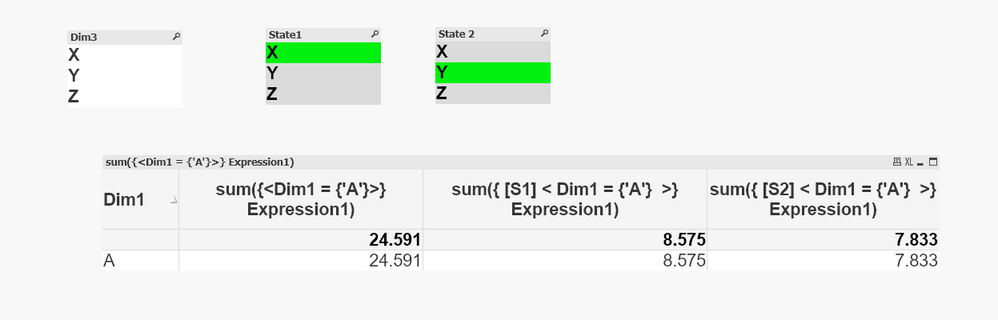
Please check the qvw
did it work for you? give like and mark the solution as accepted.
