Unlock a world of possibilities! Login now and discover the exclusive benefits awaiting you.

- Qlik Community
- :
- All Forums
- :
- QlikView
- :
- aggr function and active selection
- Subscribe to RSS Feed
- Mark Topic as New
- Mark Topic as Read
- Float this Topic for Current User
- Bookmark
- Subscribe
- Mute
- Printer Friendly Page

- Mark as New
- Bookmark
- Subscribe
- Mute
- Subscribe to RSS Feed
- Permalink
- Report Inappropriate Content
aggr function and active selection
Hello everyone,
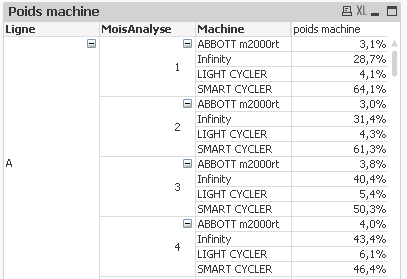
I am currently facing a small problem using the aggr () function of qlikview. I have the working lines (A, B, C etc). On each line, per month, I have the machines (image 1).
To calculate the machine weight, the formula I used is:
(Sum ([Nbr analyzes] / [Cadence Chgt Tech]) + sum [[Cadences Manip Tech])
/ [Sum (total <Line, MonthsAnalysis> aggr (sum ([Numbers analyzes] / [Cadence Chgt Tech]) + sum ([Numbers analyzes] / [Cadence Manip Tech] ,Machine)))
Explanation:
(Sum + [Cadence Manip Tech]) + [Time Set Up annual]) will calculate the time spent by a machine in a given row in A given month. .
(Sum (total <Line, MonthAnalysis> aggr (sum ([Numbers analyzes] / [Cadence Chgt Tech]) + sum [[Cadence Manip Tech] Machine))) will calculate the sum of the machine time of all machines that are on the same line, in a given month.
By dividing the time spent by a machine in a given line, in a given month to the sum of the time spent by all the machines which are on the same line, in the same month, I have the weight of the machine.
The formula is good, because without any selection, it gives me the correct results.
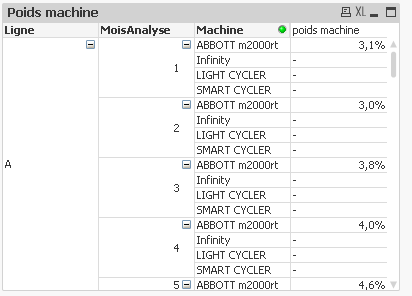
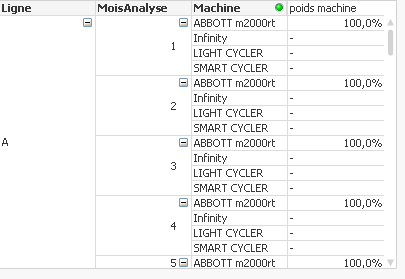
The question is, how can I keep this result, by selecting a machine? In image 2, I selected the ABBOTT machine, instead of displaying the machine weights as in image 1 (ie only 3.1% in January, 3.0% in February, 3.8 % In March etc.), qlikview displays 100%.
Can someone help me solve the problem?
thank you so much
Accepted Solutions

 sunny_talwar
- Mark as New
- Bookmark
- Subscribe
- Mute
- Subscribe to RSS Feed
- Permalink
- Report Inappropriate Content
Can you do me a favor and break the above expression into two parts
1)
Sum([Nbr analyses]/[Cadence Chgt Tech]) + Sum([Nbr analyses]/[Cadence Manip Tech]) + [Temps Set up annuel]
2)
Sum({<Machine>} TOTAL <Ligne,MoisAnalyse> Aggr(Sum({<Machine>}[Nbr analyses]/[Cadence Chgt Tech]) + Sum({<Machine>} [Nbr analyses]/[Cadence Manip Tech]) + Only({<Machine>}[Temps Set up annuel]), Ligne, MoisAnalyse, Machine))
3)
(Sum([Nbr analyses]/[Cadence Chgt Tech]) + Sum([Nbr analyses]/[Cadence Manip Tech]) + [Temps Set up annuel])/(Sum({<Machine>} TOTAL <Ligne,MoisAnalyse> Aggr(Sum({<Machine>}[Nbr analyses]/[Cadence Chgt Tech]) + Sum({<Machine>} [Nbr analyses]/[Cadence Manip Tech]) + Only({<Machine>}[Temps Set up annuel]), Ligne, MoisAnalyse, Machine)))
And then send a screenshot with and without selection
sunny_talwar
- Mark as New
- Bookmark
- Subscribe
- Mute
- Subscribe to RSS Feed
- Permalink
- Report Inappropriate Content
Try this
(Sum ([Nbr analyzes] / [Cadence Chgt Tech]) + sum [[Cadences Manip Tech])
/ [Sum ({<Machine>}total <Line, MonthsAnalysis> aggr (sum ({<Machine>}[Numbers analyzes] / [Cadence Chgt Tech]) + sum ({<Machine>}[Numbers analyzes] / [Cadence Manip Tech] ,Machine)))
- Mark as New
- Bookmark
- Subscribe
- Mute
- Subscribe to RSS Feed
- Permalink
- Report Inappropriate Content
Hi Sunny,
thank you for your answer.
Here is the original formular :
(sum([Nbr analyses]/[Cadence Chgt Tech])+sum([Nbr analyses]/[Cadence Manip Tech])+[Temps Set up annuel])
/(sum(total <Ligne,MoisAnalyse> aggr(sum([Nbr analyses]/[Cadence Chgt Tech])+sum([Nbr analyses]/[Cadence Manip Tech])+[Temps Set up annuel],Ligne,MoisAnalyse,Machine)))
and below is the formular when I follow your suggestion :
(sum([Nbr analyses]/[Cadence Chgt Tech])+sum([Nbr analyses]/[Cadence Manip Tech])+[Temps Set up annuel])
/(sum({<Machine>} total <Ligne,MoisAnalyse> aggr(sum({<Machine>}[Nbr analyses]/[Cadence Chgt Tech])+sum({<Machine>}[Nbr analyses]/[Cadence Manip Tech])+[Temps Set up annuel],Ligne,MoisAnalyse,Machine)))
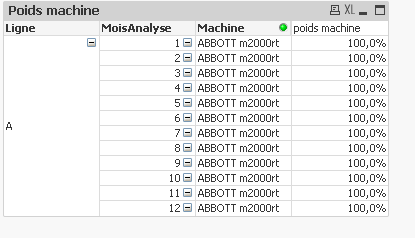
And qlikview still gives me the results as 100% (image attached). It's not exactly what I wished (cf my 1st post)
Can you help me to correct?
Thank you very much
sunny_talwar
- Mark as New
- Bookmark
- Subscribe
- Mute
- Subscribe to RSS Feed
- Permalink
- Report Inappropriate Content
Can you do me a favor and break the above expression into two parts
1)
Sum([Nbr analyses]/[Cadence Chgt Tech]) + Sum([Nbr analyses]/[Cadence Manip Tech]) + [Temps Set up annuel]
2)
Sum({<Machine>} TOTAL <Ligne,MoisAnalyse> Aggr(Sum({<Machine>}[Nbr analyses]/[Cadence Chgt Tech]) + Sum({<Machine>} [Nbr analyses]/[Cadence Manip Tech]) + Only({<Machine>}[Temps Set up annuel]), Ligne, MoisAnalyse, Machine))
3)
(Sum([Nbr analyses]/[Cadence Chgt Tech]) + Sum([Nbr analyses]/[Cadence Manip Tech]) + [Temps Set up annuel])/(Sum({<Machine>} TOTAL <Ligne,MoisAnalyse> Aggr(Sum({<Machine>}[Nbr analyses]/[Cadence Chgt Tech]) + Sum({<Machine>} [Nbr analyses]/[Cadence Manip Tech]) + Only({<Machine>}[Temps Set up annuel]), Ligne, MoisAnalyse, Machine)))
And then send a screenshot with and without selection
- Mark as New
- Bookmark
- Subscribe
- Mute
- Subscribe to RSS Feed
- Permalink
- Report Inappropriate Content
Hello again,
I copied you 3) into my pivot table and it works amazingly.
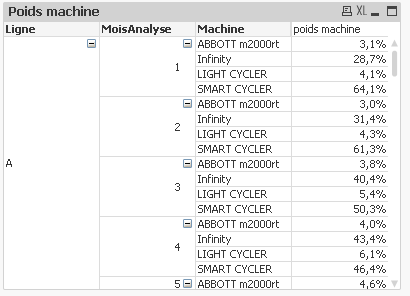
without selection (image 1)
and with selection (image 2)
Final formular : (Sum([Nbr analyses]/[Cadence Chgt Tech]) + Sum([Nbr analyses]/[Cadence Manip Tech]) + [Temps Set up annuel])/(Sum({<Machine>} TOTAL <Ligne,MoisAnalyse> Aggr(Sum({<Machine>}[Nbr analyses]/[Cadence Chgt Tech]) + Sum({<Machine>} [Nbr analyses]/[Cadence Manip Tech]) + Only({<Machine>}[Temps Set up annuel]), Ligne, MoisAnalyse, Machine)))
Thank you very much