Unlock a world of possibilities! Login now and discover the exclusive benefits awaiting you.

- Qlik Community
- :
- All Forums
- :
- QlikView
- :
- background color expression
- Subscribe to RSS Feed
- Mark Topic as New
- Mark Topic as Read
- Float this Topic for Current User
- Bookmark
- Subscribe
- Mute
- Printer Friendly Page

 didierodayo
- Mark as New
- Bookmark
- Subscribe
- Mute
- Subscribe to RSS Feed
- Permalink
- Report Inappropriate Content
background color expression
Hello,
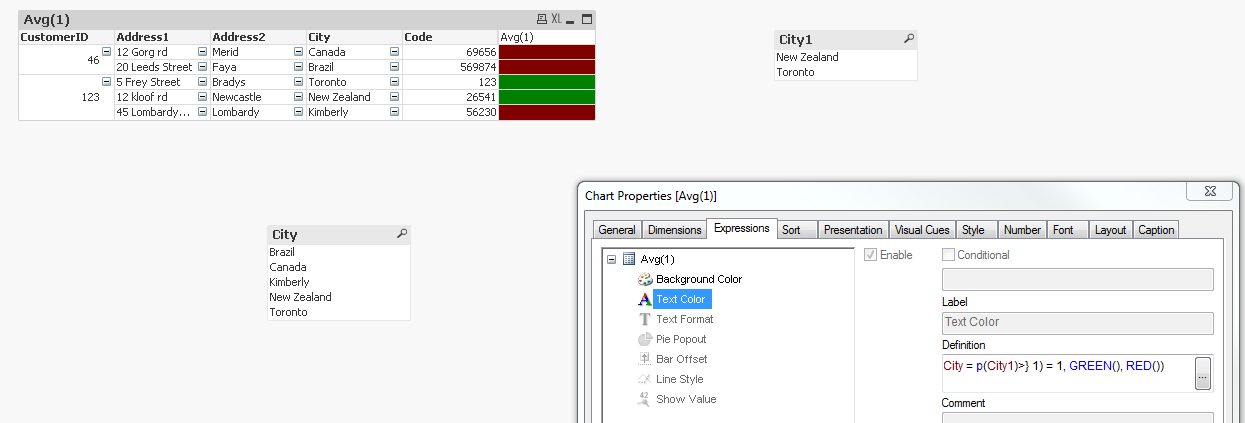
I have this scenario for background color and it is not working atm.
I have 2 tables as attached and they are not linked. I would like to set the color for city on table 1 to green if the city in table 1 is equal to the city in table 2 otherwise red.
at the moment it works fine only when I select the city in table 2 otherwise by default everything is red.
What I need is for the background expression to check table2 and load the appropriate color even without selection.
how could this be written?
Your assistance is appreciated.
Thanks
Didier
- Tags:
- background_color
Accepted Solutions

 sunny_talwar
- Mark as New
- Bookmark
- Subscribe
- Mute
- Subscribe to RSS Feed
- Permalink
- Report Inappropriate Content
sunny_talwar
- Mark as New
- Bookmark
- Subscribe
- Mute
- Subscribe to RSS Feed
- Permalink
- Report Inappropriate Content
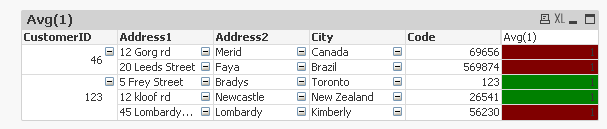
May be this:
If(Avg({<City = p(City1)>} 1) = 1, GREEN(), RED())
didierodayo
- Mark as New
- Bookmark
- Subscribe
- Mute
- Subscribe to RSS Feed
- Permalink
- Report Inappropriate Content
Thanks a lot Sunny for all your help really appreciate.It worked.
I have one question though, If I didn't want the '1' TO SHOW inside the color is there a way to keep it as pivot table but only have the color showing?
sunny_talwar
- Mark as New
- Bookmark
- Subscribe
- Mute
- Subscribe to RSS Feed
- Permalink
- Report Inappropriate Content
Use the same expression for your text color