Unlock a world of possibilities! Login now and discover the exclusive benefits awaiting you.

- Qlik Community
- :
- All Forums
- :
- QlikView
- :
- color getselectedfield
- Subscribe to RSS Feed
- Mark Topic as New
- Mark Topic as Read
- Float this Topic for Current User
- Bookmark
- Subscribe
- Mute
- Printer Friendly Page

- Mark as New
- Bookmark
- Subscribe
- Mute
- Subscribe to RSS Feed
- Permalink
- Report Inappropriate Content
color getselectedfield
Hello, i have this expression
='Chosen Customer: ' &GetFieldSelections( DimCustomer.CustomerID)
Then my text box would look like this if i choose something from customerid:
Chosen Customer: Hulla
How can i make Hulla another color ?
So chosen customer is white and hulla is green.
ps. It is in one textbox
Accepted Solutions

 Gysbert_Wassena
- Mark as New
- Bookmark
- Subscribe
- Mute
- Subscribe to RSS Feed
- Permalink
- Report Inappropriate Content
You can't. It's not possible in a single text object. There is no way to have two different text formats or colors in one text object.
talk is cheap, supply exceeds demand
- Mark as New
- Bookmark
- Subscribe
- Mute
- Subscribe to RSS Feed
- Permalink
- Report Inappropriate Content
Hi,
I'm not sure you can do it that.
Did you try with a workaround like using two textbox with two different settings for the text color ?
Hope it helps
Giampiero
P.S: If you solve your problem please share with us your solution because it's a very interesting question.Thanks
- Mark as New
- Bookmark
- Subscribe
- Mute
- Subscribe to RSS Feed
- Permalink
- Report Inappropriate Content
i can easily use two different textboxes. But i want all in one - But i havent cracked the code yet. I will let you know when i do!

 marcus_sommer
- Mark as New
- Bookmark
- Subscribe
- Mute
- Subscribe to RSS Feed
- Permalink
- Report Inappropriate Content
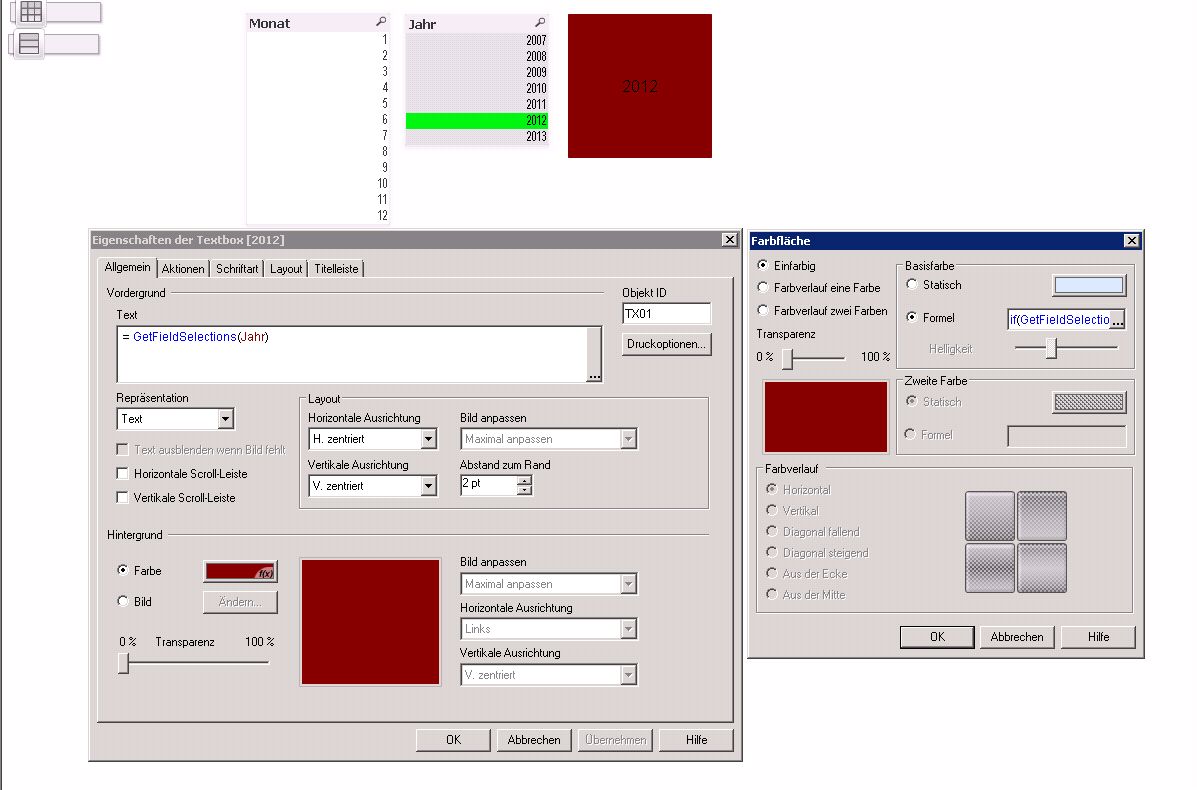
Put a formula in background-color from the textbox:
if(GetFieldSelections( DimCustomer.CustomerID) = 'Hulla', green(), white())
- Marcus
Gysbert_Wassena- Mark as New
- Bookmark
- Subscribe
- Mute
- Subscribe to RSS Feed
- Permalink
- Report Inappropriate Content
You can't. It's not possible in a single text object. There is no way to have two different text formats or colors in one text object.
talk is cheap, supply exceeds demand
 vivientexier
- Mark as New
- Bookmark
- Subscribe
- Mute
- Subscribe to RSS Feed
- Permalink
- Report Inappropriate Content
Ya ! It is impossible to have different text formats in one text object... except if you...
Use the "text aera" for your customer ID and use the caption to write "Chosen Customer:". Your text aera and caption can have different fonts, size and colors. It looks nice and costs only one object  .
.
marcus_sommer
- Mark as New
- Bookmark
- Subscribe
- Mute
- Subscribe to RSS Feed
- Permalink
- Report Inappropriate Content
In my case it works ...
- Mark as New
- Bookmark
- Subscribe
- Mute
- Subscribe to RSS Feed
- Permalink
- Report Inappropriate Content
thats shiat  But thanks for the answer
- Mark as New
- Bookmark
- Subscribe
- Mute
- Subscribe to RSS Feed
- Permalink
- Report Inappropriate Content
No does not work It colors the whole field, and not only the selection
marcus_sommer
- Mark as New
- Bookmark
- Subscribe
- Mute
- Subscribe to RSS Feed
- Permalink
- Report Inappropriate Content
You want a textbox which looks like a listbox?
Perhaps a possibility is to use a pivot like this and set (optional) the column-width on 0
set chart = ActiveDocument.GetSheetObject("CH10007")
chart.SetPixWidth 2 , 0

Another possibility could be the textbox-extension from Stefan Walter - see:
- Marcus