Unlock a world of possibilities! Login now and discover the exclusive benefits awaiting you.

- Qlik Community
- :
- All Forums
- :
- QlikView
- :
- conditional formatting
- Subscribe to RSS Feed
- Mark Topic as New
- Mark Topic as Read
- Float this Topic for Current User
- Bookmark
- Subscribe
- Mute
- Printer Friendly Page

 vireshkolagimat
- Mark as New
- Bookmark
- Subscribe
- Mute
- Subscribe to RSS Feed
- Permalink
- Report Inappropriate Content
conditional formatting
Hi Guys,
I have below sample data and i need to make certain rows bold based on the row dimension description.
Dimension | Sales1 | Sales2 |
|---|---|---|
| laptop | 2 | 7 |
| Printer | 6 | 4 |
| Desktop | 2 | 3 |
| Total | 10 | 14 |
If dimension is Printer, then i need that Printer row should be highlighted in bold. and also the total row should be in bold.
Kindly let me know if we can achieve this.
Regards,
Viresh
- « Previous Replies
-
- 1
- 2
- Next Replies »

 MK_QSL
- Mark as New
- Bookmark
- Subscribe
- Mute
- Subscribe to RSS Feed
- Permalink
- Report Inappropriate Content
Go to Dimension Tab
Click on + Sign of Dimension
Text Format
Write below
IF(Dimension= 'Printer','<b>')
 sunny_talwar
- Mark as New
- Bookmark
- Subscribe
- Mute
- Subscribe to RSS Feed
- Permalink
- Report Inappropriate Content
Isn't the Total row already bold? I thought I remember seeing it bold
 Kushal_Chawda
- Mark as New
- Bookmark
- Subscribe
- Mute
- Subscribe to RSS Feed
- Permalink
- Report Inappropriate Content
Go to Dimension Tab
Click on + Sign of Dimension
In Text Format put below expression
IF(Dimension= 'Printer','<b>')
Sames expression you need to write in both sales1 and sales2 expression Text format
sunny_talwar
- Mark as New
- Bookmark
- Subscribe
- Mute
- Subscribe to RSS Feed
- Permalink
- Report Inappropriate Content
Seems like it
Straight table
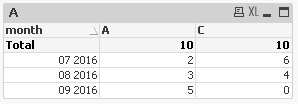
Pivot table
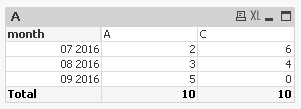
sunny_talwar
- Mark as New
- Bookmark
- Subscribe
- Mute
- Subscribe to RSS Feed
- Permalink
- Report Inappropriate Content
Oye Manish ka copy paste karta hai 
Kushal_Chawda
- Mark as New
- Bookmark
- Subscribe
- Mute
- Subscribe to RSS Feed
- Permalink
- Report Inappropriate Content
Ha to itna type karte kon bethega.. or extra bhi dala he na.
sunny_talwar
- Mark as New
- Bookmark
- Subscribe
- Mute
- Subscribe to RSS Feed
- Permalink
- Report Inappropriate Content
yeh hua na honest chor
Kushal_Chawda
- Mark as New
- Bookmark
- Subscribe
- Mute
- Subscribe to RSS Feed
- Permalink
- Report Inappropriate Content
Imandari hi to humari pehchan he
vireshkolagimat
- Mark as New
- Bookmark
- Subscribe
- Mute
- Subscribe to RSS Feed
- Permalink
- Report Inappropriate Content
Hey, thanks it is working. How to compare the multiple line items in the same expression.
I tried the below expression but not getting the result as expected.
IF(Dimension= Match(Dimension,'Printers','laptop'),'<b>')
let me know if this can be possible.
Regards,
viresh

- « Previous Replies
-
- 1
- 2
- Next Replies »