Unlock a world of possibilities! Login now and discover the exclusive benefits awaiting you.

- Qlik Community
- :
- All Forums
- :
- QlikView
- :
- convert timestamp to date
- Subscribe to RSS Feed
- Mark Topic as New
- Mark Topic as Read
- Float this Topic for Current User
- Bookmark
- Subscribe
- Mute
- Printer Friendly Page

- Mark as New
- Bookmark
- Subscribe
- Mute
- Subscribe to RSS Feed
- Permalink
- Report Inappropriate Content
convert timestamp to date
I'm trying to convert Epoch time to both a timestamp. Here is what my script looks like:
SET ThousandSep=',';
SET DecimalSep='.';
SET MoneyThousandSep=',';
SET MoneyDecimalSep='.';
SET MoneyFormat='$#,##0.00;($#,##0.00)';
SET TimeFormat='hh:mm:ss';
SET DateFormat='MM/DD/YYYY';
SET TimestampFormat='MM/DD/YYYY hh:mm:ss[.fff]';
SET MonthNames='Jan;Feb;Mar;Apr;May;Jun;Jul;Aug;Sep;Oct;Nov;Dec';
SET DayNames='Mon;Tue;Wed;Thu;Fri;Sat;Sun';
SET LongMonthNames='January;February;March;April;May;June;July;August;September;October;November;December';
SET LongDayNames='Monday;Tuesday;Wednesday;Thursday;Friday;Saturday;Sunday';
SET FirstWeekDay=6;
SET BrokenWeeks=1;
SET ReferenceDay=0;
SET FirstMonthOfYear=1;
SET CollationLocale='en-US';

[Table1]:
LOAD
    *,
    Date(Floor([Timestamp])) as [Date],
    Second([Timestamp]) as [Second],
    Minute([Timestamp]) as [Minute],
    Hour([Timestamp]) as [Hour],
    Day([Timestamp]) as [DayOfMonth],
    Month([Timestamp]) as [Month],
    Year([Timestamp]) as [Year];

FOR EACH vFile IN FILELIST('*.csv')
    CONCATENATE
    LOAD
        Timestamp(Timestamp('01/01/1970 00:00:00.000') + @1/60/60/24) AS [Timestamp]
    FROM [$(vFile)]
    (txt, codepage is 1252, no labels, delimiter is ',', msq);
NEXT vFile;
The timestamps look like
1450123265.22
1450124764.55
1450125364.76
1450570264.74
The issue is that only a few of the timestamps are getting converted to dates in the [Date] field. For example of the 4 timestamps above the first 3 result in [Date] fields of NULL. The last one parses to "12/20/2015". I'm not sure what's causing the inconsistencies in the parsing.
Any help is appreciated.
- Tags:
- qlikview_scripting
Accepted Solutions

 MarcoWedel
- Mark as New
- Bookmark
- Subscribe
- Mute
- Subscribe to RSS Feed
- Permalink
- Report Inappropriate Content

 Gysbert_Wassena
- Mark as New
- Bookmark
- Subscribe
- Mute
- Subscribe to RSS Feed
- Permalink
- Report Inappropriate Content
Your code works for me when I put the timestamps in an inline load.
Times:
LOAD
*,
Date(Floor([Timestamp])) as [Date],
Second([Timestamp]) as [Second],
Minute([Timestamp]) as [Minute],
Hour([Timestamp]) as [Hour],
Day([Timestamp]) as [DayOfMonth],
Month([Timestamp]) as [Month],
Year([Timestamp]) as [Year];
LOAD Timestamp(Timestamp('01/01/1970 00:00:00.000') + @1/60/60/24) AS [Timestamp];
LOAD * INLINE [
@1
1450123265.22
1450124764.55
1450125364.76
1450570264.74
];
Can you post a source csv file with timestamps that don't convert properly?
talk is cheap, supply exceeds demand
 sunny_talwar
- Mark as New
- Bookmark
- Subscribe
- Mute
- Subscribe to RSS Feed
- Permalink
- Report Inappropriate Content
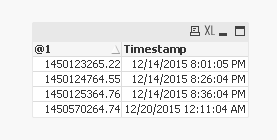
This seems to be working:
Table:
LOAD *,
Timestamp(Date('01/01/1970') + @1/(60*60*24)) AS [Timestamp];
LOAD * Inline [
@1
1450123265.22
1450124764.55
1450125364.76
1450570264.74
];
MarcoWedel
- Mark as New
- Bookmark
- Subscribe
- Mute
- Subscribe to RSS Feed
- Permalink
- Report Inappropriate Content
You could try to move the preceding load into the loop
Regards
Marco
- Mark as New
- Bookmark
- Subscribe
- Mute
- Subscribe to RSS Feed
- Permalink
- Report Inappropriate Content
Moving the preceding load into the loop fixed the issue. When the preceding load is outside of the loop it only generates the Date field for the first file in the loop. Thanks!
MarcoWedel
- Mark as New
- Bookmark
- Subscribe
- Mute
- Subscribe to RSS Feed
- Permalink
- Report Inappropriate Content
you're welcome.
regards
Marco