Unlock a world of possibilities! Login now and discover the exclusive benefits awaiting you.

- Qlik Community
- :
- All Forums
- :
- QlikView
- :
- converting milliseconds to Date Time format
- Subscribe to RSS Feed
- Mark Topic as New
- Mark Topic as Read
- Float this Topic for Current User
- Bookmark
- Subscribe
- Mute
- Printer Friendly Page

- Mark as New
- Bookmark
- Subscribe
- Mute
- Subscribe to RSS Feed
- Permalink
- Report Inappropriate Content
converting milliseconds to Date Time format
Hi all,
i have date field,
eg:
Date
233.2323
554.5454
I want to convert this milliseconds to Date and Time format.
Date
12/04/2016 01:34:23 AM
14/05/2016 05:34:23 PM
I tried with all expressions, its not working. pls help me to find out.
Thanks
Accepted Solutions

 sunny_talwar
- Mark as New
- Bookmark
- Subscribe
- Mute
- Subscribe to RSS Feed
- Permalink
- Report Inappropriate Content
May be like this in your environmental variable
SET TimestampFormat='DD/MM/YYYY hh:mm:ss TT';
and then just TimeStamp(Date) as Date in the load statement
 Chanty4u
- Mark as New
- Bookmark
- Subscribe
- Mute
- Subscribe to RSS Feed
- Permalink
- Report Inappropriate Content
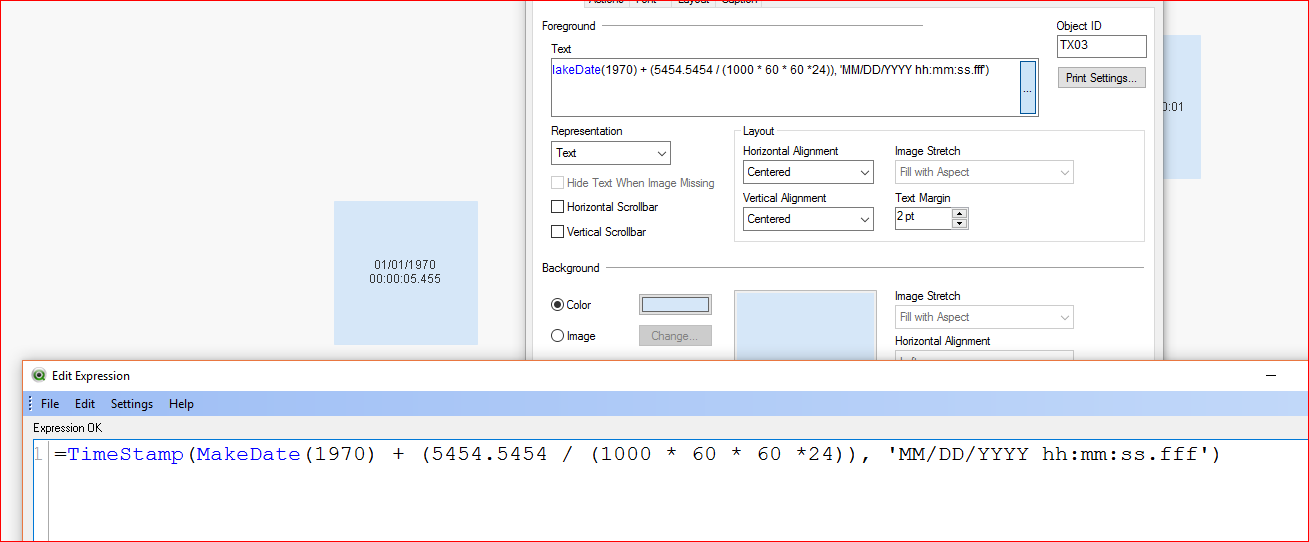
try below
sunny_talwar
- Mark as New
- Bookmark
- Subscribe
- Mute
- Subscribe to RSS Feed
- Permalink
- Report Inappropriate Content
how is 233.2323 becoming 12/04/2016? I might be missing something, but it would be great if you can elaborate and then we might be able to help better 
- Mark as New
- Bookmark
- Subscribe
- Mute
- Subscribe to RSS Feed
- Permalink
- Report Inappropriate Content
Sorry, i haven't actually posted the exact milliseconds, that converts to 12/04/2016.
i meant that just as a sample.
sunny_talwar
- Mark as New
- Bookmark
- Subscribe
- Mute
- Subscribe to RSS Feed
- Permalink
- Report Inappropriate Content
May be like this in your environmental variable
SET TimestampFormat='DD/MM/YYYY hh:mm:ss TT';
and then just TimeStamp(Date) as Date in the load statement

 Jesh19
- Mark as New
- Bookmark
- Subscribe
- Mute
- Subscribe to RSS Feed
- Permalink
- Report Inappropriate Content
Try using the below expression:
=Date(Date#(date,'ss.fff'),'M/D/YYYY h:mm:ss[.fff] TT')
or simply use
=Timestamp(date)