Unlock a world of possibilities! Login now and discover the exclusive benefits awaiting you.

- Qlik Community
- :
- All Forums
- :
- QlikView
- :
- customize Pivot table
- Subscribe to RSS Feed
- Mark Topic as New
- Mark Topic as Read
- Float this Topic for Current User
- Bookmark
- Subscribe
- Mute
- Printer Friendly Page

 vengadeshpalani
- Mark as New
- Bookmark
- Subscribe
- Mute
- Subscribe to RSS Feed
- Permalink
- Report Inappropriate Content
customize Pivot table
Hi all,
i have pivot table like below but i need to show extra one row with blue color based on Dim-3 how can i achieve this requirement?
Actual

what we need
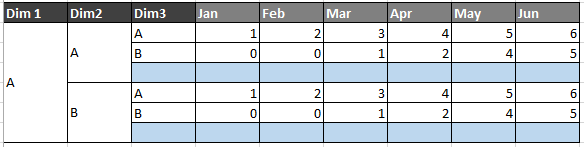
please give some idea...
- « Previous Replies
-
- 1
- 2
- Next Replies »

 sunny_talwar
- Mark as New
- Bookmark
- Subscribe
- Mute
- Subscribe to RSS Feed
- Permalink
- Report Inappropriate Content
Check attached

vengadeshpalani
- Mark as New
- Bookmark
- Subscribe
- Mute
- Subscribe to RSS Feed
- Permalink
- Report Inappropriate Content
thanks, Sunny
i have face the following issue
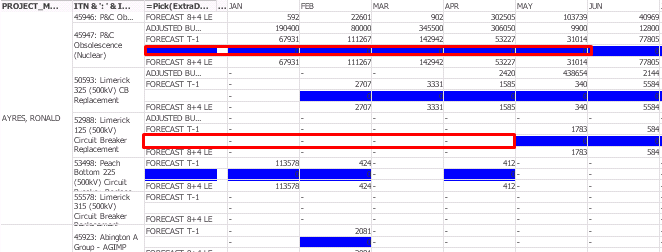
sunny_talwar
- Mark as New
- Bookmark
- Subscribe
- Mute
- Subscribe to RSS Feed
- Permalink
- Report Inappropriate Content
Uncheck 'Suppress Zero Value' on the presentation tab and see if that helps 
vengadeshpalani
- Mark as New
- Bookmark
- Subscribe
- Mute
- Subscribe to RSS Feed
- Permalink
- Report Inappropriate Content
i made changes in following things
Dim3
=Pick(ExtraDim, if([FINANCIAL PLAN]<>'ZZZZZ',[FINANCIAL PLAN]), ' ')
Dim3 color
=If(ExtraDim = 2, LightBlue())
expression
Pick(ExtraDim, (if ([FINANCIAL PLAN] <>'ZZZZZ', SUM(AMOUNT),0)), 0)
expression color
=If(ExtraDim = 2, LightBlue())
sort
Only({1} ExtraDim)
sunny_talwar
- Mark as New
- Bookmark
- Subscribe
- Mute
- Subscribe to RSS Feed
- Permalink
- Report Inappropriate Content
Uncheck 'Suppress Zero Value' on the presentation tab and see if that helps
vengadeshpalani
- Mark as New
- Bookmark
- Subscribe
- Mute
- Subscribe to RSS Feed
- Permalink
- Report Inappropriate Content
Sunny,
i have Unchecked Suppress Zero Value, it does not work.
FYI --> by default following selection will happen, when i clear all it's working fine.
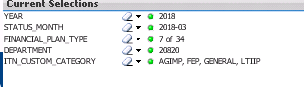
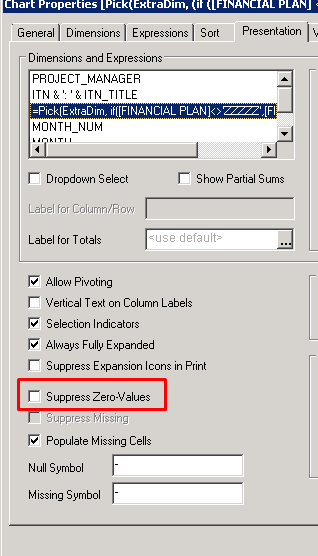
vengadeshpalani
- Mark as New
- Bookmark
- Subscribe
- Mute
- Subscribe to RSS Feed
- Permalink
- Report Inappropriate Content
Sunny
Even i clear all selection but i facing the same issue (Suppress Zero Value Unchecked)

sunny_talwar
- Mark as New
- Bookmark
- Subscribe
- Mute
- Subscribe to RSS Feed
- Permalink
- Report Inappropriate Content
May be try this
Dim3
=Pick(Only({1} ExtraDim), if([FINANCIAL PLAN]<>'ZZZZZ',[FINANCIAL PLAN]), ' ')
Dim3 color
=If(Only({1} ExtraDim) = 2, LightBlue())
expression
Pick(Only({1} ExtraDim), (if ([FINANCIAL PLAN] <>'ZZZZZ', SUM(AMOUNT),0)), 0)
expression color
=If(Only({1} ExtraDim) = 2, LightBlue())
vengadeshpalani
- Mark as New
- Bookmark
- Subscribe
- Mute
- Subscribe to RSS Feed
- Permalink
- Report Inappropriate Content
Error In Calculated Dimension 

- « Previous Replies
-
- 1
- 2
- Next Replies »