Unlock a world of possibilities! Login now and discover the exclusive benefits awaiting you.

- Qlik Community
- :
- All Forums
- :
- QlikView
- :
- drill down - table
- Subscribe to RSS Feed
- Mark Topic as New
- Mark Topic as Read
- Float this Topic for Current User
- Bookmark
- Subscribe
- Mute
- Printer Friendly Page

- Mark as New
- Bookmark
- Subscribe
- Mute
- Subscribe to RSS Feed
- Permalink
- Report Inappropriate Content
drill down - table
Hey everyone, how is it going?
I have an issue, let me show you: My data base is something like that:
| Product | Date | RM 1 | RM 2 | RM 3 | RM Total |
|---|---|---|---|---|---|
| A | 01/01/2016 | 10 | 5 | 60 | 75 |
| B | 01/01/2016 | 15 | 10 | 55 | 80 |
| C | 01/01/2016 | 20 | 15 | 55 | 90 |
| D | 01/01/2016 | 25 | 20 | 60 | 105 |
| A | 02/01/2016 | 30 | 25 | 85 | 140 |
| B | 02/01/2016 | 35 | 30 | 115 | 180 |
| C | 02/01/2016 | 40 | 35 | 150 | 225 |
| D | 02/01/2016 | 45 | 40 | 190 | 275 |
| A | 03/01/2016 | 50 | 45 | 235 | 330 |
I want to make a pivot table, where I can show by product, how much was spent of raw material and if the users wants, they can open by kind of RM (RM 1, RM2 and RM3) .
I already appreciate the attention.
Kind regards, Luiz Bisco
- « Previous Replies
-
- 1
- 2
- Next Replies »
Accepted Solutions

 vinieme12
- Mark as New
- Bookmark
- Subscribe
- Mute
- Subscribe to RSS Feed
- Permalink
- Report Inappropriate Content
Use the below expression
and check partial sums for the first two dimensions
=if(Dimensionality()=2,Pick(MATCH(Process,'Process 1','Process 2','Process 3','Process 4','Process 5','Process 6','Process 7','Process 8'),
sum([Process 1])
,sum([Process 2])
,sum([Process 3])
,sum([Process 4])
,sum([Process 5])
,sum([Process 6])
,sum([Process 7])
,sum([Process 8])
)
,if(Dimensionality()=1,
sum([Process 1])+sum([Process 2])+sum([Process 3])+sum([Process 4])+sum([Process 5])+sum([Process 6])+sum([Process 7])+sum([Process 8])
, if(Dimensionality()=0,sum(TOTAL [Process 1])+sum(TOTAL [Process 2])+sum(TOTAL [Process 3])+sum(TOTAL [Process 4])+sum(TOTAL [Process 5])+sum(TOTAL [Process 6])+sum(TOTAL [Process 7])+sum(TOTAL [Process 8]))
)
)
If a post helps to resolve your issue, please accept it as a Solution.

 sunny_talwar
- Mark as New
- Bookmark
- Subscribe
- Mute
- Subscribe to RSS Feed
- Permalink
- Report Inappropriate Content
Like this?
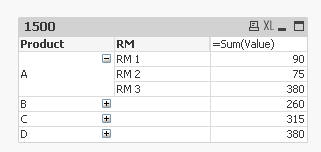
If this looks good, then you will have to use CrossTable to transform your data
Table:
CrossTable (RM, Value, 2)
LOAD Product,
Date,
[RM 1],
[RM 2],
[RM 3]
FROM
[https://community.qlik.com/thread/235208]
(html, codepage is 1252, embedded labels, table is @1);
- Mark as New
- Bookmark
- Subscribe
- Mute
- Subscribe to RSS Feed
- Permalink
- Report Inappropriate Content
Sunny, there's a problem. That data is kind of big. I have a table with 96 fields, 43 are dimensions and the others are capeble of calc.
vinieme12
- Mark as New
- Bookmark
- Subscribe
- Mute
- Subscribe to RSS Feed
- Permalink
- Report Inappropriate Content
Well you can maintain your data structure and FAKE a pivot like this, with a mapping table
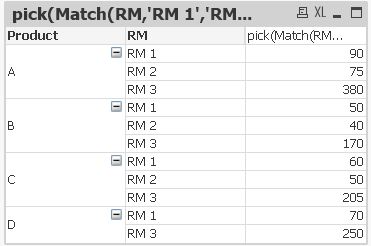
////////////////////////////////////////////////////////////////////////////////////
Dimension
Product
RM
Expression:
pick(Match(RM,'RM 1','RM 2','RM 3'),
SUM([RM 1]) , SUM([RM 2]) , SUM([RM 3]))
////////////////////////////////////////////////////////////////////////////////////
Fact:
LOAD * INLINE [
Product,Date,RM 1,RM 2,RM 3,RM Total
A,42370,10,5,60,75
B,42370,15,10,55,80
C,42370,20,15,55,90
D,42370,25,20,60,105
A,42371,30,25,85,140
B,42371,35,30,115,180
C,42371,40,35,150,225
D,42371,45,40,190,275
A,42372,50,45,235,330
];
Mappingtable:
LOAD * INLINE [
Product,RM
A,RM 1
B,RM 1
C,RM 1
D,RM 1
A,RM 2
B,RM 2
C,RM 2
D,RM 3
A,RM 3
B,RM 3
C,RM 3
D,RM 3
];
If a post helps to resolve your issue, please accept it as a Solution.
- Mark as New
- Bookmark
- Subscribe
- Mute
- Subscribe to RSS Feed
- Permalink
- Report Inappropriate Content
I did on your way, it works, but I can't 'contract' the dimension.
vinieme12
- Mark as New
- Bookmark
- Subscribe
- Mute
- Subscribe to RSS Feed
- Permalink
- Report Inappropriate Content
I did this in QV12 , what version of QV are you using?
If a post helps to resolve your issue, please accept it as a Solution.
- Mark as New
- Bookmark
- Subscribe
- Mute
- Subscribe to RSS Feed
- Permalink
- Report Inappropriate Content
11.2, this data is the real scenario:
| Date | Machine | Process 1 | Process 2 | Process 3 | Process 4 | Process 5 | Process 6 | Process 7 | Process 8 | Production |
|---|---|---|---|---|---|---|---|---|---|---|
| 01/01/2016 | MACHINE 1 | 200 | 20 | 30 | 77 | 50 | 60 | 70 | 72 | 579 |
| 01/01/2016 | MACHINE 2 | 99 | 30 | 200 | 10 | 70 | 82 | 491 | ||
| 01/01/2016 | MACHINE 3 | 10 | 20 | 30 | 40 | 50 | 60 | 70 | 40 | 320 |
| 01/01/2016 | MACHINE 4 | 66 | 60 | 70 | 65 | 261 | ||||
| 01/01/2016 | MACHINE 5 | 10 | 20 | 30 | 40 | 50 | 2 | 70 | 32 | 254 |
| 01/01/2016 | MACHINE 6 | 10 | 55 | 30 | 40 | 44 | 36 | 215 | ||
| 01/02/2016 | MACHINE 1 | 308 | 31 | 46 | 118 | 77 | 92 | 108 | 111 | 891 |
| 01/02/2016 | MACHINE 2 | - | 152 | 46 | - | 308 | 15 | 108 | 90 | 719 |
| 01/02/2016 | MACHINE 3 | 15 | 31 | 46 | 62 | 77 | 92 | 108 | 62 | 492 |
| 01/02/2016 | MACHINE 4 | - | 102 | - | - | - | 92 | 108 | 43 | 345 |
| 01/02/2016 | MACHINE 5 | 15 | 31 | 46 | 62 | 77 | 3 | 108 | 49 | 390 |
| 01/02/2016 | MACHINE 6 | 15 | 85 | 46 | 62 | - | - | 68 | 39 | 315 |
| 01/03/2016 | MACHINE 1 | 473 | 47 | 71 | 182 | 118 | 142 | 166 | 171 | 1.371 |
| 01/03/2016 | MACHINE 2 | - | 234 | 71 | - | 473 | 24 | 166 | 138 | 1.106 |
| 01/03/2016 | MACHINE 3 | 24 | 47 | 71 | 95 | 118 | 142 | 166 | 95 | 757 |
| 01/03/2016 | MACHINE 4 | - | 156 | - | - | - | 142 | 166 | 66 | 530 |
| 01/03/2016 | MACHINE 5 | 24 | 47 | 71 | 95 | 118 | 5 | 166 | 75 | 601 |
| 01/03/2016 | MACHINE 6 | 24 | 130 | 71 | 95 | - | - | 104 | 61 | 484 |
vinieme12
- Mark as New
- Bookmark
- Subscribe
- Mute
- Subscribe to RSS Feed
- Permalink
- Report Inappropriate Content
i'll try in 11.2 and let you know
If a post helps to resolve your issue, please accept it as a Solution.
vinieme12
- Mark as New
- Bookmark
- Subscribe
- Mute
- Subscribe to RSS Feed
- Permalink
- Report Inappropriate Content
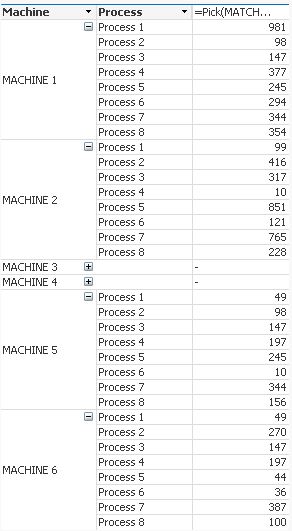
Make sure you have the below UN-Checked
1) Always fully expanded
2) Suppress Missing Values
Attaching app for reference, made in QV 11.2
If a post helps to resolve your issue, please accept it as a Solution.
- Mark as New
- Bookmark
- Subscribe
- Mute
- Subscribe to RSS Feed
- Permalink
- Report Inappropriate Content
that's the problem, I have to contratc, it can't be fully expanded all the time. :S
- « Previous Replies
-
- 1
- 2
- Next Replies »