Unlock a world of possibilities! Login now and discover the exclusive benefits awaiting you.

- Qlik Community
- :
- All Forums
- :
- QlikView
- :
- export to excel
- Subscribe to RSS Feed
- Mark Topic as New
- Mark Topic as Read
- Float this Topic for Current User
- Bookmark
- Subscribe
- Mute
- Printer Friendly Page

- Mark as New
- Bookmark
- Subscribe
- Mute
- Subscribe to RSS Feed
- Permalink
- Report Inappropriate Content
export to excel
Hi
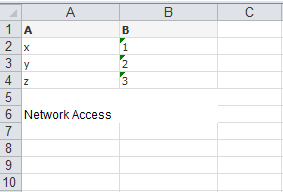
I have an straight table chart when I export that a "Network Access" text want to appear at the footer of the chart.It want to come automatically when I press the export to excel button.what I want to do for that whether I want to write any macros or I want make any settings change in the documents.?
Please help..
Thanks in advance
- « Previous Replies
-
- 1
- 2
- Next Replies »
.png "bbi_mba_76")
 bbi_mba_76
- Mark as New
- Bookmark
- Subscribe
- Mute
- Subscribe to RSS Feed
- Permalink
- Report Inappropriate Content
Hi,
without macro I think you have to write the text as total or in the caption...
- Mark as New
- Bookmark
- Subscribe
- Mute
- Subscribe to RSS Feed
- Permalink
- Report Inappropriate Content
How can I do that without macro ?
I want that text two lines below the excel report for eg:
If my excel table finishes at A10 means text should come at A12

 its_anandrjs
- Mark as New
- Bookmark
- Subscribe
- Mute
- Subscribe to RSS Feed
- Permalink
- Report Inappropriate Content
No need of macro you can export without the macro and send to excel by right click.
- Mark as New
- Bookmark
- Subscribe
- Mute
- Subscribe to RSS Feed
- Permalink
- Report Inappropriate Content
Sara, your in effect adding a footer which you couldnt do without a macro. If you want a flat export then right click export to excel if the footer is a requirement create a macro
- Mark as New
- Bookmark
- Subscribe
- Mute
- Subscribe to RSS Feed
- Permalink
- Report Inappropriate Content
Yes you are right footer is my requirement can I get any examples for my requirements.
- Mark as New
- Bookmark
- Subscribe
- Mute
- Subscribe to RSS Feed
- Permalink
- Report Inappropriate Content
I am not sure without macro I cant able to achieve this...
its_anandrjs
- Mark as New
- Bookmark
- Subscribe
- Mute
- Subscribe to RSS Feed
- Permalink
- Report Inappropriate Content
Please explain more about the requirement because it is unclear or another way is you can use N-Printing facilities from qlikview on that you can achieve that type of requirement.
bbi_mba_76
- Mark as New
- Bookmark
- Subscribe
- Mute
- Subscribe to RSS Feed
- Permalink
- Report Inappropriate Content
Without a macro you export to excel only the table content.
So you could add to generated row to have the text in excel, or you have to use total/caption, or another element of the table to add something. But you have not so possibility to move the text where you want
With a macro you could copy and paste the second macro
http://luciancotea.wordpress.com/2013/07/18/qlikview-macros-useful-collection/
and then you have to add
objExcel.Cells(r+2,c).Value = "Your text" before the end function
- Mark as New
- Bookmark
- Subscribe
- Mute
- Subscribe to RSS Feed
- Permalink
- Report Inappropriate Content
Hi
when I export the table chart it should want to export automatically with a text at a bottom of my chart
Eg :
Thanks in advance
- « Previous Replies
-
- 1
- 2
- Next Replies »