Unlock a world of possibilities! Login now and discover the exclusive benefits awaiting you.

- Qlik Community
- :
- All Forums
- :
- QlikView
- :
- expression for percentage
- Subscribe to RSS Feed
- Mark Topic as New
- Mark Topic as Read
- Float this Topic for Current User
- Bookmark
- Subscribe
- Mute
- Printer Friendly Page

 manoranjan_d
- Mark as New
- Bookmark
- Subscribe
- Mute
- Subscribe to RSS Feed
- Permalink
- Report Inappropriate Content
expression for percentage
=num(sum(AMT)/Sum(totalAMT),'##0%')
in this scenraio i want to avoid the null value in the denominator for the expression , since dept field have some null value. how to avoid the null in expression
- « Previous Replies
-
- 1
- 2
- Next Replies »
manoranjan_d
- Mark as New
- Bookmark
- Subscribe
- Mute
- Subscribe to RSS Feed
- Permalink
- Report Inappropriate Content
I want to avoid the Null as well as the NA in the demonitor , since dept have null as well as the Na value?

 kaushiknsolanki
- Mark as New
- Bookmark
- Subscribe
- Mute
- Subscribe to RSS Feed
- Permalink
- Report Inappropriate Content
Hi,
Have a look at the application attached in my earlier post.
Regards,
Kaushik Solanki
manoranjan_d
- Mark as New
- Bookmark
- Subscribe
- Mute
- Subscribe to RSS Feed
- Permalink
- Report Inappropriate Content
| amount | dept | presentabsent | SECTION | student |
| 100 | cse | absent | SEC9 | 1 |
| 100 | cse | absent | SEC10 | 1 |
| 100 | cse | Present | SEC2 | 1 |
| 100 | ece | absent | SEC35 | 1 |
| 100 | ece | absent | SEC40 | 1 |
| 100 | ece | Present | SEC3 | 1 |
| 100 | ece | Present | SEC34 | 1 |
| 100 | IT | absent | SEC4 | 1 |
| 100 | IT | absent | SEC5 | 1 |
| 100 | IT | Present | SEC1 | 1 |
| 100 | NA | absent | SEC35 | 1 |
| 100 | NA | absent | SEC40 | 1 |
| 100 | NA | Present | SEC3 | 1 |
| 100 | NA | Present | SEC34 | 1 |
| 100 | absent | SEC35 | 1 | |
| 100 | absent | SEC40 | 1 | |
| 100 | Present | SEC3 | 1 | |
| 100 | Present | SEC34 | 1 |
now i want to calculate the amount percentage as per the dept wise, so i n the dept we have null and NA values
so while making calculation how to avoid the dept of null and NA?
i m normally using =num(sum(AMT)/Sum(totalAMT),'##0%') so this will take the Null as as well as the NA value, so i want to avoid the NUll and NA in the calculation part
how to do this
manoranjan_d
- Mark as New
- Bookmark
- Subscribe
- Mute
- Subscribe to RSS Feed
- Permalink
- Report Inappropriate Content
as per the demanitor part Sum(totalAMT),'##0%') this will take over all right, so i wan to avoid the Null and NA in this demanitor ?
kaushiknsolanki
- Mark as New
- Bookmark
- Subscribe
- Mute
- Subscribe to RSS Feed
- Permalink
- Report Inappropriate Content
Posting code here, in case you are unable to open the application.
Add below 2 lines in script.
NullAsValue *;
Set NullValue = 'NA';
Then update your chart expression as.
=num(sum(amount)/Sum({<dept -= {"NA"}>}total amount),'##0%')
Regards,
Kaushik Solanki
manoranjan_d
- Mark as New
- Bookmark
- Subscribe
- Mute
- Subscribe to RSS Feed
- Permalink
- Report Inappropriate Content
no as per the requirement i cant do that, pls ust give me idea in the calculation part

 tamilarasu
- Mark as New
- Bookmark
- Subscribe
- Mute
- Subscribe to RSS Feed
- Permalink
- Report Inappropriate Content
Hi,
Try this,
=Num(Sum(amount)/Sum(TOTAL If(Len(Trim(dept))>0 and dept<>'NA', amount)),'##0%')


- Mark as New
- Bookmark
- Subscribe
- Mute
- Subscribe to RSS Feed
- Permalink
- Report Inappropriate Content
Try This
=Num(Sum(amount)/Sum(TOTAL If(Len(Trim(dept),'',dept)>0 and dept -= {'NA'},amount)),'##0%')
=if(your expression=0,'',your expression)
kaushiknsolanki
- Mark as New
- Bookmark
- Subscribe
- Mute
- Subscribe to RSS Feed
- Permalink
- Report Inappropriate Content
I can see the duplicate data.
Can you tell us what output you are expecting?
If it is as below.
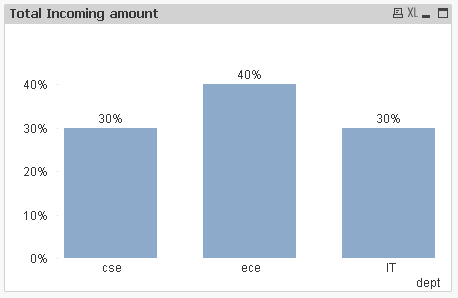
Then use below expression.
Sum(Aggr(sum(Distinct amount),SECTION)) / Sum(Total Aggr(sum(Distinct amount),SECTION))
Regards,
Kaushik Solanki

- « Previous Replies
-
- 1
- 2
- Next Replies »