Unlock a world of possibilities! Login now and discover the exclusive benefits awaiting you.

- Qlik Community
- :
- All Forums
- :
- QlikView
- :
- expression
- Subscribe to RSS Feed
- Mark Topic as New
- Mark Topic as Read
- Float this Topic for Current User
- Bookmark
- Subscribe
- Mute
- Printer Friendly Page

 upaliwije
- Mark as New
- Bookmark
- Subscribe
- Mute
- Subscribe to RSS Feed
- Permalink
- Report Inappropriate Content
expression
Hi Friends
I have developed a Qv document to get some stats for Insurance Policies and I have created a pivot table and screen shot is shown below
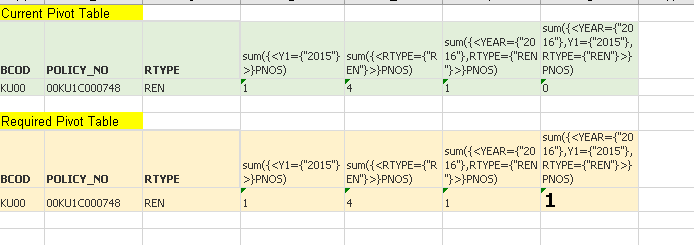
In my current Pivot table last column remain 0 but I want that 0 to be 1 as shown in my second Pivot table . Kindly help correct my pivot table and I have attached my QV doc h/w plaese.
Accepted Solutions

 Vegar
Vegar
- Mark as New
- Bookmark
- Subscribe
- Mute
- Subscribe to RSS Feed
- Permalink
- Report Inappropriate Content
When Selecting Year=2016 you have no data accociated to Y1=2015. You need to adjust your expression or your data in order to get your desired output in your expression
sum({<YEAR={"$(vN2)"},Y1={"$(vN1)"},RTYPE={"REN"}>}PNOS)

Qlik Community MVP
Vegar
- Mark as New
- Bookmark
- Subscribe
- Mute
- Subscribe to RSS Feed
- Permalink
- Report Inappropriate Content
When Selecting Year=2016 you have no data accociated to Y1=2015. You need to adjust your expression or your data in order to get your desired output in your expression
sum({<YEAR={"$(vN2)"},Y1={"$(vN1)"},RTYPE={"REN"}>}PNOS)
Qlik Community MVP

 jfkinspari
- Mark as New
- Bookmark
- Subscribe
- Mute
- Subscribe to RSS Feed
- Permalink
- Report Inappropriate Content
You don't have any records where YEAR = 2016 and Y1 = 2015, so that is why the column calculates to 0.
So either your data is different from what you expect, or you have a datamodel issue.
 upaliwije
- Mark as New
- Bookmark
- Subscribe
- Mute
- Subscribe to RSS Feed
- Permalink
- Report Inappropriate Content
Thanks I got your point
