Unlock a world of possibilities! Login now and discover the exclusive benefits awaiting you.

- Qlik Community
- :
- All Forums
- :
- QlikView
- :
- firstsortedvalue with group by?
- Subscribe to RSS Feed
- Mark Topic as New
- Mark Topic as Read
- Float this Topic for Current User
- Bookmark
- Subscribe
- Mute
- Printer Friendly Page

 devarasu07
- Mark as New
- Bookmark
- Subscribe
- Mute
- Subscribe to RSS Feed
- Permalink
- Report Inappropriate Content
firstsortedvalue with group by?
Hi All,
Requirement:
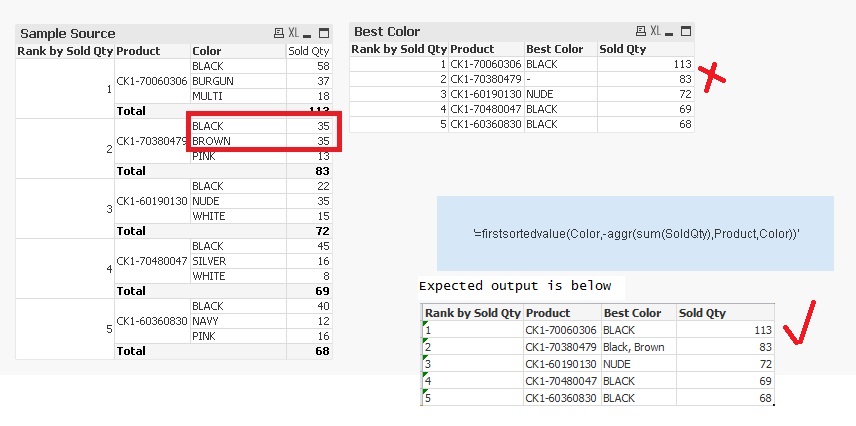
Need find the Best Color with the highest Sold Qty for each Product.
What i did is,
used below expression and able to get the best color by product wise
=firstsortedvalue(Color,-aggr(sum(SoldQty),Product,Color))
Issue:
If two color in same rank then it's showing null. is there anyway to resolve it? or just show any of one color instead of null?
Accepted Solutions

 sunny_talwar
- Mark as New
- Bookmark
- Subscribe
- Mute
- Subscribe to RSS Feed
- Permalink
- Report Inappropriate Content
Try this:
=Concat(DISTINCT Aggr(If(Sum(SoldQty) = Max(TOTAL <Product> Aggr(Sum(SoldQty), Product, Color)), Color), Product, Color), ', ')
sunny_talwar
- Mark as New
- Bookmark
- Subscribe
- Mute
- Subscribe to RSS Feed
- Permalink
- Report Inappropriate Content
Try this:
=Concat(DISTINCT Aggr(If(Sum(SoldQty) = Max(TOTAL <Product> Aggr(Sum(SoldQty), Product, Color)), Color), Product, Color), ', ')
sunny_talwar
- Mark as New
- Bookmark
- Subscribe
- Mute
- Subscribe to RSS Feed
- Permalink
- Report Inappropriate Content
For any one color, you can use FirstSortedValue() function with DISTINCT
=firstsortedvalue(distinct Color,-aggr(sum(SoldQty),Product,Color))
 trdandamudi
- Mark as New
- Bookmark
- Subscribe
- Mute
- Subscribe to RSS Feed
- Permalink
- Report Inappropriate Content
Also you can try the below expression: ( One of Sunny's post inspired me with this expression ). Hope this helps...
=firstsortedvalue(Color,-aggr(sum(SoldQty) + Rank([Color])/1E10,Product,Color))
