Unlock a world of possibilities! Login now and discover the exclusive benefits awaiting you.

- Qlik Community
- :
- All Forums
- :
- QlikView
- :
- generation of data
- Subscribe to RSS Feed
- Mark Topic as New
- Mark Topic as Read
- Float this Topic for Current User
- Bookmark
- Subscribe
- Mute
- Printer Friendly Page

- Mark as New
- Bookmark
- Subscribe
- Mute
- Subscribe to RSS Feed
- Permalink
- Report Inappropriate Content
generation of data
Hi
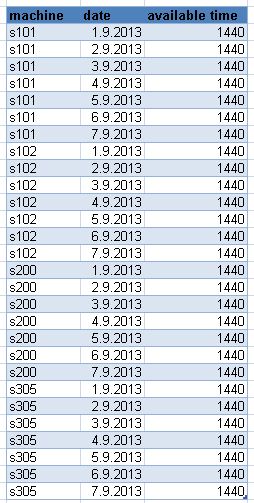
I need to generate some data I don't have, result looks very simple, but I don't know how to do it - I don't want create excel table.
I have to calcute available time for each production line, but they are available also during days when there was no production, so I gues I have to generate also dates.
How can I do this?
Thank for help.
result I need:
- Tags:
- generate_table
- Mark as New
- Bookmark
- Subscribe
- Mute
- Subscribe to RSS Feed
- Permalink
- Report Inappropriate Content
Klaudia
In the Script Editor do:
- Insert
- Test Script
You'll see it adds in some test data generation code.
This includes examples of autogenerate and while.
You should be able to use this as inspiration to generate you specific test data.
Best Regards, Bill

 Gysbert_Wassena
- Mark as New
- Bookmark
- Subscribe
- Mute
- Subscribe to RSS Feed
- Permalink
- Report Inappropriate Content
Perhaps this document will give you some ideas: Generating Missing Data In QlikView
talk is cheap, supply exceeds demand
 ngulliver
- Mark as New
- Bookmark
- Subscribe
- Mute
- Subscribe to RSS Feed
- Permalink
- Report Inappropriate Content
Hi, Klaudia.
Just a tip -
If you go into your edit script and with Crtl key pressed, type Q twice (so that's CTRL Q Q),
it will automatically create a script which generates some test data for you. You may be able to amend the script to suit your requirements.
Regards,
Neil.