Unlock a world of possibilities! Login now and discover the exclusive benefits awaiting you.

Announcements
Share your agentic AI experience, learn from others, and earn a new badge: Put Agentic AI to Work
- Qlik Community
- :
- All Forums
- :
- QlikView
- :
- help in set analysis
Options
- Subscribe to RSS Feed
- Mark Topic as New
- Mark Topic as Read
- Float this Topic for Current User
- Bookmark
- Subscribe
- Mute
- Printer Friendly Page
Turn on suggestions
Auto-suggest helps you quickly narrow down your search results by suggesting possible matches as you type.
Showing results for

 ali_hijazi
Partner - Master II
2015-08-05
08:07 AM
- Mark as New
- Bookmark
- Subscribe
- Mute
- Subscribe to RSS Feed
- Permalink
- Report Inappropriate Content
help in set analysis
Hello got the following sample data:
TPK, Date, Metric
A, 7/6/2015, 9
A,8/6/2015, 15
B,5/5/2015, 10
B, 6/5/2015, 7
now the user selects the months May and June
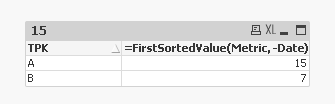
what I want to display in a pivot table (dimension = TPK) for A, 15 and for B, 7
i.e. the metric that corresponds to the latest date for each TPK in the selection
I can walk on water when it freezes
838 Views
1 Solution
Accepted Solutions

 sunny_talwar
MVP
2015-08-05
08:10 AM
- Mark as New
- Bookmark
- Subscribe
- Mute
- Subscribe to RSS Feed
- Permalink
- Report Inappropriate Content
775 Views
4 Replies
sunny_talwar
MVP
2015-08-05
08:10 AM
- Mark as New
- Bookmark
- Subscribe
- Mute
- Subscribe to RSS Feed
- Permalink
- Report Inappropriate Content
Try this expression:
=FirstSortedValue(Metric, -Date)
776 Views
sunny_talwar
MVP
2015-08-05
08:13 AM
- Mark as New
- Bookmark
- Subscribe
- Mute
- Subscribe to RSS Feed
- Permalink
- Report Inappropriate Content
This:
775 Views

Anonymous
Not applicable
2015-08-05
08:13 AM
- Mark as New
- Bookmark
- Subscribe
- Mute
- Subscribe to RSS Feed
- Permalink
- Report Inappropriate Content
do you have master calendar?
If yes why don't you try with Max(Date)?
775 Views
ali_hijazi
Partner - Master II
2015-08-05
08:16 AM
Author
- Mark as New
- Bookmark
- Subscribe
- Mute
- Subscribe to RSS Feed
- Permalink
- Report Inappropriate Content
yeah
I forgot about this function
I can walk on water when it freezes