Unlock a world of possibilities! Login now and discover the exclusive benefits awaiting you.

- Qlik Community
- :
- All Forums
- :
- QlikView
- :
- hide unselected items
- Subscribe to RSS Feed
- Mark Topic as New
- Mark Topic as Read
- Float this Topic for Current User
- Bookmark
- Subscribe
- Mute
- Printer Friendly Page

- Mark as New
- Bookmark
- Subscribe
- Mute
- Subscribe to RSS Feed
- Permalink
- Report Inappropriate Content
hide unselected items
Hi all,
i have a straight table something like this:
Salesman All Sales ({Salesman={<'A','B','C','D'}>} sales (only for selected salesman)
A 40 10
B 40 10
C 40 10
D 40 10
when I select a salesman, the table shows all salesmen thanks to the formula for all sales, but with 0 value for unselected items
how can I fix this?
Thanks
Cosmin
- Mark as New
- Bookmark
- Subscribe
- Mute
- Subscribe to RSS Feed
- Permalink
- Report Inappropriate Content
Sum({<Salesman=>}Sales)
In your exampel it works
- Mark as New
- Bookmark
- Subscribe
- Mute
- Subscribe to RSS Feed
- Permalink
- Report Inappropriate Content
I can't see the attach
- Mark as New
- Bookmark
- Subscribe
- Mute
- Subscribe to RSS Feed
- Permalink
- Report Inappropriate Content
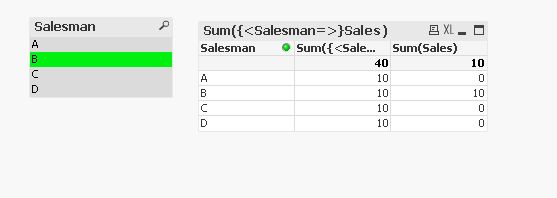
I put your formula but, as you can see, the table contains all salesmen
thanks
- Mark as New
- Bookmark
- Subscribe
- Mute
- Subscribe to RSS Feed
- Permalink
- Report Inappropriate Content
it's half correct, but if there aren't any selection I want a desagregation for each salesman; it works just when I select one of them
thanks
Cosmin

 Roop
Roop
- Mark as New
- Bookmark
- Subscribe
- Mute
- Subscribe to RSS Feed
- Permalink
- Report Inappropriate Content
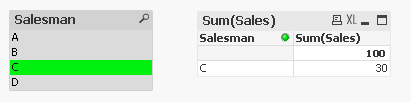
Last go - simply a text box over the top that can be made to look part of the table - not elegant but may work for you
 PradeepReddy
- Mark as New
- Bookmark
- Subscribe
- Mute
- Subscribe to RSS Feed
- Permalink
- Report Inappropriate Content
Try the bellow expression only in table:
SUM({$<Salesman = {$(=GetFieldSelections(Salesman))}>} Sales)
PradeepReddy
- Mark as New
- Bookmark
- Subscribe
- Mute
- Subscribe to RSS Feed
- Permalink
- Report Inappropriate Content
Remove the other columns from the table and use the below expression only..
SUM({$<Salesman = {$(=GetFieldSelections(Salesman))}>} Sales)
- Mark as New
- Bookmark
- Subscribe
- Mute
- Subscribe to RSS Feed
- Permalink
- Report Inappropriate Content
so you want only those salesmen in the table whichhad been selected?
then the following trick will do
define the first expression like that
= if (Sum(Sales)=0,0,Sum({<Salesman={'A','B','C','D'}>}Sales))
set the "suppress when value is null"
and it works !
unfortunately I cannot load up your qvw.
- Mark as New
- Bookmark
- Subscribe
- Mute
- Subscribe to RSS Feed
- Permalink
- Report Inappropriate Content
yes, this is what I want
I tried to put this as a dimension where I have this option but it return to me a Error in calculation
I don't see where is this option for an expression
thanks
Cosmin
Roop
- Mark as New
- Bookmark
- Subscribe
- Mute
- Subscribe to RSS Feed
- Permalink
- Report Inappropriate Content
I like this solution a lot - The only change I would make is to change the Salesman={'A','B','C','D'} clause to Salesman= so that you do not need a list of the specific salesmen