Unlock a world of possibilities! Login now and discover the exclusive benefits awaiting you.

- Qlik Community
- :
- All Forums
- :
- QlikView
- :
- how Create DOD Calculation field in straight table
- Subscribe to RSS Feed
- Mark Topic as New
- Mark Topic as Read
- Float this Topic for Current User
- Bookmark
- Subscribe
- Mute
- Printer Friendly Page

 nazaninslp
- Mark as New
- Bookmark
- Subscribe
- Mute
- Subscribe to RSS Feed
- Permalink
- Report Inappropriate Content
how Create DOD Calculation field in straight table
Dears
I want to calculate of DOD (20181202-20181201/20181201) and MOM f my REVENUE trend based on each service and date_key
but my expression is not working 😞
would you please help me in this regards:
Dimension: DATE_KEY, SERVICE_NAME
Expression:
sum({<DATE_KEY={"$(=Date(max(DATE_KEY),'YYYY-MM-DD'))"}REVENUE)- sum({<DATE_KEY={">=$(=Max(DATE_KEY)-1)<=$(=Max(DATE_KEY))"}REVENUE)/sum({<DATE_KEY={">=$(=Max(DATE_KEY)-1)<=$(=Max(DATE_KEY))"}REVENUE) * 100
- « Previous Replies
-
- 1
- 2
- Next Replies »
Accepted Solutions

 sunny_talwar
- Mark as New
- Bookmark
- Subscribe
- Mute
- Subscribe to RSS Feed
- Permalink
- Report Inappropriate Content
Try this
Expression
(Sum({<DATE_KEY>} REVENUE)/Above(Sum({<DATE_KEY>} REVENUE)) - 1) * Avg({<DATE_KEY = {"$(=Date(Max(DATE_KEY), 'YYYY-MM-DD'))"}>}1)Sorting
1st by SERVICE_NAME
2nd by DATE_KEY (ascending order)
sunny_talwar
- Mark as New
- Bookmark
- Subscribe
- Mute
- Subscribe to RSS Feed
- Permalink
- Report Inappropriate Content
Try using Inter Record Functions here
Sum({<DATE_KEY = {"$(=Date(Max(DATE_KEY), 'YYYY-MM-DD'))"}>} REVENUE)/Above(Sum({<DATE_KEY>} REVENUE)) - 1
nazaninslp
- Mark as New
- Bookmark
- Subscribe
- Mute
- Subscribe to RSS Feed
- Permalink
- Report Inappropriate Content
Dear Stalwar
as I used your expression, I faced with below table and I checked the values manually and they are not correct
would you please help me?
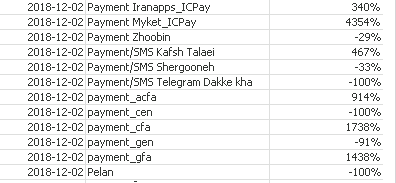
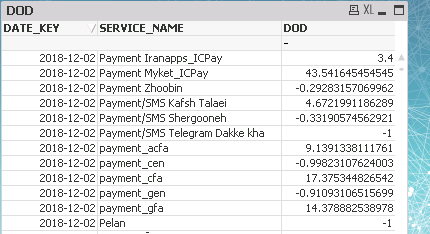 sunny_talwar
- Mark as New
- Bookmark
- Subscribe
- Mute
- Subscribe to RSS Feed
- Permalink
- Report Inappropriate Content
nazaninslp
- Mark as New
- Bookmark
- Subscribe
- Mute
- Subscribe to RSS Feed
- Permalink
- Report Inappropriate Content
Dear Stalwar
for example for the revenue for 20181203 is (32079000) and for 20181202 is (32157000).
I want the DOD of it.
DOD= 20181203-20181202/20181202 *100
DOD= 32079000-32157000/32157000 *100 DOD= -0.024 %
But as I checked my straight table , it is wrong.
I attached my file .
sunny_talwar
- Mark as New
- Bookmark
- Subscribe
- Mute
- Subscribe to RSS Feed
- Permalink
- Report Inappropriate Content
Do you have QV12 or above? If you do, then try this
Only({<DATE_KEY = {"$(=Date(Max(DATE_KEY), 'YYYY-MM-DD'))"}>}
  Aggr(
    Sum({<DATE_KEY>} REVENUE)/Above(Sum({<DATE_KEY>} REVENUE)) - 1
  , SERVICE_NAME, (DATE_KEY, (NUMERIC)))
)
nazaninslp
- Mark as New
- Bookmark
- Subscribe
- Mute
- Subscribe to RSS Feed
- Permalink
- Report Inappropriate Content
Dear Stalwar
it is working fine on Qlikview 12.
but the issue is that our qlikview server supports QV v.11 😞
is there a way to launch it on qlikview 11?
sunny_talwar
- Mark as New
- Bookmark
- Subscribe
- Mute
- Subscribe to RSS Feed
- Permalink
- Report Inappropriate Content
nazaninslp
- Mark as New
- Bookmark
- Subscribe
- Mute
- Subscribe to RSS Feed
- Permalink
- Report Inappropriate Content
I sorted the DATE_KEY in SORT Tab as ascending but still I get error in expression. 😞
sunny_talwar
- Mark as New
- Bookmark
- Subscribe
- Mute
- Subscribe to RSS Feed
- Permalink
- Report Inappropriate Content
Try this
Expression
(Sum({<DATE_KEY>} REVENUE)/Above(Sum({<DATE_KEY>} REVENUE)) - 1) * Avg({<DATE_KEY = {"$(=Date(Max(DATE_KEY), 'YYYY-MM-DD'))"}>}1)Sorting
1st by SERVICE_NAME
2nd by DATE_KEY (ascending order)

- « Previous Replies
-
- 1
- 2
- Next Replies »