Unlock a world of possibilities! Login now and discover the exclusive benefits awaiting you.

- Qlik Community
- :
- All Forums
- :
- QlikView
- :
- is there a way
- Subscribe to RSS Feed
- Mark Topic as New
- Mark Topic as Read
- Float this Topic for Current User
- Bookmark
- Subscribe
- Mute
- Printer Friendly Page

 ali_hijazi
- Mark as New
- Bookmark
- Subscribe
- Mute
- Subscribe to RSS Feed
- Permalink
- Report Inappropriate Content
is there a way
Hello
is there a way to let users choose between showing totals and hiding them?
Accepted Solutions

 sunny_talwar
- Mark as New
- Bookmark
- Subscribe
- Mute
- Subscribe to RSS Feed
- Permalink
- Report Inappropriate Content
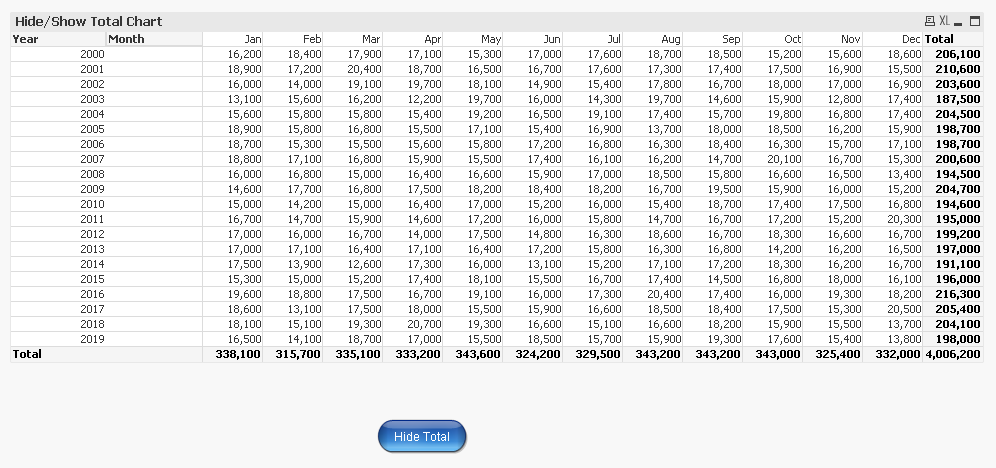
Showing total
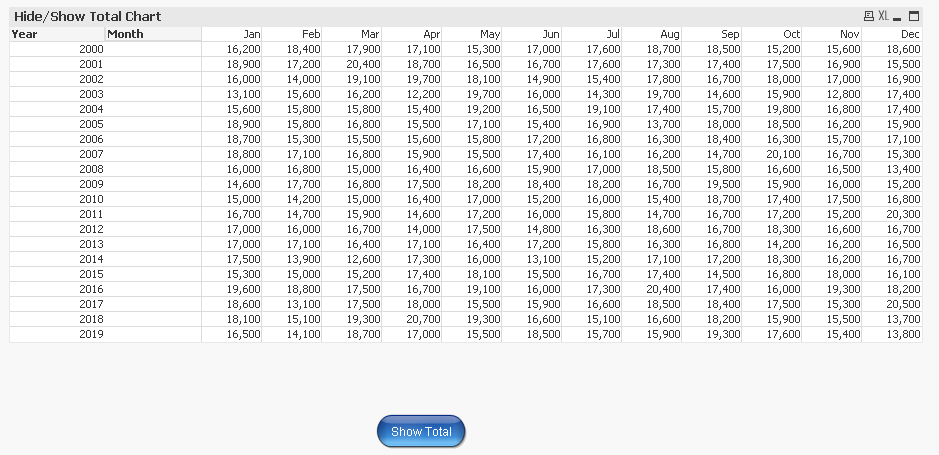
Totals hidden
Expression used
=If(vToggle, Sum(Sales), Aggr(Sum(Sales), Year, Month))
'Show Partial Sums' are on for both Year and Month field
Hope this is what you are looking for.
Best,
Sunny
sunny_talwar
- Mark as New
- Bookmark
- Subscribe
- Mute
- Subscribe to RSS Feed
- Permalink
- Report Inappropriate Content
I think this should be possible. Do you have a particular example where we can play around with it?
 jpenuliar
- Mark as New
- Bookmark
- Subscribe
- Mute
- Subscribe to RSS Feed
- Permalink
- Report Inappropriate Content
Hi Ali,
Have a look at QlikView How To (or Tips & Tricks) Application by Lee Matthews
http://community.qlik.com/docs/DOC-5486
You can make use of "Conditional" poroperty of chart expressions to Show or hide values.
 jeckstein
- Mark as New
- Bookmark
- Subscribe
- Mute
- Subscribe to RSS Feed
- Permalink
- Report Inappropriate Content
There is no way to toggle totals on/off in Qlik sense. You can only do something like that for the title.
You can have users use the page editor (but this is not recommended).
.png "Miguel_Angel_Baeyens")
 Miguel_Angel_Ba
- Mark as New
- Bookmark
- Subscribe
- Mute
- Subscribe to RSS Feed
- Permalink
- Report Inappropriate Content
There is, indeed, as they can right click on the object and select themselves, but that might not be what you want to use.
For me, the quickest solution would be to replicate those objects in a different sheet which looks like the same (i.e: same menus) but the totals are not there. And you can get to these "no-totals" sheets with a button in your menu, or clicking on a text object or something similar.
jeckstein
- Mark as New
- Bookmark
- Subscribe
- Mute
- Subscribe to RSS Feed
- Permalink
- Report Inappropriate Content
Can you explain what you mean by "they can right click on the object and select themselves"?.
Miguel_Angel_Ba- Mark as New
- Bookmark
- Subscribe
- Mute
- Subscribe to RSS Feed
- Permalink
- Report Inappropriate Content
I mean use the object properties (right click) to show/hide totals, if you allow them to do that.
EDIT: Ajax client: right click on the chart > Properties > Expressions > More > Use Expression Total > No Totals

 el_aprendiz111
- Mark as New
- Bookmark
- Subscribe
- Mute
- Subscribe to RSS Feed
- Permalink
- Report Inappropriate Content
sunny_talwar
- Mark as New
- Bookmark
- Subscribe
- Mute
- Subscribe to RSS Feed
- Permalink
- Report Inappropriate Content
Showing total
Totals hidden
Expression used
=If(vToggle, Sum(Sales), Aggr(Sum(Sales), Year, Month))
'Show Partial Sums' are on for both Year and Month field
Hope this is what you are looking for.
Best,
Sunny
