Unlock a world of possibilities! Login now and discover the exclusive benefits awaiting you.

Announcements
Share your agentic AI experience, learn from others, and earn a new badge: Put Agentic AI to Work
- Qlik Community
- :
- All Forums
- :
- QlikView
- :
- issue on bar chart
Options
- Subscribe to RSS Feed
- Mark Topic as New
- Mark Topic as Read
- Float this Topic for Current User
- Bookmark
- Subscribe
- Mute
- Printer Friendly Page
Turn on suggestions
Auto-suggest helps you quickly narrow down your search results by suggesting possible matches as you type.
Showing results for

Not applicable
2016-06-01
04:46 PM
- Mark as New
- Bookmark
- Subscribe
- Mute
- Subscribe to RSS Feed
- Permalink
- Report Inappropriate Content
issue on bar chart
hi
i have created a bar chart .but bars are not closer to each other.
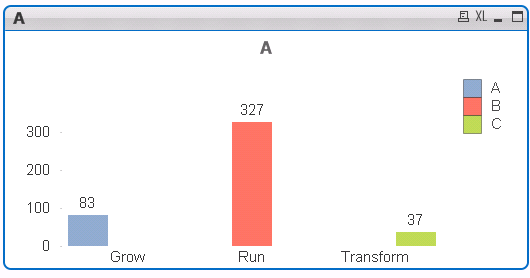
Exp:=if(CATEGORY='Grow',count(CATEGORY))
expression working fine
Thanks
Siddik
801 Views
1 Solution
Accepted Solutions

 sunny_talwar
MVP
2016-06-01
04:47 PM
- Mark as New
- Bookmark
- Subscribe
- Mute
- Subscribe to RSS Feed
- Permalink
- Report Inappropriate Content
I think you are using two dimensions which is causing this. Have you tried changing the style to stacked and see if that helps?
767 Views
2 Replies
sunny_talwar
MVP
2016-06-01
04:47 PM
- Mark as New
- Bookmark
- Subscribe
- Mute
- Subscribe to RSS Feed
- Permalink
- Report Inappropriate Content
I think you are using two dimensions which is causing this. Have you tried changing the style to stacked and see if that helps?
768 Views

 swuehl
Champion III
2016-06-01
04:51 PM
- Mark as New
- Bookmark
- Subscribe
- Mute
- Subscribe to RSS Feed
- Permalink
- Report Inappropriate Content
Are you using three expression like
=if(CATEGORY='Grow',count(CATEGORY))
=if(CATEGORY='Run',count(CATEGORY))
=if(CATEGORY='Transform',count(CATEGORY))
?
Then try using a single expression
=Count(CATEGORY)