Unlock a world of possibilities! Login now and discover the exclusive benefits awaiting you.

- Qlik Community
- :
- All Forums
- :
- QlikView
- :
- left join adds row ?
- Subscribe to RSS Feed
- Mark Topic as New
- Mark Topic as Read
- Float this Topic for Current User
- Bookmark
- Subscribe
- Mute
- Printer Friendly Page

 curiousfellow
- Mark as New
- Bookmark
- Subscribe
- Mute
- Subscribe to RSS Feed
- Permalink
- Report Inappropriate Content
left join adds row ?
I want to add a field from table B to table A
My script :
Left join (tableA)
load tableB.value as newfield
Resident tableB where tableB.value > 0;
drop table B;
Original there is one row in table A, after performing the script I have two rows (same values).
In table B there is only one row (per key) that meets the condition > 0.
I cannot understand why I get two rows.
Although table A is build out of various other tables, using resident and drop table there are no other tables .
Unfortunately I cannot add an example because of privacy issues.
Accepted Solutions

 marcus_sommer
- Mark as New
- Bookmark
- Subscribe
- Mute
- Subscribe to RSS Feed
- Permalink
- Report Inappropriate Content
Especially if there is only one field and always if there any problems with the number of records is mapping more suitable then a join: Don't join - use Applymap instead.
- Marcus

- Mark as New
- Bookmark
- Subscribe
- Mute
- Subscribe to RSS Feed
- Permalink
- Report Inappropriate Content
Hello,
Yes, it's because you renamed the field to newfield. That's why you're having 2 exact same columns with different names.
If you want more help you could try building up an example and trying to explain what exacly you want to accomplish.
Best of luck
marcus_sommer
- Mark as New
- Bookmark
- Subscribe
- Mute
- Subscribe to RSS Feed
- Permalink
- Report Inappropriate Content
Especially if there is only one field and always if there any problems with the number of records is mapping more suitable then a join: Don't join - use Applymap instead.
- Marcus

 MindaugasBacius
- Mark as New
- Bookmark
- Subscribe
- Mute
- Subscribe to RSS Feed
- Permalink
- Report Inappropriate Content
Make it as marcus_sommer suggests.
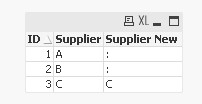
There is the sample:
map_table:
mapping Load *
Inline [
ID, Supplier NEW
1, A
2, B
3, C
]
Where ID > 2;


Table:
Load *,
  ApplyMap('map_table', ID, ':') as [Supplier New]
Inline [
ID, Supplier
1, A
2, B
3, C
];
And there is how it looks after the reload:
 PrashantSangle
- Mark as New
- Bookmark
- Subscribe
- Mute
- Subscribe to RSS Feed
- Permalink
- Report Inappropriate Content
Hi,
I don't think so.
can you post entire script as well as if possible qvw or screen shot which gives issue.
Regards
Please appreciate our Qlik community members by giving Kudos for sharing their time for your query. If your query is answered, please mark the topic as resolved 🙂