Unlock a world of possibilities! Login now and discover the exclusive benefits awaiting you.

- Qlik Community
- :
- All Forums
- :
- QlikView
- :
- list box design
- Subscribe to RSS Feed
- Mark Topic as New
- Mark Topic as Read
- Float this Topic for Current User
- Bookmark
- Subscribe
- Mute
- Printer Friendly Page

- Mark as New
- Bookmark
- Subscribe
- Mute
- Subscribe to RSS Feed
- Permalink
- Report Inappropriate Content
list box design
Hi All,
I have field "Service Type " having field Values as Incidents, Release,Requests 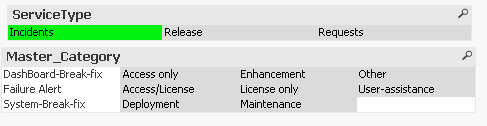
But want it as below when i click on the incidents all related to incidents has to get selected but it should be like below ,all the master category related has to be under incidents same for all , and i also want to eliminate the empty block in the master category ,its not null it is because of presentation settings
But i want it like this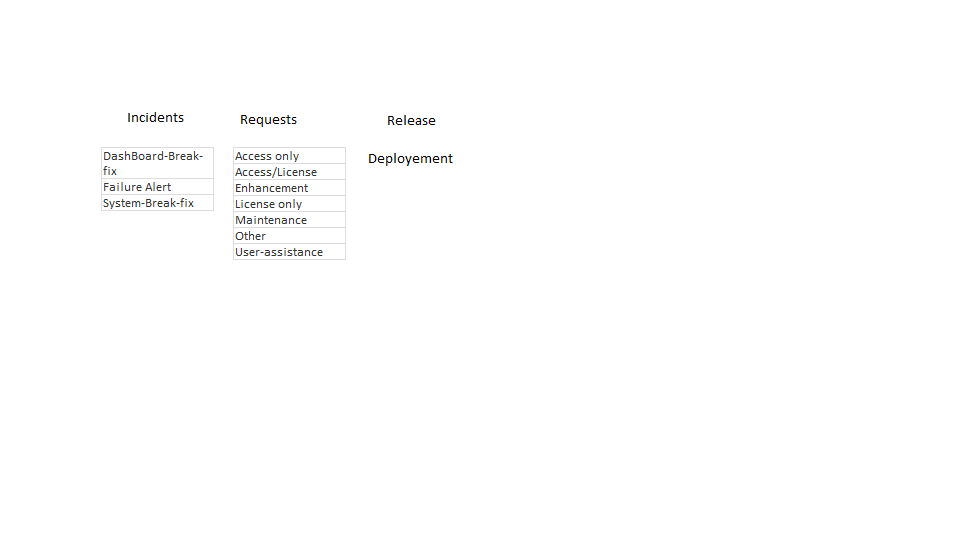
Accepted Solutions

 swuehl
- Mark as New
- Bookmark
- Subscribe
- Mute
- Subscribe to RSS Feed
- Permalink
- Report Inappropriate Content
Try using a field <expression> in your list box like
=Aggr(only({<ServiceType = {Requests},Master_Category= >}Master_Category),Master_Category)
swuehl
- Mark as New
- Bookmark
- Subscribe
- Mute
- Subscribe to RSS Feed
- Permalink
- Report Inappropriate Content
Your sample QVW seems to be empty.
- Mark as New
- Bookmark
- Subscribe
- Mute
- Subscribe to RSS Feed
- Permalink
- Report Inappropriate Content
sorry ,PFA
swuehl
- Mark as New
- Bookmark
- Subscribe
- Mute
- Subscribe to RSS Feed
- Permalink
- Report Inappropriate Content
Try using a field <expression> in your list box like
=Aggr(only({<ServiceType = {Requests},Master_Category= >}Master_Category),Master_Category)
- Mark as New
- Bookmark
- Subscribe
- Mute
- Subscribe to RSS Feed
- Permalink
- Report Inappropriate Content
You are awesome , you been helping me by answering all of my questions  Thanks a lot for helping