Unlock a world of possibilities! Login now and discover the exclusive benefits awaiting you.

- Qlik Community
- :
- All Forums
- :
- QlikView
- :
- Re: need help on Ad-hoc report
- Subscribe to RSS Feed
- Mark Topic as New
- Mark Topic as Read
- Float this Topic for Current User
- Bookmark
- Subscribe
- Mute
- Printer Friendly Page

 Nagaraju_KCS
- Mark as New
- Bookmark
- Subscribe
- Mute
- Subscribe to RSS Feed
- Permalink
- Report Inappropriate Content
need help on Ad-hoc report
Hi Community,
I have done simple Ad-hoc report,
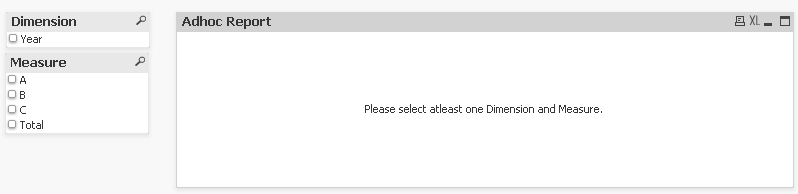
if i make selections Dimension = Year and Measure= A,B,C and Total

here total working fine 1550, total calculation A+B+C.
MY requirement, if i make single selection Measure= A and Total, i have to show my total, my total not showing because,
i have written my expression Column(1)+Column(2)+Column(3),
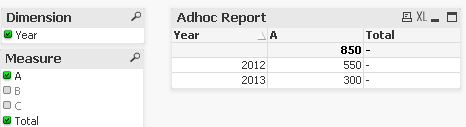
and if i'm make selections A, B and Total, i need to show based on selection Total.
same as A, C and Total
How to write expression total ?
Thanks in Advance...

 tresB
tresB
- Mark as New
- Bookmark
- Subscribe
- Mute
- Subscribe to RSS Feed
- Permalink
- Report Inappropriate Content
Use below expression for Total column:
=RangeSum(column(1),Column(2),Column(3))

 PrashantSangle
- Mark as New
- Bookmark
- Subscribe
- Mute
- Subscribe to RSS Feed
- Permalink
- Report Inappropriate Content
Try below expression for Total
=
if(SubStringCount('|' & Concat(distinct Measure, '|') & '|', '|0 - 30|')=1,Column(1),0)+
if(SubStringCount('|' & Concat(distinct Measure, '|') & '|', '|31 - 60|')=1,Column(2),0)+
if(SubStringCount('|' & Concat(distinct Measure, '|') & '|', '|61 - 90|')=1,Column(3),0)
Regards,
Please appreciate our Qlik community members by giving Kudos for sharing their time for your query. If your query is answered, please mark the topic as resolved 🙂
Nagaraju_KCS
- Mark as New
- Bookmark
- Subscribe
- Mute
- Subscribe to RSS Feed
- Permalink
- Report Inappropriate Content
this expression multiplying twice.
PrashantSangle
- Mark as New
- Bookmark
- Subscribe
- Mute
- Subscribe to RSS Feed
- Permalink
- Report Inappropriate Content
did you try my suggestion???
Regards,
Please appreciate our Qlik community members by giving Kudos for sharing their time for your query. If your query is answered, please mark the topic as resolved 🙂
Nagaraju_KCS
- Mark as New
- Bookmark
- Subscribe
- Mute
- Subscribe to RSS Feed
- Permalink
- Report Inappropriate Content
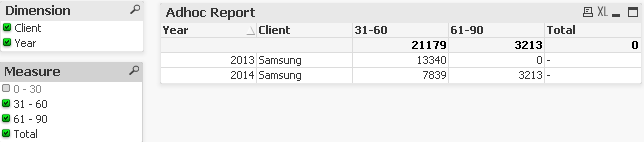
this expression already i had tried, problem is if i make selection order only working fine.
suppose, if i make selection 31-60, 61-90 and total. Total not showing.
tresB
- Mark as New
- Bookmark
- Subscribe
- Mute
- Subscribe to RSS Feed
- Permalink
- Report Inappropriate Content
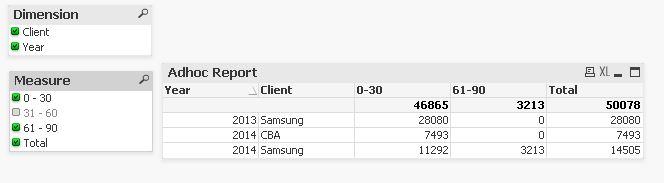
Yes, you are right, and this is because the Total column itself is getting added in such scenarios. I have got a more dynamic (a bit tricky too) expression. Try :
RangeSum($(=mid(Concat(',Column(' &ValueLoop(1,$(=Count(Measure)-1))&')' ),2)))

 stabben23
- Mark as New
- Bookmark
- Subscribe
- Mute
- Subscribe to RSS Feed
- Permalink
- Report Inappropriate Content
Hi, instead of column(), use RangeSum([0-30],[31-60],[61-90])
PrashantSangle
- Mark as New
- Bookmark
- Subscribe
- Mute
- Subscribe to RSS Feed
- Permalink
- Report Inappropriate Content
can we do it like simply
(your_expression)/2
Regards,
Please appreciate our Qlik community members by giving Kudos for sharing their time for your query. If your query is answered, please mark the topic as resolved 🙂
tresB
- Mark as New
- Bookmark
- Subscribe
- Mute
- Subscribe to RSS Feed
- Permalink
- Report Inappropriate Content
Perhaps not. Because of two reasons:
- The Total calculation would get affected again by /2 ; recursive effect
- When all measures are selected, no division is expected, hence /2 would give wrong result
PrashantSangle
- Mark as New
- Bookmark
- Subscribe
- Mute
- Subscribe to RSS Feed
- Permalink
- Report Inappropriate Content
Thanks...
Please appreciate our Qlik community members by giving Kudos for sharing their time for your query. If your query is answered, please mark the topic as resolved 🙂
