Unlock a world of possibilities! Login now and discover the exclusive benefits awaiting you.

- Qlik Community
- :
- All Forums
- :
- QlikView
- :
- need help with chart expression and set analysis
- Subscribe to RSS Feed
- Mark Topic as New
- Mark Topic as Read
- Float this Topic for Current User
- Bookmark
- Subscribe
- Mute
- Printer Friendly Page

- Mark as New
- Bookmark
- Subscribe
- Mute
- Subscribe to RSS Feed
- Permalink
- Report Inappropriate Content
need help with chart expression and set analysis
Hi All ,
Attached QVW file has all the information in it. Please let me know in case of any questions. Thanks for your help
- « Previous Replies
-
- 1
- 2
- Next Replies »
Accepted Solutions

 sunny_talwar
- Mark as New
- Bookmark
- Subscribe
- Mute
- Subscribe to RSS Feed
- Permalink
- Report Inappropriate Content
Straight table solution

Sum(Aggr(If(vDocumentDate - [Due Date] < 1, Sum({$<[Document Date_BLDAT]={'<=$(vDocumentDate)'}, Clearing_AUGDT={'>$(vDocumentDate)'}>} [Amount in LC_DMBTR])), [Document Number_BELNR], [Document Date_BLDAT], [Due Date], Clearing_AUGDT))
- Mark as New
- Bookmark
- Subscribe
- Mute
- Subscribe to RSS Feed
- Permalink
- Report Inappropriate Content
pfa
sunny_talwar
- Mark as New
- Bookmark
- Subscribe
- Mute
- Subscribe to RSS Feed
- Permalink
- Report Inappropriate Content
Do you have to use a straight table or a pivot table might also work?
sunny_talwar
- Mark as New
- Bookmark
- Subscribe
- Mute
- Subscribe to RSS Feed
- Permalink
- Report Inappropriate Content
Straight table solution
Sum(Aggr(If(vDocumentDate - [Due Date] < 1, Sum({$<[Document Date_BLDAT]={'<=$(vDocumentDate)'}, Clearing_AUGDT={'>$(vDocumentDate)'}>} [Amount in LC_DMBTR])), [Document Number_BELNR], [Document Date_BLDAT], [Due Date], Clearing_AUGDT))
sunny_talwar
- Mark as New
- Bookmark
- Subscribe
- Mute
- Subscribe to RSS Feed
- Permalink
- Report Inappropriate Content
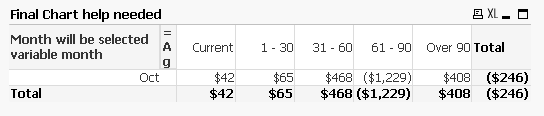
Here is a pivot table based solution
- Mark as New
- Bookmark
- Subscribe
- Mute
- Subscribe to RSS Feed
- Permalink
- Report Inappropriate Content
Sunny need in pivot table what is the expression
sunny_talwar
- Mark as New
- Bookmark
- Subscribe
- Mute
- Subscribe to RSS Feed
- Permalink
- Report Inappropriate Content
Dimension
=month(vDocumentDate)
=Aggr(
If(vDocumentDate - [Due Date] < 1, Dual('Current', 1),
If(vDocumentDate - [Due Date] >= 1 and vDocumentDate - [Due Date] <= 30, Dual('1 - 30', 2),
If(vDocumentDate - [Due Date] >= 31 and vDocumentDate - [Due Date] <= 60, Dual('31 - 60', 3),
If(vDocumentDate - [Due Date] >= 61 and vDocumentDate - [Due Date] <= 90, Dual('61 - 90', 4), Dual('Over 90', 5))))), [Document Number_BELNR], [Document Date_BLDAT], [Due Date], Clearing_AUGDT)
Expression
Sum({$<[Document Date_BLDAT]={'<=$(vDocumentDate)'}, Clearing_AUGDT={'>$(vDocumentDate)'}>} [Amount in LC_DMBTR] )
- Mark as New
- Bookmark
- Subscribe
- Mute
- Subscribe to RSS Feed
- Permalink
- Report Inappropriate Content
thank you Sunny. That definitely helps.
sunny_talwar
- Mark as New
- Bookmark
- Subscribe
- Mute
- Subscribe to RSS Feed
- Permalink
- Report Inappropriate Content
Awesome 
- Mark as New
- Bookmark
- Subscribe
- Mute
- Subscribe to RSS Feed
- Permalink
- Report Inappropriate Content
Sunny a small change in the request. Let me know if i have to do a separate post
if i have this DATE field which will have month end dates in case of the vDocumentDate variable. How can i get the expression get to work for each month. See the attached app you will have more information.
- « Previous Replies
-
- 1
- 2
- Next Replies »