Unlock a world of possibilities! Login now and discover the exclusive benefits awaiting you.

- Qlik Community
- :
- All Forums
- :
- QlikView
- :
- num function is not working in background color
- Subscribe to RSS Feed
- Mark Topic as New
- Mark Topic as Read
- Float this Topic for Current User
- Bookmark
- Subscribe
- Mute
- Printer Friendly Page

 vipingarg23
- Mark as New
- Bookmark
- Subscribe
- Mute
- Subscribe to RSS Feed
- Permalink
- Report Inappropriate Content
num function is not working in background color
Hi Team,
Please find the attachment for sample data.
Here I am using below expression in pivot table:
num(Value,'#,#0.##','.',',')
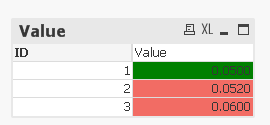
It is working fine but same is not working in background color. I need that if Value is >0.05 then color should be red otherwise green. for that I am using below expression in bg color:
if(num(Value,'#,#0.##','.',',')>0.05,RGB(242,108,100),green())
I want for ID 2, color should be green instead of red.

 stabben23
- Mark as New
- Bookmark
- Subscribe
- Mute
- Subscribe to RSS Feed
- Permalink
- Report Inappropriate Content
Why?
ID2 is larger than 0.05
vipingarg23
- Mark as New
- Bookmark
- Subscribe
- Mute
- Subscribe to RSS Feed
- Permalink
- Report Inappropriate Content
Yes...I know..thats why I am coverting it to 0.05 first then matching with
value.
On Tue, Jul 3, 2018 at 5:10 PM, Staffan Johansson <qcwebmaster@qlikview.com>
stabben23
- Mark as New
- Bookmark
- Subscribe
- Mute
- Subscribe to RSS Feed
- Permalink
- Report Inappropriate Content
if you use this in Your expression
round(Value,0.005)
it will round 0.052 to 0.05 and 0.056 to 0.055

 BalaBhaskar_Qli
- Mark as New
- Bookmark
- Subscribe
- Mute
- Subscribe to RSS Feed
- Permalink
- Report Inappropriate Content
may be,
if(num(Value,'#,#0.##','.',',')>0.0500,RGB(242,108,100),green())
