Unlock a world of possibilities! Login now and discover the exclusive benefits awaiting you.

- Qlik Community
- :
- All Forums
- :
- QlikView
- :
- peek Logic
- Subscribe to RSS Feed
- Mark Topic as New
- Mark Topic as Read
- Float this Topic for Current User
- Bookmark
- Subscribe
- Mute
- Printer Friendly Page

 subbareddykm
- Mark as New
- Bookmark
- Subscribe
- Mute
- Subscribe to RSS Feed
- Permalink
- Report Inappropriate Content
peek Logic
Hi all,
i need one logic. i.e
I have project, phase and date like below
| ProjectName | Phase | QAFPartsReceiptPlanDate |
| 556 | 0 | 6/8/2016 |
| 556 | 116 | 6/8/2016 |
| 556 | 116 | 6/10/2016 |
| 556 | 116 | 6/14/2016 |
| 556 | 116 | 6/15/2016 |
| 556 | 116 | 6/30/2016 |
| 556 | 116 | 7/8/2016 |
| 556 | 116 | 7/14/2016 |
| 556 | 116 | 7/15/2016 |
For every project , every phase pick min and Max date and Like below
| ProjectName | Phase | QAFPartsReceiptPlanDate | Output | Logic | |
| 556 | 0 | 6/8/2016 | 6/8/2016 | min date project and Phase 0 | |
| 556 | 116 | 6/8/2016 | 6/8/2016 | min date project and Phase 116 | |
| 556 | 116 | 6/10/2016 | 6/15/2016 | above date + 7 | |
| 556 | 116 | 6/14/2016 | 6/22/2016 | above date + 7 | |
| 556 | 116 | 6/15/2016 | 6/29/2016 | above date + 7 | |
| 556 | 116 | 6/30/2016 | 7/6/2016 | above date + 7 | |
| 556 | 116 | 7/8/2016 | 7/13/2016 | above date + 7 | |
| 556 | 116 | 7/14/2016 | 7/20/2016 | above date + 7 | |
| 556 | 116 | 7/15/2016 | 7/27/2016 | above date + 7 | |
Can any body tell me how to get this.
Note: +7 should not exceed Max date of phase and If it exceeds Pick max date instead.
Accepted Solutions

 jonathandienst
- Mark as New
- Bookmark
- Subscribe
- Mute
- Subscribe to RSS Feed
- Permalink
- Report Inappropriate Content
Piggy backing on Massimo's code to get the upper range limit:
t:
load * inline [
ProjectName, Phase, Date
556, 0, 6/8/2016
556, 116, 6/8/2016
556, 116, 6/10/2016
556, 116, 6/14/2016
556, 116, 6/15/2016
556, 116, 6/30/2016
556, 116, 7/8/2016
556, 116, 7/14/2016
556, 116, 7/15/2016
];
Join(t)
LOAD ProjectName,
Max(Date) as ProjectMaxDate
Resident t
Group By ProjectName;
t2:
LOAD *,
If(ProjectName <> Peek('ProjectName') Or Phase <> Peek('Phase'),
Date,
Date(RangeMin(Date(Peek('Output') + 7), ProjectMaxDate))
) as Output
Resident t
order by ProjectName, Phase, Date;
DROP Table t;
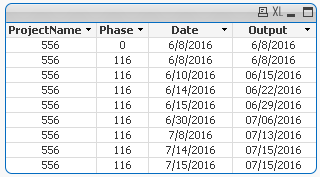

 maxgro
- Mark as New
- Bookmark
- Subscribe
- Mute
- Subscribe to RSS Feed
- Permalink
- Report Inappropriate Content
t:
load * inline [
ProjectName, Phase, Date
556, 0, 6/8/2016
556, 116, 6/8/2016
556, 116, 6/10/2016
556, 116, 6/14/2016
556, 116, 6/15/2016
556, 116, 6/30/2016
556, 116, 7/8/2016
556, 116, 7/14/2016
556, 116, 7/15/2016
];
t2:
load *,
if(ProjectName <> Peek('ProjectName') or Phase <> Peek('Phase'), Date, Date(Peek('Output') +7)) as Output
Resident t
order by ProjectName, Phase, Date;
DROP Table t;
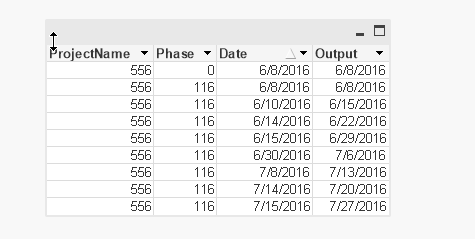
subbareddykm
- Mark as New
- Bookmark
- Subscribe
- Mute
- Subscribe to RSS Feed
- Permalink
- Report Inappropriate Content
Exactly same but it should not exceed my max date Check above
Example :
project=556,pHase=116 my max date is 7/15/2016 but output date 7/27/2016
If Date is exceeding output date Pick max date instead
I want to apply +7 for In between Min and Max date of of my Phase
jonathandienst
- Mark as New
- Bookmark
- Subscribe
- Mute
- Subscribe to RSS Feed
- Permalink
- Report Inappropriate Content
Piggy backing on Massimo's code to get the upper range limit:
t:
load * inline [
ProjectName, Phase, Date
556, 0, 6/8/2016
556, 116, 6/8/2016
556, 116, 6/10/2016
556, 116, 6/14/2016
556, 116, 6/15/2016
556, 116, 6/30/2016
556, 116, 7/8/2016
556, 116, 7/14/2016
556, 116, 7/15/2016
];
Join(t)
LOAD ProjectName,
Max(Date) as ProjectMaxDate
Resident t
Group By ProjectName;
t2:
LOAD *,
If(ProjectName <> Peek('ProjectName') Or Phase <> Peek('Phase'),
Date,
Date(RangeMin(Date(Peek('Output') + 7), ProjectMaxDate))
) as Output
Resident t
order by ProjectName, Phase, Date;
DROP Table t;
subbareddykm
- Mark as New
- Bookmark
- Subscribe
- Mute
- Subscribe to RSS Feed
- Permalink
- Report Inappropriate Content
I have one doubt here if it exceed my max i dont want to pick max date and i want to stop there itself ,then where i need to change ?
Exp :
In output Phase=116 ,07/15/2016 that we are picking from actual date right . i want to stop 07/13/2013 .
Can tell me where i need to change from script ?
