Unlock a world of possibilities! Login now and discover the exclusive benefits awaiting you.

- Qlik Community
- :
- All Forums
- :
- QlikView
- :
- percentage difference
- Subscribe to RSS Feed
- Mark Topic as New
- Mark Topic as Read
- Float this Topic for Current User
- Bookmark
- Subscribe
- Mute
- Printer Friendly Page

 surajap123
- Mark as New
- Bookmark
- Subscribe
- Mute
- Subscribe to RSS Feed
- Permalink
- Report Inappropriate Content
percentage difference
Hi All,
I want to find percentage difference between 2 percentages.
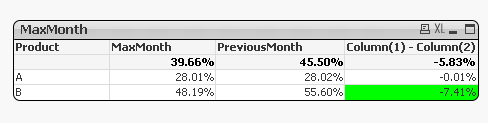
So, in 3rd expression i want to show difference(comparing current and previous month percentages). Also, If the MaxMonth has more than 5% decrease compared to previous month then i want to show the 3rd expression in green background.
expr1- sum({<MonthYear = {"$(vMaxMonth)"}>}Margin)/sum({<MonthYear = {"$(vMaxMonth)"}>}Sales)
expr2- sum({<MonthYear = {"$(vPreMonth)"}>}Margin)/sum({<MonthYear = {"$(vPreMonth)"}>}Sales)
expr3- Column(1) - Column(2)
Please help.
Accepted Solutions

 sunny_talwar
- Mark as New
- Bookmark
- Subscribe
- Mute
- Subscribe to RSS Feed
- Permalink
- Report Inappropriate Content
sunny_talwar
- Mark as New
- Bookmark
- Subscribe
- Mute
- Subscribe to RSS Feed
- Permalink
- Report Inappropriate Content
You want this?
surajap123
- Mark as New
- Bookmark
- Subscribe
- Mute
- Subscribe to RSS Feed
- Permalink
- Report Inappropriate Content
Sorry, attached wrong app earlier.
Hi Sunny,
Thank you so much for the solution.
I have a query. If i format the 1st and 2nd expressions with num() function(and disabled percentage checkbox in number tab), then i see the 3rd expression is not working.
eg-
num(sum({<MonthYear = {"$(vMaxMonth)"}>}Margin)/sum({<MonthYear = {"$(vMaxMonth)"}>}Sales)*100,'0.00%')
!Could you please help.
sunny_talwar
- Mark as New
- Bookmark
- Subscribe
- Mute
- Subscribe to RSS Feed
- Permalink
- Report Inappropriate Content
I guess what exactly would you want to see? Remove percentage from the number's tab to see this
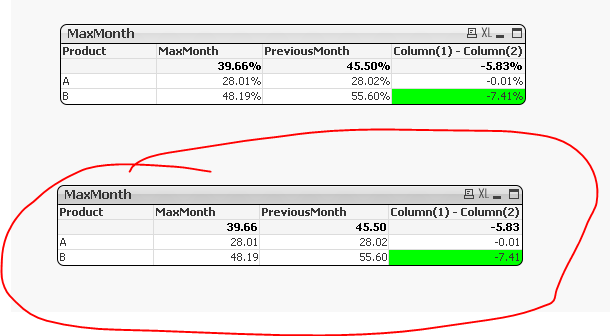
Is there a reason you are formatting using Num() function rather than using the number's tab?
surajap123
- Mark as New
- Bookmark
- Subscribe
- Mute
- Subscribe to RSS Feed
- Permalink
- Report Inappropriate Content
Thanks for the clarification.:)
I was trying various ways to understand the behaviour.
