Unlock a world of possibilities! Login now and discover the exclusive benefits awaiting you.

- Qlik Community
- :
- All Forums
- :
- QlikView
- :
- prior 4 & 52 week
- Subscribe to RSS Feed
- Mark Topic as New
- Mark Topic as Read
- Float this Topic for Current User
- Bookmark
- Subscribe
- Mute
- Printer Friendly Page

- Mark as New
- Bookmark
- Subscribe
- Mute
- Subscribe to RSS Feed
- Permalink
- Report Inappropriate Content
prior 4 & 52 week
Hi,
I want to compare the date for same day last 4 week and 52 week.
in dimension i put day(1,2,3,4....31) i can't do this
any help or idea
Many thanks
- « Previous Replies
-
- 1
- 2
- Next Replies »
Accepted Solutions

 jagan
jagan
- Mark as New
- Bookmark
- Subscribe
- Mute
- Subscribe to RSS Feed
- Permalink
- Report Inappropriate Content
Hi,
Please check the attachment for solution.
Hope this helps you.
Regards,
Jagan.
jagan
- Mark as New
- Bookmark
- Subscribe
- Mute
- Subscribe to RSS Feed
- Permalink
- Report Inappropriate Content
Hi,
Can you attach the sample file.
Regards,
Jagan.
- Mark as New
- Bookmark
- Subscribe
- Mute
- Subscribe to RSS Feed
- Permalink
- Report Inappropriate Content
Hi,
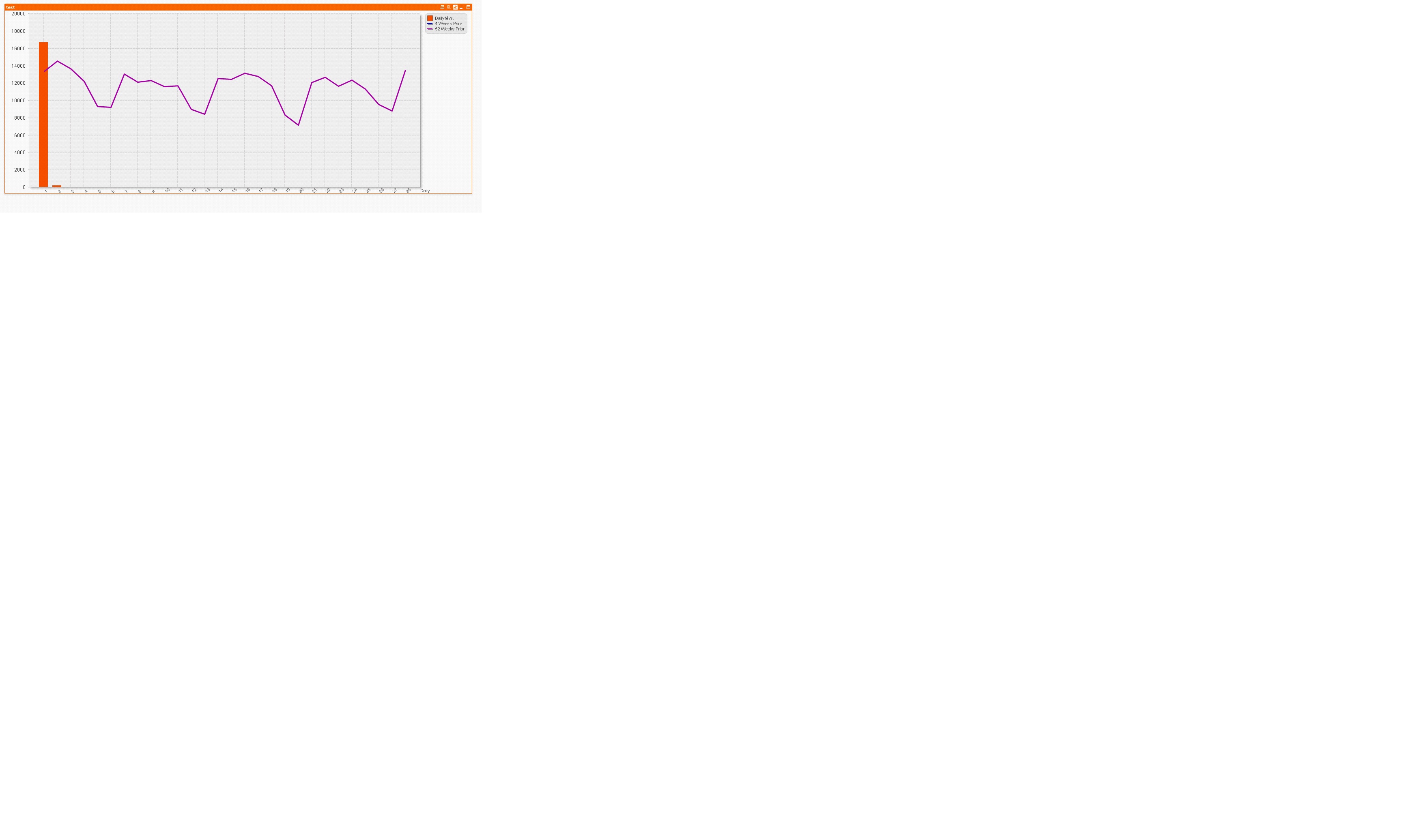
Here is the chart and the set analysis expression
4 prior week =count({<CreationDate={'>=$(=monthstart(date(Today()-28)))<$(=date(monthstart(Today())))'} >} amount).
52 prior week =count({<CreationDate={'>=$(=MakeDate(Year(Today())-1, num(month(today()))))<=$(=AddYears(monthend(Today()),-1))'} >} Amount)
i want compare same day and 4 week prior.
Many thanks for your help 
jagan
- Mark as New
- Bookmark
- Subscribe
- Mute
- Subscribe to RSS Feed
- Permalink
- Report Inappropriate Content
Hi,
Please check the below expressions
This will get the prior 4th week data
=count({<CreationDate={'>=$(=WeekStart(Today()-4))<$(=WeekEnd(Today(), -4))'} >} amount)
This will get the prior 52nd week data
=count({<CreationDate={'>=$(=WeekStart(Today()-52))<$(=WeekEnd(Today(), -52))'} >} amount)
Hope this helps you.
Regards,
Jagan.
- Mark as New
- Bookmark
- Subscribe
- Mute
- Subscribe to RSS Feed
- Permalink
- Report Inappropriate Content
Hi,
Your requirement is not clear. please mention clearly and if possible attach a sample appliation
- Mark as New
- Bookmark
- Subscribe
- Mute
- Subscribe to RSS Feed
- Permalink
- Report Inappropriate Content
Hi,
Thanks for your reply but i still have problem i want exactly reproduit this table in chart in dimension Day
for month Fevrier so on
| Day | Daily | Daily -28(4 prior week) | Daily -364( 52week prior) |
| 1 | 10843,81 | 10815,81 | 10791,81 |
| 2 | 12211,50 | 12183,5 | 12159,5 |
| 3 | 12339,88 | 12311,88 | 12287,88 |
| 4 | 11879,32 | 11851,32 | 11827,32 |
| 5 | 11376,02 | 11348,02 | 11324,02 |
| 6 | 14062,21 | 14034,21 | 14010,21 |
| 7 | 10738,80 | 10710,8 | 10686,8 |
| 8 | 12532,88 | 12504,88 | 12480,88 |
| 9 | 12892,14 | 12864,14 | 12840,14 |
| 10 | 14036,49 | 14008,49 | 13984,49 |
| 11 | 10029,03 | 10001,03 | 9977,03 |
| 12 | 12383,33 | 12355,33 | 12331,33 |
| 13 | 11727,15 | 11699,15 | 11675,15 |
| 14 | 12370,23 | 12342,23 | 12318,23 |
| 15 | 11620,61 | 11592,61 | 11568,61 |
| 16 | 11274,52 | 11246,52 | 11222,52 |
| 17 | 9917,24 | 9889,24 | 9865,24 |
| 18 | 11279,78 | 11251,78 | 11227,78 |
| 19 | 11142,08 | 11114,08 | 11090,08 |
| 20 | 12582,85 | 12554,85 | 12530,85 |
| 21 | 12704,41 | 12676,41 | 12652,41 |
| 22 | 12234,24 | 12206,24 | 12182,24 |
| 23 | 12188,79 | 12160,79 | 12136,79 |
| 24 | 10580,92 | 10552,92 | 10528,92 |
| 25 | 10661,29 | 10633,29 | 10609,29 |
| 26 | 10876,06 | 10848,06 | 10824,06 |
| 27 | 10467,09 | 10439,09 | 10415,09 |
| 28 | 11683,10 | 11655,1 | 11631,1 |
| 29 | 10073,75 | 10045,75 | 10021,75 |
| 30 | 10728,48 | 10700,48 | 10676,48 |
| 31 | 7466,20 | 7438,2 | 7414,2 |
Thanks
jagan
- Mark as New
- Bookmark
- Subscribe
- Mute
- Subscribe to RSS Feed
- Permalink
- Report Inappropriate Content
Hi,
Can you attach the sample file with script.
Regards,
Jagan.
 CELAMBARASAN
- Mark as New
- Bookmark
- Subscribe
- Mute
- Subscribe to RSS Feed
- Permalink
- Report Inappropriate Content
Hi,
Try with this,
4 week prior
=count({<CreationDate={'$(=Date(Num(CreationDate) - 28))'} >} amount)
52 week prior
=count({<CreationDate={'$(=Date(Num(CreationDate) - 364))'} >} amount)
Hope it helps
Celambarasan
- Mark as New
- Bookmark
- Subscribe
- Mute
- Subscribe to RSS Feed
- Permalink
- Report Inappropriate Content
Hi,
Here is.
Thanks
jagan
- Mark as New
- Bookmark
- Subscribe
- Mute
- Subscribe to RSS Feed
- Permalink
- Report Inappropriate Content
Hi,
Please check the attachment for solution.
Hope this helps you.
Regards,
Jagan.
- « Previous Replies
-
- 1
- 2
- Next Replies »