Unlock a world of possibilities! Login now and discover the exclusive benefits awaiting you.

- Qlik Community
- :
- All Forums
- :
- QlikView
- :
- Re: qlik requirement
- Subscribe to RSS Feed
- Mark Topic as New
- Mark Topic as Read
- Float this Topic for Current User
- Bookmark
- Subscribe
- Mute
- Printer Friendly Page

 siva8
siva8
- Mark as New
- Bookmark
- Subscribe
- Mute
- Subscribe to RSS Feed
- Permalink
- Report Inappropriate Content
qlik requirement
Accepted Solutions

 Taoufiq_Zarra
- Mark as New
- Bookmark
- Subscribe
- Mute
- Subscribe to RSS Feed
- Permalink
- Report Inappropriate Content
as I understand it, you have this sample data that I added the makeweekdate function to return a date.
Data:

load *,makeweekdate(left(WeekOfCaptureDate,4),mid(WeekOfCaptureDate,index(WeekOfCaptureDate,'/')+1)) as DateWeek inline [
Material , WeekOfCaptureDate , key
R6H60A ,2020/21, 1
R6H60A ,2020/20, 1
R6H60A ,2020/19, 1
R6H60A ,2020/22, 1
R6H60A ,2020/22, 1
R6H60A ,2020/15, 1
R6H60A ,2020/16, 1
R6H60A ,2020/19, 1
SN500-00192 ,2020/14, 2
SN500-00192 ,2020/15, 2
SN500-00192 ,2020/15, 2
SN500-00194 ,2020/15, 2
SN500-00194 ,2020/15, 2
SN500-00194 ,2020/16, 2
SN500-00194 ,2020/16, 2
SN500-00194 ,2020/17, 2
];
with this I can go through the last four weeks by the max function.
So for pivot Table :
Dimension :
- Materiel
- WeekOfCaptureDate
Measure :
count({<DateWeek={">=$(=Max(DateWeek,4))"}>} key)
the output :
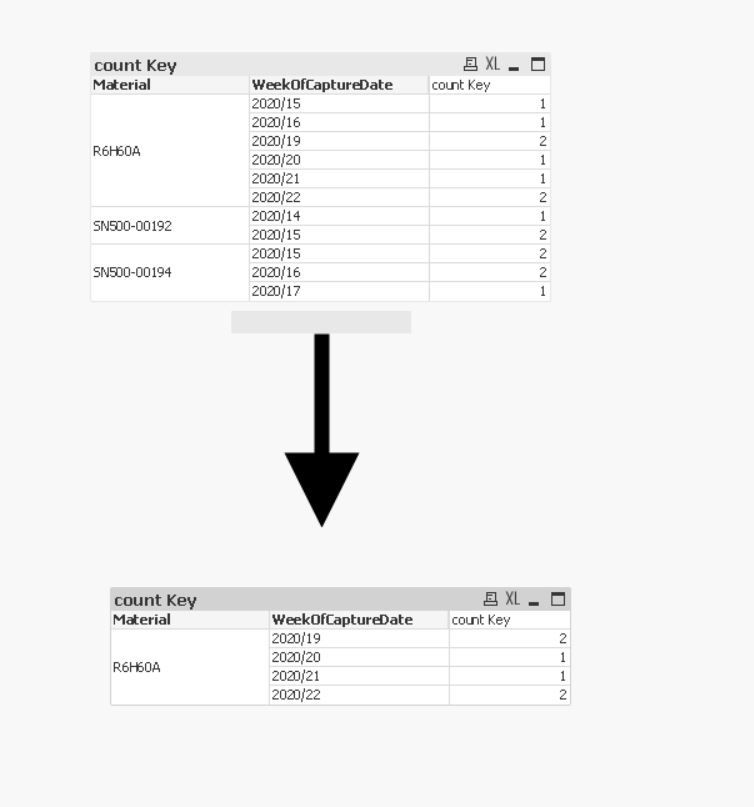
attached qvw file
Taoufiq ZARRA
"Please LIKE posts and "Accept as Solution" if the provided solution is helpful "
(you can mark up to 3 "solutions") 😉
Taoufiq_Zarra
- Mark as New
- Bookmark
- Subscribe
- Mute
- Subscribe to RSS Feed
- Permalink
- Report Inappropriate Content
as I understand it, you have this sample data that I added the makeweekdate function to return a date.
Data:

load *,makeweekdate(left(WeekOfCaptureDate,4),mid(WeekOfCaptureDate,index(WeekOfCaptureDate,'/')+1)) as DateWeek inline [
Material , WeekOfCaptureDate , key
R6H60A ,2020/21, 1
R6H60A ,2020/20, 1
R6H60A ,2020/19, 1
R6H60A ,2020/22, 1
R6H60A ,2020/22, 1
R6H60A ,2020/15, 1
R6H60A ,2020/16, 1
R6H60A ,2020/19, 1
SN500-00192 ,2020/14, 2
SN500-00192 ,2020/15, 2
SN500-00192 ,2020/15, 2
SN500-00194 ,2020/15, 2
SN500-00194 ,2020/15, 2
SN500-00194 ,2020/16, 2
SN500-00194 ,2020/16, 2
SN500-00194 ,2020/17, 2
];
with this I can go through the last four weeks by the max function.
So for pivot Table :
Dimension :
- Materiel
- WeekOfCaptureDate
Measure :
count({<DateWeek={">=$(=Max(DateWeek,4))"}>} key)
the output :
attached qvw file
Taoufiq ZARRA
"Please LIKE posts and "Accept as Solution" if the provided solution is helpful "
(you can mark up to 3 "solutions") 😉
siva8
- Mark as New
- Bookmark
- Subscribe
- Mute
- Subscribe to RSS Feed
- Permalink
- Report Inappropriate Content
HI Team ,
the above post was not clear, so here i am attaching the sample data
Hi Team,
please help me with the below requirement
i have to show only last 4 weeks in pivot table ((i,e 2020/22,2020/21,2020/20,2020/19) )
dimension: material,WeekOfCaptureDate (week column)
measures: count(key)
please find the attached and sample data
Thanks
siva
Taoufiq_Zarra
- Mark as New
- Bookmark
- Subscribe
- Mute
- Subscribe to RSS Feed
- Permalink
- Report Inappropriate Content
@siva8 Did you check my post ?
Taoufiq ZARRA
"Please LIKE posts and "Accept as Solution" if the provided solution is helpful "
(you can mark up to 3 "solutions") 😉
siva8
- Mark as New
- Bookmark
- Subscribe
- Mute
- Subscribe to RSS Feed
- Permalink
- Report Inappropriate Content
Hi Taoufiq,
Thanks for your prompt response , its working fine as expected ,
i have another requirement here -- if user select a particular week in list box( for example i .e 2020/15,2020/16) that time the chart should render based on the selection they made .if nothing is selected chart should show only last 4 weeks.
Thanks
siva
Taoufiq_Zarra
- Mark as New
- Bookmark
- Subscribe
- Mute
- Subscribe to RSS Feed
- Permalink
- Report Inappropriate Content
Hi @siva8
attached new version :
with selection
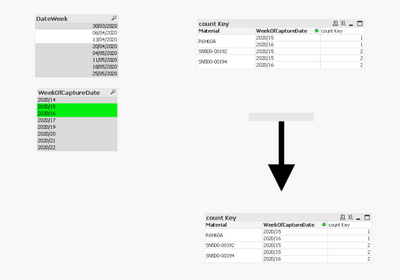
no Selection :
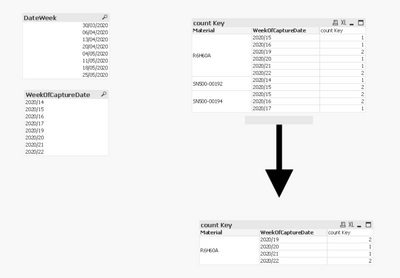
Taoufiq ZARRA
"Please LIKE posts and "Accept as Solution" if the provided solution is helpful "
(you can mark up to 3 "solutions") 😉
siva8
- Mark as New
- Bookmark
- Subscribe
- Mute
- Subscribe to RSS Feed
- Permalink
- Report Inappropriate Content
