Unlock a world of possibilities! Login now and discover the exclusive benefits awaiting you.

- Qlik Community
- :
- All Forums
- :
- QlikView
- :
- qlikview date/time
- Subscribe to RSS Feed
- Mark Topic as New
- Mark Topic as Read
- Float this Topic for Current User
- Bookmark
- Subscribe
- Mute
- Printer Friendly Page

 wade12
- Mark as New
- Bookmark
- Subscribe
- Mute
- Subscribe to RSS Feed
- Permalink
- Report Inappropriate Content
qlikview date/time
quick question please, any/all advices appreciated, thank you in advance.
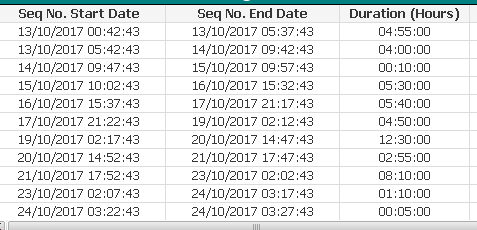
formula to calculate correct duration please (as per screenshot):
note, the figures for duration in the screenshot are incorrect because they fai to take into account the rolling over into another day.
Accepted Solutions

 marcus_sommer
- Mark as New
- Bookmark
- Subscribe
- Mute
- Subscribe to RSS Feed
- Permalink
- Report Inappropriate Content
If you export this table to excel you will see that the calculation will be right but Qlik displayed only the time-part. To display also the days you could use: interval(End - Start, 'D hh:mm:ss'). And you need to enable expression-standard within the tab numbers.
- Marcus
 sunny_talwar
- Mark as New
- Bookmark
- Subscribe
- Mute
- Subscribe to RSS Feed
- Permalink
- Report Inappropriate Content
I think you need to use TimeStamp fields which have dates in them to find the difference and then use Interval function to get the duration
Interval([Seq No. End Date] - [Seq No. Start Date], 'hh:mm:ss')

 tresB
tresB
- Mark as New
- Bookmark
- Subscribe
- Mute
- Subscribe to RSS Feed
- Permalink
- Report Inappropriate Content
May be like this?
Interval( Date1-Date2, 'hh:mm:ss')

- Mark as New
- Bookmark
- Subscribe
- Mute
- Subscribe to RSS Feed
- Permalink
- Report Inappropriate Content
Perhaps this?
Interval(TimeStamp#([Seq No. End Date]) - TimeStamp#([Seq No. Start Date]), 'hh:mm:ss')
marcus_sommer
- Mark as New
- Bookmark
- Subscribe
- Mute
- Subscribe to RSS Feed
- Permalink
- Report Inappropriate Content
If you export this table to excel you will see that the calculation will be right but Qlik displayed only the time-part. To display also the days you could use: interval(End - Start, 'D hh:mm:ss'). And you need to enable expression-standard within the tab numbers.
- Marcus
wade12
- Mark as New
- Bookmark
- Subscribe
- Mute
- Subscribe to RSS Feed
- Permalink
- Report Inappropriate Content
Thanks Marcus.
... but how can I format 1 04:30:00 to be 28:30:00 ?
sunny_talwar
- Mark as New
- Bookmark
- Subscribe
- Mute
- Subscribe to RSS Feed
- Permalink
- Report Inappropriate Content
Instead of using the format 'D hh:mm:ss', use 'hh:mm:ss'
wade12
- Mark as New
- Bookmark
- Subscribe
- Mute
- Subscribe to RSS Feed
- Permalink
- Report Inappropriate Content
Thanks Sunny.
