Unlock a world of possibilities! Login now and discover the exclusive benefits awaiting you.

- Qlik Community
- :
- All Forums
- :
- QlikView
- :
- qvw size?
- Subscribe to RSS Feed
- Mark Topic as New
- Mark Topic as Read
- Float this Topic for Current User
- Bookmark
- Subscribe
- Mute
- Printer Friendly Page

- Mark as New
- Bookmark
- Subscribe
- Mute
- Subscribe to RSS Feed
- Permalink
- Report Inappropriate Content
qvw size?
I have q qvds like 30mb ,4GB, i have loaded my qvds and developed dashboard when it come to size of qvw like
400 mb see when we compare to size of qvds it is very less ? how it is happening ? what is the concept behind ?
as of my point of view i feel data is storing in ram not in dash board? am i right?
- Tags:
- new_to_qlikview
Accepted Solutions

.png "Former Employee") JonnyPoole
JonnyPoole
- Mark as New
- Bookmark
- Subscribe
- Mute
- Subscribe to RSS Feed
- Permalink
- Report Inappropriate Content
I think you are asking why the QVW is less than the QVD size ?
The primary reason is that by default, all QVWs are compressed whereas QVDs are not. Compression can reduce size into the 90's% .... but it all depends on how unique each record of data is to begin with.
So if you had a 30MB and a 4GB QVD , your QVW of 400MB represents ~90% compression.
Note that when you open the QVW in RAM, it will expand somewhat. Then if there is RAM left on the machine, Qlik will use that to store the aggregated numbers for the UI that result from the user requests .

 jagan
jagan
- Mark as New
- Bookmark
- Subscribe
- Mute
- Subscribe to RSS Feed
- Permalink
- Report Inappropriate Content
Hi,
Qlikview file not only stores the QVD data, but it also stores the chart definitions, sheet definitions, data model and associations, so that is why qlikview file size is usually more than that of QVD file size.
Regards,
Jagan.
- Mark as New
- Bookmark
- Subscribe
- Mute
- Subscribe to RSS Feed
- Permalink
- Report Inappropriate Content
in my case qvw size is small when it comapred to qvds size ?
jagan
- Mark as New
- Bookmark
- Subscribe
- Mute
- Subscribe to RSS Feed
- Permalink
- Report Inappropriate Content
HI,
You have loaded all the columns and records into QVW file?
Regards,
Jagan.
JonnyPoole
- Mark as New
- Bookmark
- Subscribe
- Mute
- Subscribe to RSS Feed
- Permalink
- Report Inappropriate Content
I think you are asking why the QVW is less than the QVD size ?
The primary reason is that by default, all QVWs are compressed whereas QVDs are not. Compression can reduce size into the 90's% .... but it all depends on how unique each record of data is to begin with.
So if you had a 30MB and a 4GB QVD , your QVW of 400MB represents ~90% compression.
Note that when you open the QVW in RAM, it will expand somewhat. Then if there is RAM left on the machine, Qlik will use that to store the aggregated numbers for the UI that result from the user requests .

 Clever_Anjos
- Mark as New
- Bookmark
- Subscribe
- Mute
- Subscribe to RSS Feed
- Permalink
- Report Inappropriate Content
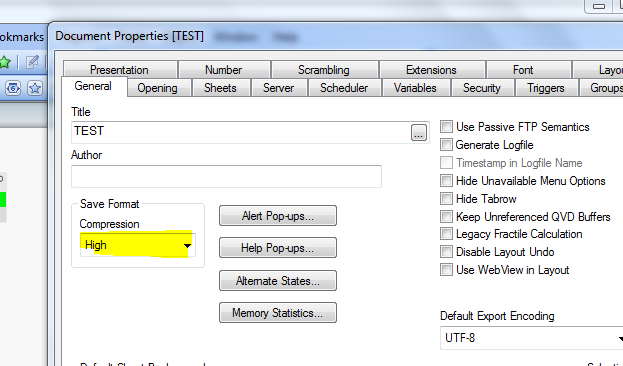
QVW can be compressed by defaul, please check at Document Properties if your qvw is compressed