Unlock a world of possibilities! Login now and discover the exclusive benefits awaiting you.

- Qlik Community
- :
- All Forums
- :
- QlikView
- :
- reg-straight table
- Subscribe to RSS Feed
- Mark Topic as New
- Mark Topic as Read
- Float this Topic for Current User
- Bookmark
- Subscribe
- Mute
- Printer Friendly Page

- Mark as New
- Bookmark
- Subscribe
- Mute
- Subscribe to RSS Feed
- Permalink
- Report Inappropriate Content
reg-straight table
hi all i have few questions recording straight table and i have attached an sample pic and i want to do like that can anyone help me recording this
1.i want to get a separator for each product as shown in pic
2. i want to merge multiple rows into single like as shown in the sample pic
and both i should get in the straight table
- Tags:
- hi
- « Previous Replies
- Next Replies »
- Mark as New
- Bookmark
- Subscribe
- Mute
- Subscribe to RSS Feed
- Permalink
- Report Inappropriate Content
I think the best way is to use a pivot table object instead a straight table.

 sebastiandperei
- Mark as New
- Bookmark
- Subscribe
- Mute
- Subscribe to RSS Feed
- Permalink
- Report Inappropriate Content
The first column is a Dimention or a Expression one?
- Mark as New
- Bookmark
- Subscribe
- Mute
- Subscribe to RSS Feed
- Permalink
- Report Inappropriate Content
QUARTER AND MONTH ARE THE DIMENSIONS
sebastiandperei
- Mark as New
- Bookmark
- Subscribe
- Mute
- Subscribe to RSS Feed
- Permalink
- Report Inappropriate Content
I guess you have only one dimmention, with both quarter and months.
You could put an expression with =' ' between the products expressions, and fill it with a color, open the  symbol in that expression, and in "Background Color", set with RGB(red_value, green_value, blue_value) which you want.
I cant understand your second request
- Mark as New
- Bookmark
- Subscribe
- Mute
- Subscribe to RSS Feed
- Permalink
- Report Inappropriate Content
first column is expression and quarter and months are the dimensions
- Mark as New
- Bookmark
- Subscribe
- Mute
- Subscribe to RSS Feed
- Permalink
- Report Inappropriate Content
in second one i want to add multiple measures of product to merged in to single row as shown in fig b
- Mark as New
- Bookmark
- Subscribe
- Mute
- Subscribe to RSS Feed
- Permalink
- Report Inappropriate Content
hi if am using that expression what you said it is going to change whole cell but i want only dark like above the product only
 sunilkumarqv
- Mark as New
- Bookmark
- Subscribe
- Mute
- Subscribe to RSS Feed
- Permalink
- Report Inappropriate Content
Hi Mvr,
I dont think will get those functionalities instead of that you use color borders for that firstly create Ids in your database IN + Experssion tab background color,Text color,Text Format below see sample
how Id related to background color,Text color,Text Format
background color
=If(RowNo(Total)=ID or
RowNo(Total)=ID or
RowNo(Total)=ID or
RowNo(Total)=ID,RGB(203,235,245))
= If(RowNo(Total)=1 or
RowNo(Total)=5 or
RowNo(Total)=9 or
RowNo(Total)=15 or
RowNo(Total)=16 or
RowNo(Total)=17 or
RowNo(Total)=18 or
RowNo(Total)=19 or
RowNo(Total)=20 or
RowNo(Total)=30 or
RowNo(Total)=31, '<B>')
&
If(RowNo(Total)=5 or
RowNo(Total)=9 or
RowNo(Total)=15 or
RowNo(Total)=16 or
RowNo(Total)=17 or
RowNo(Total)=19 or
RowNo(Total)=30 or
RowNo(Total)=31,'<I>')
- Mark as New
- Bookmark
- Subscribe
- Mute
- Subscribe to RSS Feed
- Permalink
- Report Inappropriate Content
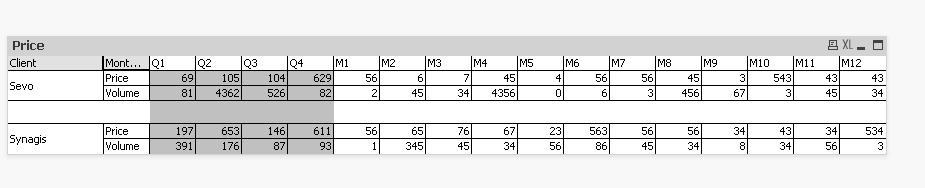
I can reach that so far. To be able to collapse, I should have Price and Volume like a dimension and not a metric Name,
- « Previous Replies
- Next Replies »