Unlock a world of possibilities! Login now and discover the exclusive benefits awaiting you.

- Qlik Community
- :
- All Forums
- :
- QlikView
- :
- replace string
- Subscribe to RSS Feed
- Mark Topic as New
- Mark Topic as Read
- Float this Topic for Current User
- Bookmark
- Subscribe
- Mute
- Printer Friendly Page

 vignesh_s
- Mark as New
- Bookmark
- Subscribe
- Mute
- Subscribe to RSS Feed
- Permalink
- Report Inappropriate Content
replace string
hi all i have 2 excel file,1st 1 is String and 2nd excel contains which string should replaced with what
ex:
excel1:
| Name |
| My name is Fund |
| A for Apple |
| Apple is a fruit |
| C for Cat |
| Fund is a Vlaue |
| D for Dog |
| F for Fund |
| E for Eli |
| Xmas is on 25 dec |
excel2:
| String | Replace String |
| ball | Bat is best because of batman |
| dog | is not |
| eli | Vadivel padam |
| apple | Android is best |
| xmas | pongal tha gethu |
i need scrit such that it should work dynamicaly,means what ever i give in 2nd excel (replace string) should reflect in out put by just doing reload.Can any1 help
- « Previous Replies
- Next Replies »
Accepted Solutions

 sunny_talwar
- Mark as New
- Bookmark
- Subscribe
- Mute
- Subscribe to RSS Feed
- Permalink
- Report Inappropriate Content
I would not recommend using this, but here you go...
excel1:
LOAD * INLINE [
Name
My name is Fund
A for Apple
Apple is a fruit
C for Cat
Fund is a Vlaue
D for Dog
F for Fund
E for Eli
Xmas is on 25 dec
];
Temp:
NoConcatenate
LOAD *
Resident excel1;
Join (Temp)
LOAD Capitalize(String) as String,
[Replace String]
INLINE [
String, Replace String
ball, Bat is best because of batman
dog, is not
eli, Vadivel padam
apple, Android is best
xmas, pongal tha gethu
];
FinalTable:
LOAD Name,
Name as TempName,
[Replace String]
Resident Temp
Where WildMatch(Name, '*'&String&'*');
Concatenate(FinalTable)
LOAD Name
Resident excel1
Where Not Exists(TempName, Name);
DROP Table excel1, Temp;
sunny_talwar
- Mark as New
- Bookmark
- Subscribe
- Mute
- Subscribe to RSS Feed
- Permalink
- Report Inappropriate Content
May be using

 tresB
tresB
- Mark as New
- Bookmark
- Subscribe
- Mute
- Subscribe to RSS Feed
- Permalink
- Report Inappropriate Content
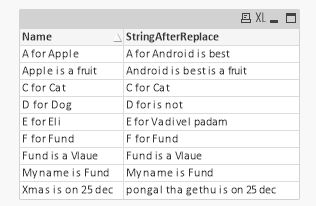
Try like:
excel2:
Mapping Load Capitalize(String),
[Replace String]
Inline [
String, "Replace String"
ball, Bat is best because of batman
dog, is not
eli, Vadivel padam
apple, Android is best
xmas, pongal tha gethu];
excel1:
Load *,
MapSubString('excel2', Name) as StringAfterReplace Inline [
Name
My name is Fund
A for Apple
Apple is a fruit
C for Cat
Fund is a Vlaue
D for Dog
F for Fund
E for Eli
Xmas is on 25 dec];
vignesh_s
- Mark as New
- Bookmark
- Subscribe
- Mute
- Subscribe to RSS Feed
- Permalink
- Report Inappropriate Content
can u share your qvd
vignesh_s
- Mark as New
- Bookmark
- Subscribe
- Mute
- Subscribe to RSS Feed
- Permalink
- Report Inappropriate Content
hi,i wanna replace entier string with replacing string
sunny_talwar
- Mark as New
- Bookmark
- Subscribe
- Mute
- Subscribe to RSS Feed
- Permalink
- Report Inappropriate Content
May be this
excel2:
Mapping
LOAD Capitalize(String),
'/' & [Replace String] & '\'
INLINE [
String, Replace String
ball, Bat is best because of batman
dog, is not
eli, Vadivel padam
apple, Android is best
xmas, pongal tha gethu
];
excel1:
LOAD *,
TextBetween(MapSubString('excel2', Name), '/', '\') as StringAfterReplace
INLINE [
Name
My name is Fund
A for Apple
Apple is a fruit
C for Cat
Fund is a Vlaue
D for Dog
F for Fund
E for Eli
Xmas is on 25 dec
];
vignesh_s
- Mark as New
- Bookmark
- Subscribe
- Mute
- Subscribe to RSS Feed
- Permalink
- Report Inappropriate Content
thank you,
if the string is not matched i wanna retain the same string,the above code giving blank for that
sunny_talwar
- Mark as New
- Bookmark
- Subscribe
- Mute
- Subscribe to RSS Feed
- Permalink
- Report Inappropriate Content
How difficult could that be for you to solve 
If(Len(Trim(TextBetween(MapSubString('excel2', Name), '/', '\'))) = 0, Name, TextBetween(MapSubString('excel2', Name), '/', '\'))
Checking if the mapping gives 0 using len(Trim()) = 0... if it does, then just use Name, else use the mapping
tresB
- Mark as New
- Bookmark
- Subscribe
- Mute
- Subscribe to RSS Feed
- Permalink
- Report Inappropriate Content
Try just putting an additional condition on substringmap() like:
....
If(MapSubString('excel2', Name)=Name, Name,
TextBetween(MapSubString('excel2', Name), '/', '\')) as StringAfterReplace
....
vignesh_s
- Mark as New
- Bookmark
- Subscribe
- Mute
- Subscribe to RSS Feed
- Permalink
- Report Inappropriate Content
hi sunny ,sorry to open this token again, i have some issue in this expression,i.e, you have used "delimiters" for replace strings and u retrived those from textbetween,but the issue is what if the input string or replace string contains delimiters already

- « Previous Replies
- Next Replies »