Unlock a world of possibilities! Login now and discover the exclusive benefits awaiting you.

- Qlik Community
- :
- All Forums
- :
- QlikView
- :
- rounding numbers
- Subscribe to RSS Feed
- Mark Topic as New
- Mark Topic as Read
- Float this Topic for Current User
- Bookmark
- Subscribe
- Mute
- Printer Friendly Page

 srik00001
- Mark as New
- Bookmark
- Subscribe
- Mute
- Subscribe to RSS Feed
- Permalink
- Report Inappropriate Content
rounding numbers
Hello everyone,
I have a requirement as below and wanted to check if anyone has a better way of approaching it.
1. If the number is <=1000 then i want to round it to the nearest 100
2. if the number is >1000 and <10000, then i want to round it to the nearest 1000. For ex: 1234 would be 1000
3. if the number is >=10000 i want to keep the first 2 digits and replace the rest with 0's
3a) if the number is 12418, the result is 12000
3b) If the number is 7621478, the result is 7600000
Currently i am using a combination of if statements,ceil and pow function.
if(Value<1000,ceil(Value,100),
if(Value>=1000 and Value <10000,ceil(Value,1000),
left(Value,2)* pow(10,len(round(Value,1))-2)
)
)
Appreciate any help from the members,
Thanks,
Sri
- Tags:
- rounding_functions

 ahaahaaha
- Mark as New
- Bookmark
- Subscribe
- Mute
- Subscribe to RSS Feed
- Permalink
- Report Inappropriate Content
Hi Sri,
May be like this (look attached file).
If(Value<1000, Div(Value, 100)*100,
If(Value>=1000 And Value<10000, Div(Value, 1000)*1000,
Div(Value, Pow(10,(Len(Value)-2)))*Pow(10,(Len(Value)-2))
))
Regards,
Andrey

 Kushal_Chawda
- Mark as New
- Bookmark
- Subscribe
- Mute
- Subscribe to RSS Feed
- Permalink
- Report Inappropriate Content
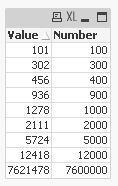
Data:
LOAD *,if(Value<=1000,left(Value,1)& Repeat(0,len(Value)-1),
if(Value>1000 and Value<10000,left(Value,1)& Repeat(0,len(Value)-1),
if(Value>=10000,left(Value,2)& Repeat(0,len(Value)-2)))) as Number
Inline [
Value
101
456
302
936
1278
2111
5724
12418
7621478
];