Unlock a world of possibilities! Login now and discover the exclusive benefits awaiting you.

- Qlik Community
- :
- All Forums
- :
- QlikView
- :
- set analysis with GetFieldSelections
- Subscribe to RSS Feed
- Mark Topic as New
- Mark Topic as Read
- Float this Topic for Current User
- Bookmark
- Subscribe
- Mute
- Printer Friendly Page

 ilanbaruch
- Mark as New
- Bookmark
- Subscribe
- Mute
- Subscribe to RSS Feed
- Permalink
- Report Inappropriate Content
set analysis with GetFieldSelections
Hi All,
i want to create an expression with set analysis based on another field / dimension selection?
any ideas ?
tried it like this:
sum({$<Office={GetFieldSelections(OFFICE_BUDGET)}> } amount)
- Tags:
- getfieldselections
- getfieldselections()
- set analyis
- set analysis expression
- set analysis in set analysis
Accepted Solutions

 MarcoWedel
- Mark as New
- Bookmark
- Subscribe
- Mute
- Subscribe to RSS Feed
- Permalink
- Report Inappropriate Content
Hi,
maybe another solution could be:
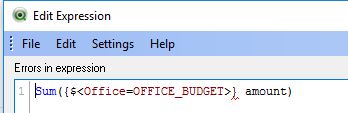
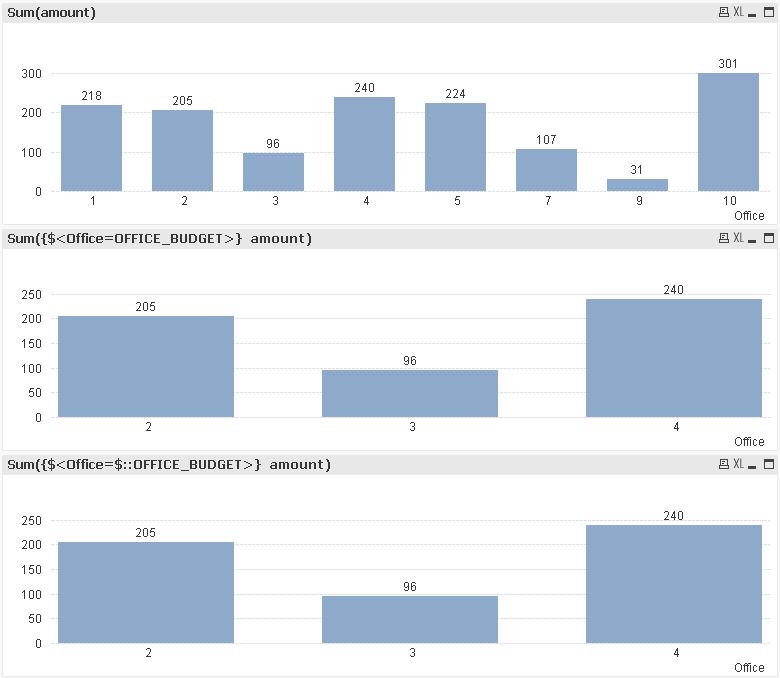
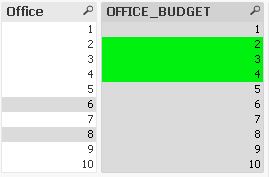
Sum({$<Office=OFFICE_BUDGET>} amount)
or
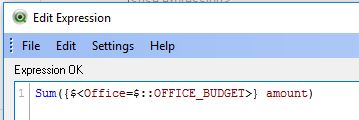
Sum({$<Office=$::OFFICE_BUDGET>} amount)
to avoid an "error in expression":
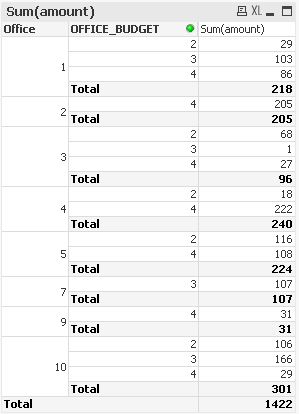
hope this helps
regards
Marco
 sunny_talwar
- Mark as New
- Bookmark
- Subscribe
- Mute
- Subscribe to RSS Feed
- Permalink
- Report Inappropriate Content
Try this instead:
Sum({$<Office = P(OFFICE_BUDGET)>} amount)
sunny_talwar
- Mark as New
- Bookmark
- Subscribe
- Mute
- Subscribe to RSS Feed
- Permalink
- Report Inappropriate Content
Or this if you really want to use GetFieldSelections
Sum({$<Office = {$(=Chr(39) & GetFieldSelections(OFFICE_BUDGET,Chr(39) & ',' & Chr(39)) & Chr(39))}>} amount)
MarcoWedel
- Mark as New
- Bookmark
- Subscribe
- Mute
- Subscribe to RSS Feed
- Permalink
- Report Inappropriate Content
Hi,
maybe another solution could be:
Sum({$<Office=OFFICE_BUDGET>} amount)
or
Sum({$<Office=$::OFFICE_BUDGET>} amount)
to avoid an "error in expression":
hope this helps
regards
Marco
ilanbaruch
- Mark as New
- Bookmark
- Subscribe
- Mute
- Subscribe to RSS Feed
- Permalink
- Report Inappropriate Content
it helps,thank you!

- Mark as New
- Bookmark
- Subscribe
- Mute
- Subscribe to RSS Feed
- Permalink
- Report Inappropriate Content
Hi ilan,
It is working fine, but what is the actual usage of $::. Thanks in advance...