Unlock a world of possibilities! Login now and discover the exclusive benefits awaiting you.

- Qlik Community
- :
- All Forums
- :
- QlikView
- :
- sheetid
- Subscribe to RSS Feed
- Mark Topic as New
- Mark Topic as Read
- Float this Topic for Current User
- Bookmark
- Subscribe
- Mute
- Printer Friendly Page

 NavinReddy
- Mark as New
- Bookmark
- Subscribe
- Mute
- Subscribe to RSS Feed
- Permalink
- Report Inappropriate Content
sheetid
Dear All, How can i get my sheetid , i want to create one variable i need to assign sheet id to that variable Best Regards, Niranjan
- « Previous Replies
-
- 1
- 2
- Next Replies »
Accepted Solutions

 MK_QSL
- Mark as New
- Bookmark
- Subscribe
- Mute
- Subscribe to RSS Feed
- Permalink
- Report Inappropriate Content
=SubField(GetActiveSheetId(),'\',2)
MK_QSL
- Mark as New
- Bookmark
- Subscribe
- Mute
- Subscribe to RSS Feed
- Permalink
- Report Inappropriate Content
GetActiveSheetID()

- Mark as New
- Bookmark
- Subscribe
- Mute
- Subscribe to RSS Feed
- Permalink
- Report Inappropriate Content
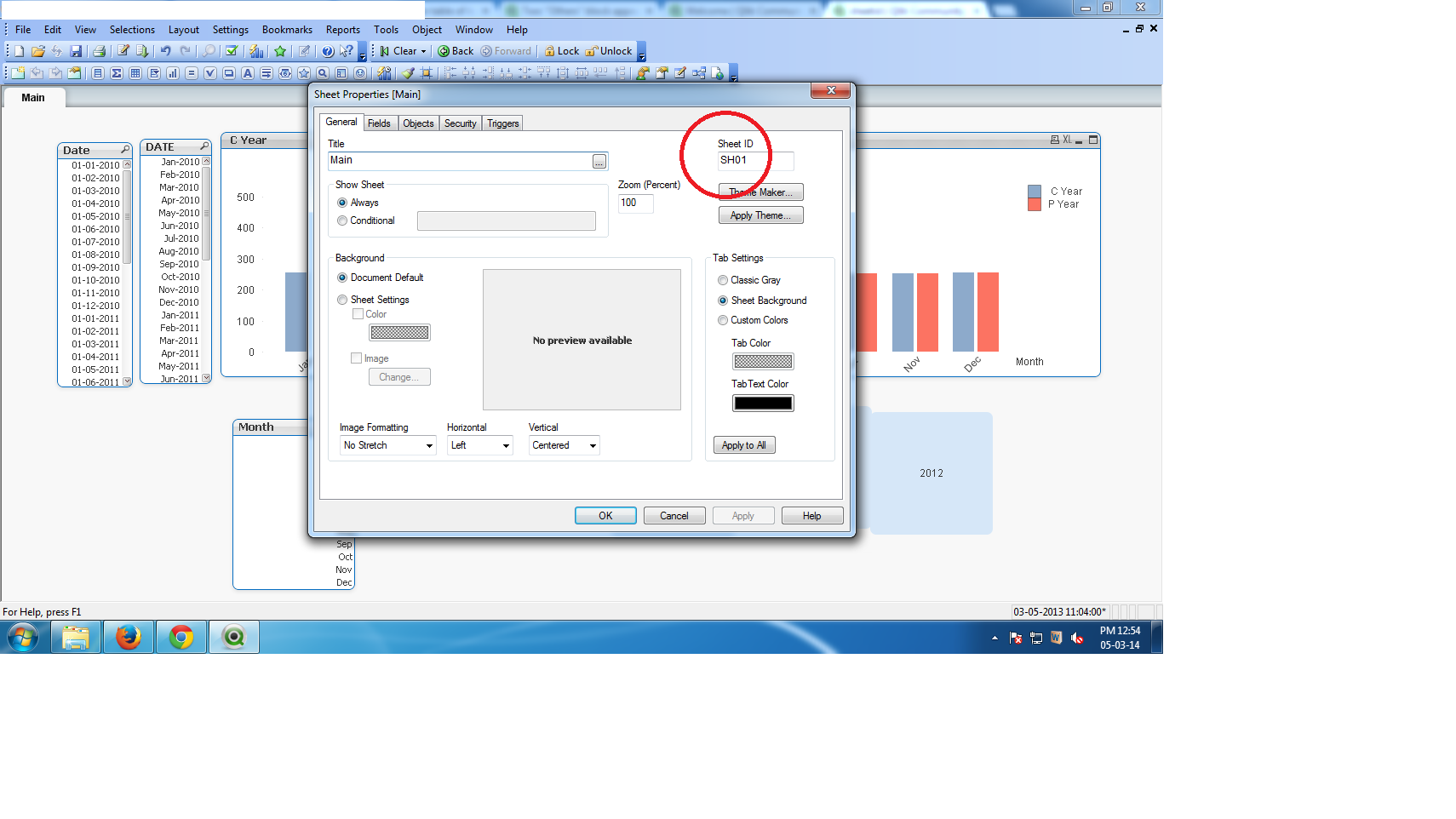
go to sheet properties an have look at image
- Mark as New
- Bookmark
- Subscribe
- Mute
- Subscribe to RSS Feed
- Permalink
- Report Inappropriate Content
Hi,
You can simply right click on your sheet, go to Properties--Genral tab and you will find Sheet ID there.
Or you can use GetActiveSheetID() function in a text box as suggested by Manish to get Sheet ID.
Hope this helps!
NavinReddy
- Mark as New
- Bookmark
- Subscribe
- Mute
- Subscribe to RSS Feed
- Permalink
- Report Inappropriate Content
Hi manish,
That gives Document\SH01
how can i get only SH01
Thank you so much for reply
Regards,
Niranjan

 jagan
jagan
- Mark as New
- Bookmark
- Subscribe
- Mute
- Subscribe to RSS Feed
- Permalink
- Report Inappropriate Content
Hi,
Try GetActiveSheetID(), will give you the Current sheet ID.
vCurrentSheetID = GetActiveSheetID()
Regards,
Jagan.
MK_QSL
- Mark as New
- Bookmark
- Subscribe
- Mute
- Subscribe to RSS Feed
- Permalink
- Report Inappropriate Content
=SubField(GetActiveSheetId(),'\',2)
NavinReddy
- Mark as New
- Bookmark
- Subscribe
- Mute
- Subscribe to RSS Feed
- Permalink
- Report Inappropriate Content
Hi Jagan,
That gives Document\SH01
how can i get only SH01
Regards,
Niranjan
jagan
- Mark as New
- Bookmark
- Subscribe
- Mute
- Subscribe to RSS Feed
- Permalink
- Report Inappropriate Content
Hi,
Try this
=SubField(GetActiveSheetId(),'\',2)
Regards,
Jagan.
- Mark as New
- Bookmark
- Subscribe
- Mute
- Subscribe to RSS Feed
- Permalink
- Report Inappropriate Content
=SubField(GetActiveSheetId(),'\',2)
- « Previous Replies
-
- 1
- 2
- Next Replies »